導入
Thank you for choosing the VR SHINECON VR Headset. This device is designed to provide an immersive virtual reality experience for movies, videos, and games using your smartphone. This manual will guide you through the setup, operation, maintenance, and troubleshooting of your VR headset to ensure optimal performance and enjoyment.
箱の中身
パッケージの内容をチェックして、すべてのアイテムが揃っていることを確認してください。
- VR SHINECON VR Headset
- Controllers (if included with your specific package)
- オーディオアクセサリー
- キャリングケース
- 電源アダプタ(含まれている場合)
- ユーザーマニュアル(このドキュメント)
製品終了view
The VR SHINECON VR Headset offers a 360° ultra-wide realistic experience, transforming your smartphone into a personal IMAX private theater. It features adjustable pupil and focal distance settings for individual eye comfort and clarity, along with integrated Hi-Fi stereo headphones for an immersive audio experience.

画像: Close-up of the VR SHINECON VR Headset highlighting its adjustable headphones, soft facial padding, and integrated control buttons for volume and phone interaction.
The headset is constructed with high-quality Acrylic (PMMA) lenses, providing up to 92% light transmittance for a clear visual experience, comparable to 4K film quality. It is compatible with most Android and iOS smartphones ranging from 4.7 to 6.2 inches in size.

画像: 内部の view of the VR SHINECON VR Headset, showcasing the high-transmittance Acrylic (PMMA) lenses designed for clear visual fidelity.
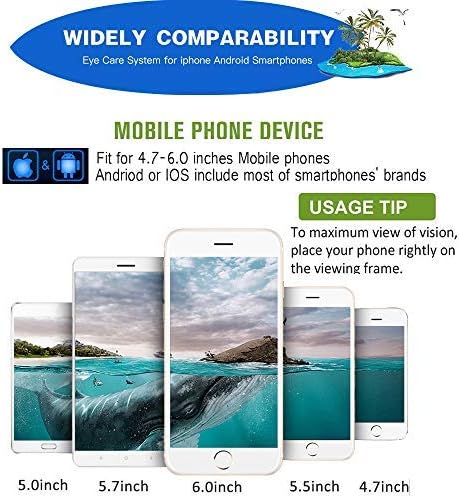
画像: A visual guide illustrating the wide compatibility of the VR SHINECON VR Headset with various smartphone sizes, specifically from 4.7 to 6.0 inches, for both Android and iOS devices.
セットアップ手順
- スマートフォンを準備する: Ensure your smartphone is charged and has a 3.5mm headphone jack for optimal audio. If your iPhone only has a Lightning port, a 3.5mm to Lightning adapter is required, though headphone functionality may vary. Remove your phone case to ensure proper fit and prevent overheating.
- Install VR Content: Download and install VR applications, games, or 3D video players from your smartphone's app store.
- スマートフォンを挿入: Open the front cover of the VR headset. Carefully slide your smartphone into the designated holder, ensuring it is centered and securely latched.
- ヘッドストラップを調整する: ヘッドセットを頭に装着し、伸縮性のあるヘッドストラップを調整して、快適でしっかりとしたフィット感を得てください。ストラップはヘッドセットをしっかりと固定し、不快感を与えないようにしてください。
- オーディオを接続: Plug the headset's 3.5mm audio cable into your smartphone's headphone jack.
ビデオ: An official product video from VR SHINECON Direct demonstrating the features and setup of the VR Headset, including inserting a smartphone and adjusting components. This video highlights the adjustable pupil and focal distance, multifunction buttons, and Hi-Fi stereo headphones.
操作手順
- Adjust Pupil Distance (PD): Use the adjustment wheel on the top of the headset to move the lenses closer or further apart until the image appears clear and comfortable for both eyes.
- Adjust Focal Distance: Use the individual focus adjustment wheels for each eye to fine-tune the clarity of the image. This is particularly useful for users with varying vision in each eye.
- 音量コントロール: Utilize the volume up/down buttons located on the headset to adjust the audio level.
- Interaction Button: The multifunction button (often a square button on the bottom right) allows for basic interaction within VR applications by simulating a screen tap. For more complex controls, external VR controllers (if included) may be necessary.
- コンテンツをお楽しみください: Once adjustments are made, launch your chosen VR application or 3D content and immerse yourself in the virtual experience.
メンテナンス
- レンズのクリーニング: Use a soft, dry microfiber cloth specifically designed for optical lenses to gently wipe the VR headset lenses. Avoid using abrasive materials or chemical cleaners, which can damage the lens coating.
- ヘッドセット本体のクリーニング: ヘッドセットの外側を柔らかく、少し硬めの布で拭いてください。amp cloth. Do not use excessive moisture or immerse the headset in water.
- ストレージ: Store the VR headset in its carrying case or a clean, dry place away from direct sunlight, dust, and extreme temperatures.
- ヘッドフォンのお手入れ: Keep the headphone pads clean and dry. If removable, follow instructions for cleaning or replacing them.
トラブルシューティング
| 問題 | 考えられる原因 | 解決 |
|---|---|---|
| 画像がぼやけている、または焦点が合っていない | Incorrect pupil distance or focal distance settings. | Adjust the pupil distance and individual focal distance wheels until the image is clear. Ensure your phone is properly centered. |
| 音が出ない、または音質が悪い | Headphone cable not fully connected; phone lacks 3.5mm jack or adapter issue. | Ensure the 3.5mm audio cable is securely plugged into your phone. If using an adapter, verify its functionality. Check phone's volume settings. |
| 携帯電話の過熱 | Phone case obstructing ventilation; prolonged use. | Remove your phone case before inserting it into the headset. Take breaks during extended use to allow your phone to cool down. |
| Buttons on headset not responding | Compatibility issue with specific app; loose connection. | Ensure the phone is correctly positioned for the internal button to make contact. Some apps may require an external Bluetooth controller for full functionality. |
仕様
- モデル番号: 5962857254
- 製品寸法: 8.74 x 8.07 x 3.9インチ
- 商品の重量: 14.6オンス
- 対応デバイス: スマートフォン(Android、iOS)
- サポートされている携帯電話のサイズ: 4.7~6.2インチ
- 接続技術: Wired (for audio)
- 特別な機能: Adjustable Pupil Distance, Adjustable Focal Distance, Integrated Hi-Fi Stereo Headphones, Multifunction Button
- 色: 黒
- メーカー: VRシャインコン
- 具体的な用途: Gaming, Entertainment
- 年齢範囲: 全年齢対象
保証とサポート
For warranty information and customer support, please refer to the documentation provided with your purchase or contact VR SHINECON customer service directly. Keep your purchase receipt as proof of purchase for any warranty claims.
For further assistance, you may visit the official VR SHINECON store online: VR SHINECONストア


