1. はじめに
This manual provides comprehensive instructions for the Came ZBK Electronic Control Board, model 88001-0063. This control board is designed for use with Came BK series sliding gate motors, specifically compatible with BK800, BK1200, and BK1800 models. It serves as a direct replacement for the older 3199ZBK generation control board. Please read this manual thoroughly before installation and operation to ensure proper function and safety.
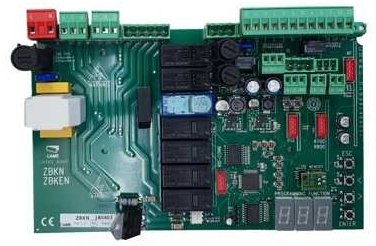
Image showing the Came ZBK Electronic Control Board, model 88001-0063, a replacement part for gate automation systems.
2. 安全情報
重要: Installation and maintenance of this electronic control board should only be performed by qualified personnel. Failure to follow these safety guidelines may result in serious injury or damage to property.
- Always disconnect the main power supply to the gate motor before performing any installation, maintenance, or troubleshooting.
- Ensure all electrical connections comply with local electrical codes and regulations.
- Protect the control board from moisture, dust, and extreme temperatures.
- Do not attempt to modify the control board. Use only genuine Came replacement parts.
- Keep children and unauthorized persons away from the gate area during installation and operation.
3. セットアップとインストール
3.1 パッケージ内容
- 1 x Came ZBK Electronic Control Board (Model 88001-0063)
3.2 互換性
This control board is compatible with Came BK series sliding gate motors: BK800, BK1200, and BK1800. It is designed as a direct replacement for the previous generation 3199ZBK control board.
3.3 インストール手順
- 電源を切る: Ensure the main power supply to the gate motor is completely disconnected at the circuit breaker. Verify with a voltageテスター。
- アクセス制御ボックス: Open the gate motor's control box cover.
- ドキュメント接続: Carefully photograph or sketch the existing wiring connections on the old control board (if replacing). This will be crucial for correct re-connection.
- 古いボードを削除します。 Disconnect all wires from the old 3199ZBK control board and carefully remove it from its mounting.
- 新しいボードをインストールします: Mount the new Came ZBK 88001-0063 control board in the same position.
- 配線を接続: Reconnect all wires to the new control board according to your documentation from step 3. Refer to the specific wiring diagram provided with your Came BK series motor for detailed connection points. Pay close attention to power, motor, safety device, and accessory connections.
- 安全な接続: Ensure all terminal connections are tight and secure.
- コントロールボックスを閉じる: Securely close the control box cover, ensuring no wires are pinched.
- 電力を回復する: Reconnect the main power supply to the gate motor.
Note: For detailed wiring diagrams and specific motor configurations, always refer to the original instruction manual for your Came BK800, BK1200, or BK1800 motor.
4. 操作
After successful installation, the Came ZBK control board will manage the operation of your sliding gate motor. Initial setup and programming typically involve:
- モーターの方向: Verifying and setting the correct motor rotation direction.
- 制限スイッチ: Adjusting and programming the open and close limit switches for precise gate positioning.
- リモートコントロール: Pairing and programming remote control transmitters.
- 安全装置: Testing and configuring safety photocells and other safety devices.
- 動作パラメータ: Setting parameters such as opening/closing speed, pause time, and force.
Consult the specific programming guide for your Came BK series motor for detailed instructions on configuring these settings. The ZBK board's functionality is integrated with the motor's overall system.
5. メンテナンス
Regular maintenance ensures the longevity and reliable operation of your Came ZBK control board and gate system.
- 目視検査: 制御ボードに損傷、腐食、接続の緩みなどの兆候がないか定期的に点検してください。
- 清潔さ: Keep the control box interior clean and free from dust, insects, and debris. Use a soft, dry brush or compressed air.
- Wiring Checks: Ensure all wiring connections remain secure and free from wear or damage.
- 専門家によるチェック: It is recommended to have the entire gate automation system, including the control board, inspected by a qualified technician at least once a year.
メンテナンスを行う前に必ず電源を切ってください。
6。 トラブルシューティング
If you encounter issues with your gate system, refer to the following common troubleshooting steps. For complex problems, contact a qualified technician.
| 問題 | 考えられる原因 | 解決 |
|---|---|---|
| ゲートはコマンドに応答しません。 | No power to the control board. Remote control battery dead. Safety devices (photocells) obstructed or faulty. | 主電源と回路ブレーカーを確認してください。 リモコンの電池を交換してください。 Clear obstruction from photocells; check their alignment and wiring. |
| ゲートは開きますが、閉じません。 | Safety devices (photocells) obstructed or faulty. Close limit switch not registering. | Check photocells for obstructions or malfunction. Inspect and adjust the close limit switch. |
| モーターは動きますが、ゲートは動きません。 | Motor clutch disengaged. Mechanical issue with the gate or motor. | Check if the motor's manual release is engaged. Re-engage clutch. Inspect gate for obstructions or damage to gears/rack. |
| Control board LEDs are off. | No power supply to the board. | Verify main power supply and check fuses on the board (if present). |
内部コンポーネントを検査する前に必ず電源を切ってください。
7. 仕様
| 特徴 | 詳細 |
|---|---|
| モデル番号 | 88001-0063 |
| ブランド | 来た |
| 互換性 | Came BK800, BK1200, BK1800 series sliding gate motors |
| 置き換え | Came 3199ZBK control board |
| ASIN | B07FW83F4Y |
| メーカー | 来た |
| 初回利用可能日 | 25年2018月XNUMX日 |
| スペアパーツの入手可能性 | 情報なし |
8.保証とサポート
For information regarding the warranty period and terms for your Came ZBK Electronic Control Board, please refer to the documentation provided at the time of purchase or contact your authorized Came dealer. For technical support, installation assistance, or spare parts inquiries, please contact Came customer service or an authorized service center.
You can typically find contact information on the official Came webサイトまたは製品サプライヤーを通じて入手できます。