1. はじめにview
The Zoom LiveTrak L-20 is a 20-channel digital mixer designed for live sound, studio recording, and podcasting. It integrates a 24-bit/96kHz 22-track recorder, a 22-in/4-out USB audio interface, 6 independent monitor outputs, 3-band EQ, and 20 built-in effects. This manual provides essential information for setting up, operating, maintaining, and troubleshooting your L-20 unit.
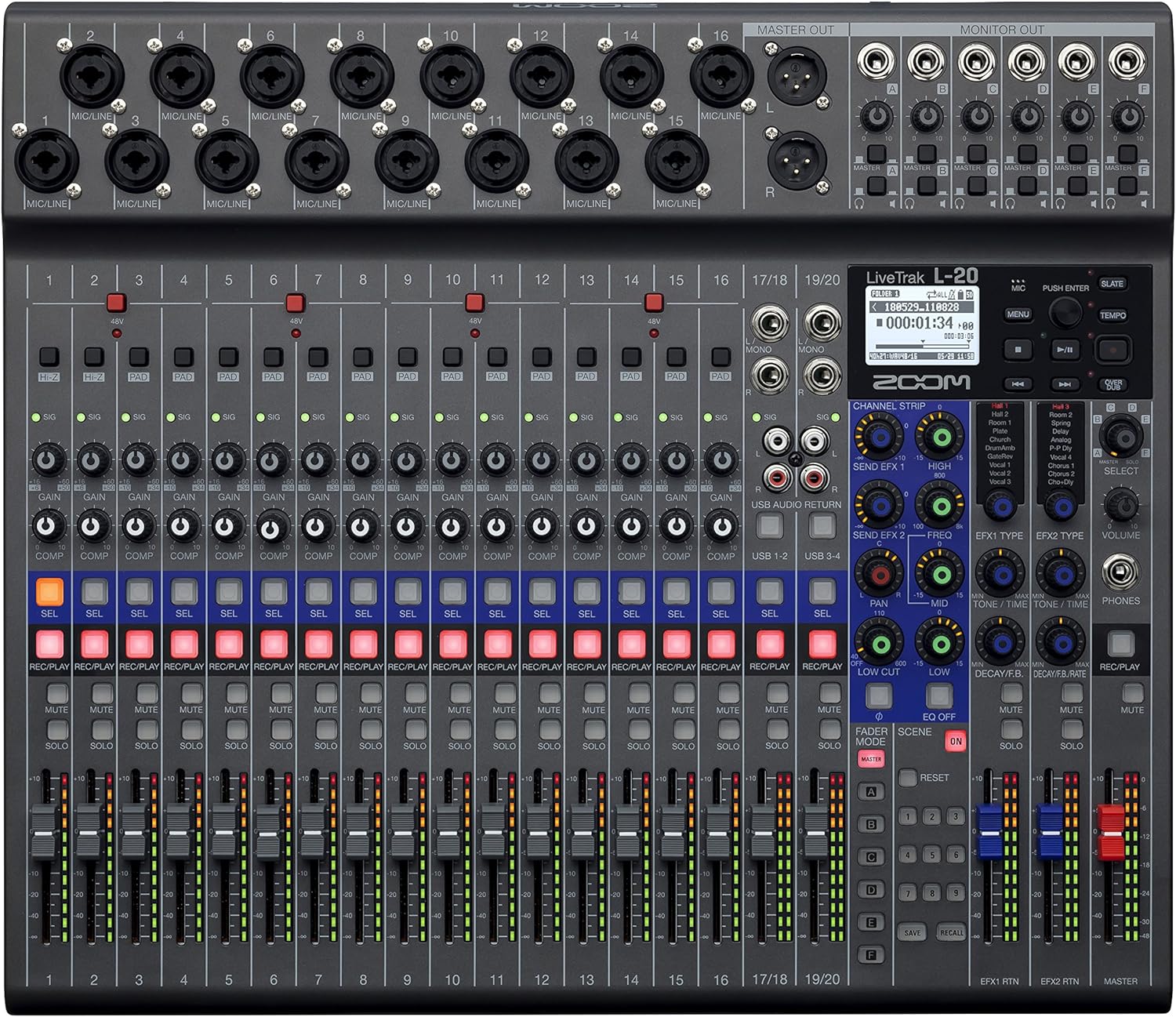
図1: 前面 view of the Zoom LiveTrak L-20 Digital Mixer, showcasing its comprehensive control surface.
主な特徴:
- 優れた音質: Experience pristine audio with 44.1/48/96 kHz sampling, ensuring every recording captures the nuances of your performance with exceptional clarity and depth.
- 多彩な接続性: Seamlessly integrate with various devices using USB 2.0 for audio interface capabilities, offering 22-channel recording and 4-channel playback for flexible workflow.
- 直感的なコントロール: Navigate effortlessly with the LCD backlight display (128 x 64 resolution), providing clear visual feedback for settings and levels, enhancing your mixing experience.
- Expanded Input Options: Accommodate diverse audio sources with 16 mono (MIC/LINE) inputs and 2 stereo (LINE) inputs, offering XLR/TRS combo jacks and selectable Hi-Z input for instruments.
- Robust Recording Capabilities: Capture every moment with up to 22 simultaneous recording tracks at high resolution (96 kHz), ensuring no detail is missed during live performances or studio sessions.
2. セットアップ
2.1 開梱と初期検査
Upon receiving your Zoom LiveTrak L-20, carefully unpack all components. The package typically includes the L-20 unit and an AC Adapter. Inspect the unit for any signs of damage during transit. Ensure all listed accessories are present.
2.2 電源の接続
Connect the supplied AC adapter to the DC IN 12V port on the rear panel of the L-20 and plug it into a suitable power outlet. Use the POWER switch to turn the unit on or off.
2.3 入出力接続
The L-20 offers extensive connectivity options:
- マイク/ライン入力(チャンネル1~16): These channels feature XLR/TRS combo jacks, accommodating both microphones and line-level instruments. Channels 1-2 also offer selectable Hi-Z input for direct connection of guitars or basses.
- ステレオライン入力(チャンネル17/18、19/20): These inputs are suitable for stereo line-level sources such as keyboards or media players.
- マスター出力: メイン PA システムまたはスタジオ モニターに接続するための XLR 出力。
- Monitor Outputs (A-F): Six independent TRS outputs for connecting to personal monitor systems or headphones, allowing for customized mixes for each performer.
- USB ポート: USB Host port for connecting flash drives and a USB 2.0 port for computer connectivity (audio interface mode).
- SDカードスロット: For multitrack recording directly to an SD card.
- フットスイッチ入力: Allows connection of an optional foot switch for remote control of certain functions, such as punch-in/out for recording.

Figure 2: Rear panel connections of the Zoom LiveTrak L-20, detailing various input and output options.
2.4 SDカードの挿入
Insert a compatible SD card (up to 512GB) into the SD card slot on the front panel. The L-20 supports SD, SDHC, and SDXC cards. Ensure the card is formatted correctly by the L-20 before recording.
2.5Bluetoothリモートコントロール
The L-20 includes a Bluetooth remote adapter. Insert this adapter into the 'REMOTE' port on the front panel. This enables wireless control of the L-20 via a dedicated application on a compatible device (e.g., iPad).
3. 操作手順
3.1 チャンネルコントロール
Each channel on the L-20 features dedicated controls for optimal sound shaping:
- ゲインノブ: 各チャンネルの入力レベルを調整します。
- PADボタン: Attenuates the input signal by 26dB for high-level sources.
- COMP(コンプレッサー)ノブ: Applies compression to the input signal, helping to control dynamics.
- 3バンドEQ: High, Mid, and Low frequency controls to shape the tone of each channel.
- SEND EFX: Controls the amount of signal sent to the built-in effects processor.
- PAN: チャンネルのステレオ位置を調整します。
- REC/PLAY Button: Engages recording or playback for the individual track.
- 消音ボタン: チャンネルをミュートします。
- ソロボタン: 監視のためにチャネルを分離します。
- フェーダー: Controls the output level of the channel.
3.2 Multitrack Recording
The L-20 can record up to 22 tracks simultaneously to an SD card. To begin recording:
- Ensure an SD card is inserted and formatted.
- を押す 録音/再生 button on each channel you wish to record. The button will illuminate red.
- メインを押す 記録 button (red circle) in the master section to start recording.
- を押す 遊ぶ 録画を停止するボタン。
3.3 Monitor Mixes
The L-20 provides 6 independent monitor mixes (A-F). Each mix can be customized for individual performers:
- Select the desired monitor mix (A-F) using the dedicated buttons.
- Adjust the level of each channel within that specific monitor mix using the channel's 送信 ノブ。
- Connect headphones or in-ear monitors to the corresponding monitor output.
3.4種類の内蔵エフェクト
The L-20 features 20 built-in effects. To apply effects:
- 使用 EFXタイプ knob to select the desired effect.
- 調整する エフェクトリターン level to control the overall effect amount.
- 使用 SEND EFX 個々のチャンネルのノブを操作すると、エフェクト プロセッサに信号が送信されます。
3.5 USB Audio Interface Mode
The L-20 can function as a 22-in/4-out USB audio interface for your computer (Mac/PC/iOS). Use the デバイスモード switch to select between HOST (for flash drives) and DEVICE (for computer connection). The CLASS COMPLIANT MODE switch allows for driverless operation with iOS devices.
ビデオ1:製品終了view of the Zoom LiveTrak L-20. This video demonstrates the key features and operational aspects of the mixer, including inputs, outputs, and controls.
ビデオ2: 詳細view of the Zoom LiveTrak L-20 Digital Mixer and Multitrack Recorder. This video focuses on the recording features, input channels, and overall design.
4. メンテナンス
4.1 クリーニング
Regularly clean the surface of the L-20 with a soft, dry cloth. For stubborn dirt, use a slightly damp cloth with a mild, non-abrasive cleaner. Avoid using harsh chemicals or solvents, as these can damage the finish and electronic components. Ensure no liquids enter the unit.
4.2 ストレージ
When not in use, store the L-20 in a cool, dry place away from direct sunlight, extreme temperatures, and high humidity. Protect the unit from dust by covering it with a dust cover or storing it in its original packaging or a suitable carrying case.
4.3ファームウェアアップデート
Periodically check the official Zoom website for firmware updates. Keeping your L-20's firmware up-to-date ensures optimal performance, new features, and bug fixes. Follow the instructions provided by Zoom carefully when performing updates.
5。 トラブルシューティング
This section addresses common issues you might encounter with your Zoom LiveTrak L-20.
5.1 電源なし
- Ensure the AC adapter is securely connected to both the L-20 and a working power outlet.
- 電源スイッチが「オン」の位置にあることを確認します。
- 別のデバイスで電源コンセントをテストし、機能していることを確認します。
5.2 音が出ない
- 入力から出力までのすべてのケーブル接続を確認します。
- Ensure channel faders and the master fader are raised.
- Verify that channels are not muted or soloed incorrectly.
- Check the gain settings for each channel to ensure adequate input level.
- Confirm that monitor mixes are correctly configured and their output levels are sufficient.
5.3 録音の問題
- Ensure a compatible SD card is inserted and properly formatted.
- Check the available space on the SD card.
- 確認する 録音/再生 button is illuminated red for the desired tracks before pressing the main 記録 ボタン。
- If using as a USB audio interface, ensure the correct drivers are installed (if required by your OS) and the L-20 is selected as the audio input/output device in your DAW.
5.4 Bluetooth接続の問題
- Ensure the Bluetooth remote adapter is securely inserted into the 'REMOTE' port.
- Verify Bluetooth is enabled on your controlling device (e.g., iPad).
- Restart both the L-20 and your controlling device.
- Ensure the controlling app is up-to-date.
6. 仕様
| 特徴 | 仕様 |
|---|---|
| アイテム重量 | 9.8オンス(0.28 kg) |
| 製品寸法 | 17.5 x 15.3 x 3.25 インチ (44.45 x 38.86 x 8.26 cm) |
| 商品型番 | L-20 |
| チャンネル数 | 20 |
| 電源 | コード式電気 |
| 接続技術 | USB |
| Sampリンギング周波数 | 44.1 / 48 / 96 kHz |
| 録音トラック | Up to 22 simultaneous tracks |
| モニター出力 | 6つの独立した出力 |
| エフェクト搭載 | 20種類 |
7. 保証情報
The Zoom LiveTrak L-20 typically comes with a manufacturer's warranty. For detailed information regarding warranty coverage, duration, and terms, please refer to the warranty card included with your product or visit the official Zoom webサイトでご確認ください。保証請求に備えて購入証明書を保管してください。
8. サポートとお問い合わせ
For further assistance, technical support, or to download the latest drivers and firmware, please visit the official Zoom support webサイトをご覧ください。さらに詳しいヘルプが必要な場合は、FAQ やコミュニティ フォーラムもご覧ください。
公式ズーム Webサイト: www.zoom.co.jp


