1. はじめに
The APC SMC1500IC Line-Interactive 1500VA Uninterruptible Power Supply (UPS) provides reliable power protection for your electronic devices. It delivers pure sine wave output, essential for servers with active power factor corrected (PFC) power supplies, and offers network-grade power conditioning to safeguard against damaging surges and disruptive noise. This UPS ensures continuous operation during power outages and allows for graceful system shutdowns, protecting your valuable equipment and data.

Image: The APC SMC1500IC UPS unit, a compact black device with an LCD screen, positioned next to a black briefcase on a carpeted floor, illustrating its size and typical office environment use.
2. 安全情報
Please read and understand these safety instructions before installing or operating the UPS. Failure to follow these instructions may result in electric shock, fire, or serious injury.
- 電気安全: このユニットには危険な量が含まれていますtages. Do not attempt to disassemble the UPS. Servicing should only be performed by qualified personnel.
- バッテリーの安全性: The UPS contains a sealed lead-acid battery. Do not dispose of batteries in a fire as they may explode. Do not open or mutilate batteries. Released electrolyte is harmful to the skin and eyes.
- インストール環境: Install the UPS indoors in a controlled environment, away from excessive moisture, direct sunlight, heat sources, or conductive contaminants. Ensure adequate ventilation around the unit.
- 接地: UPS は接地された AC 電源コンセントに接続する必要があります。
- 耐荷重: Do not overload the UPS. Ensure the total power draw of connected equipment does not exceed the UPS's rated output capacity.
3.製品オーバーview
Familiarize yourself with the components of your APC SMC1500IC UPS.
フロントパネル
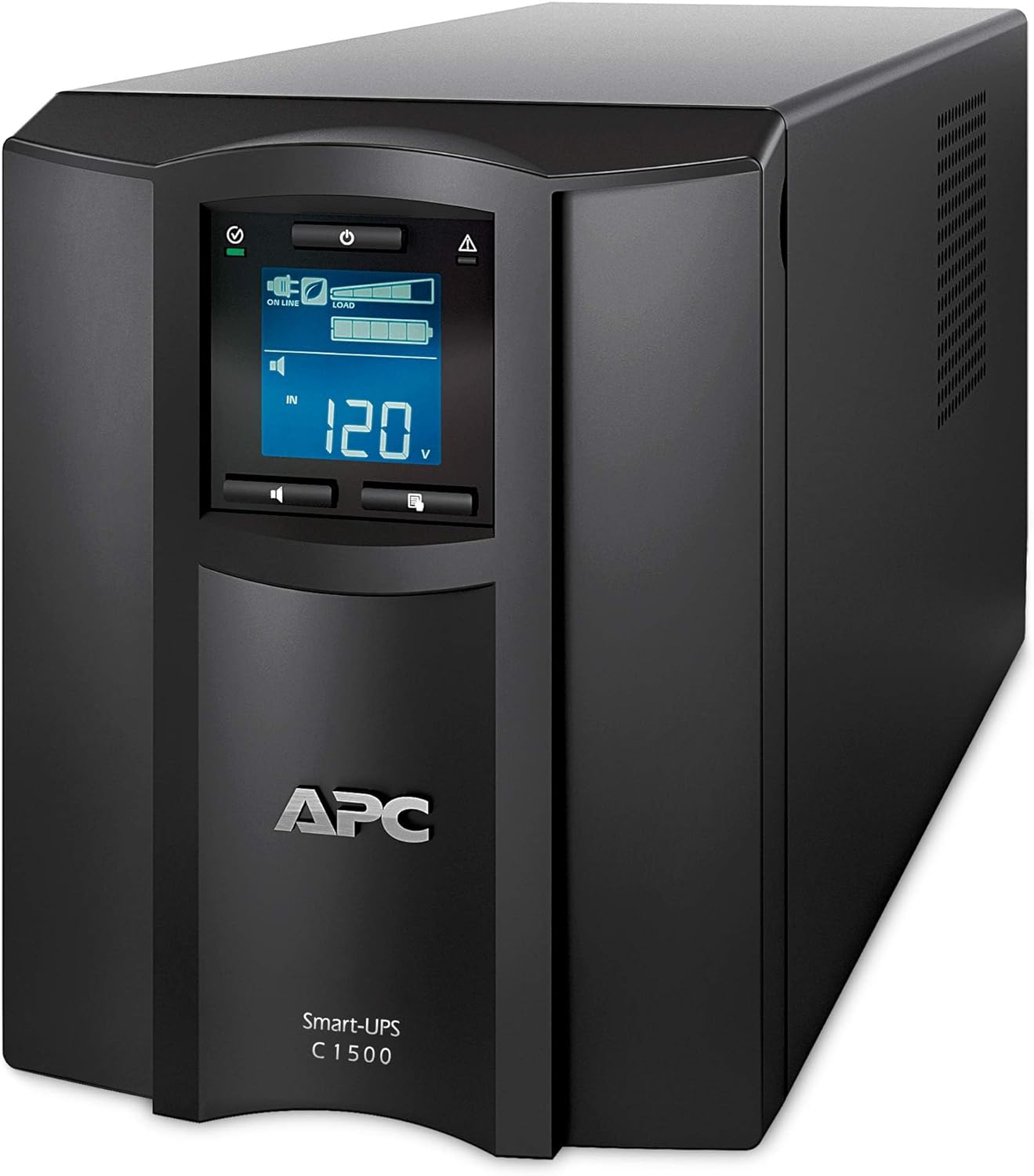
画像: 詳細な前面 view of the APC SMC1500IC UPS, highlighting the central LCD display panel and the power button below it. The unit is black with ventilation grilles on the sides.
- LCDディスプレイ: Provides real-time status information, configuration options, and alerts.
- ナビゲーションボタン: LCD 上のメニューを移動したり設定を調整したりするために使用されます。
- 電源ボタン: UPS および接続された機器への電源を制御します。
背面パネル
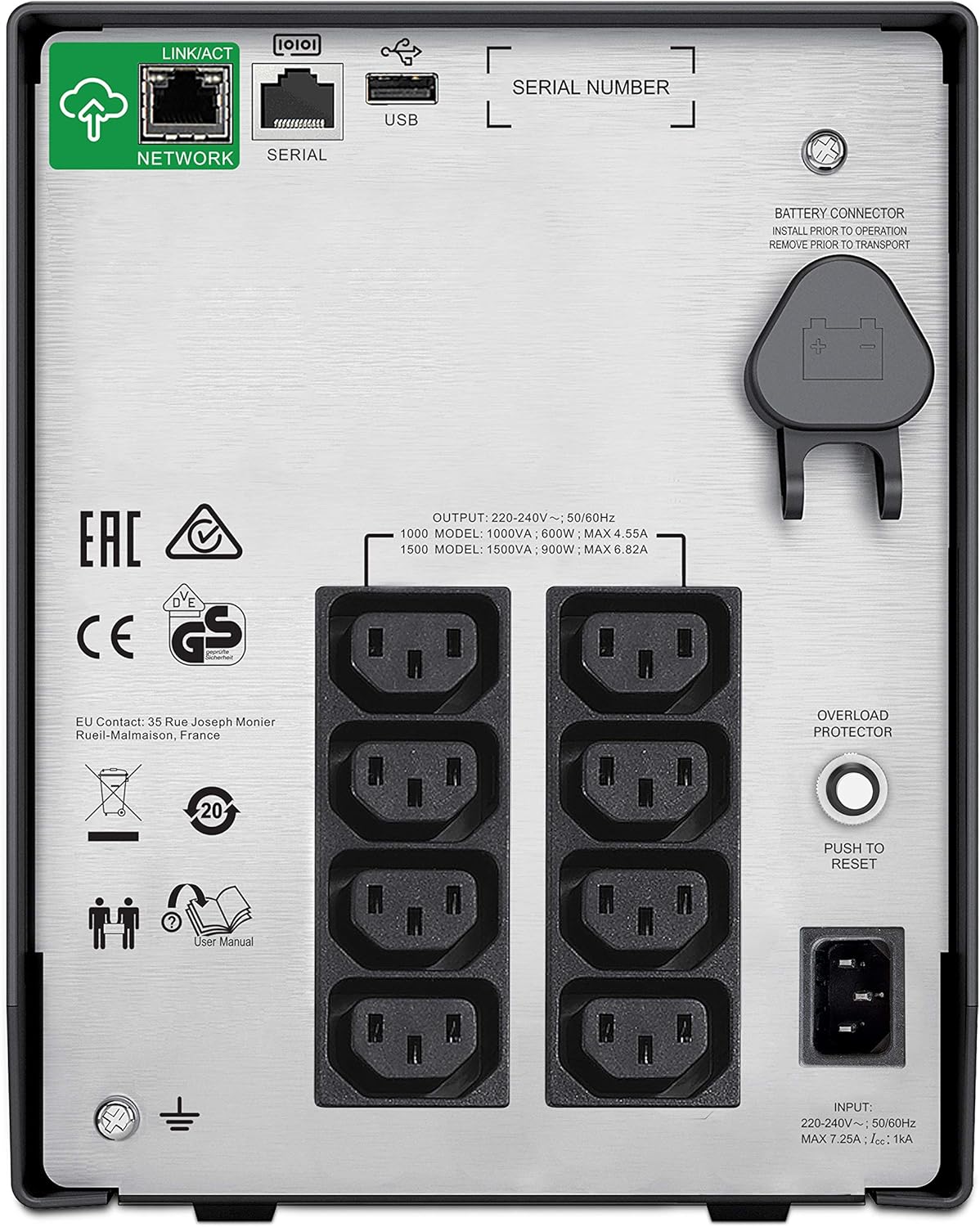
Image: The rear panel of the APC SMC1500IC UPS, displaying multiple AC power outlets, a network port, a serial port, a USB port, an overload protector button, and the battery connector.
- ACコンセント: 接続されたデバイスにバッテリー バックアップとサージ保護を提供します。
- ネットワークポート(RJ45): For network management and SmartConnect functionality.
- シリアルポート(RJ45): For direct communication with a computer or server.
- USBポート: For communication with a computer or server.
- バッテリーコネクタ: Connects the internal battery to the UPS.
- オーバーロードプロテクター: A resettable circuit breaker.
- 入力電源コード: UPS を商用電源に接続します。

画像: クローズアップ view of the communication ports on the rear of the APC SMC1500IC UPS, specifically showing the 'NETWORK' (RJ45), 'SERIAL' (RJ45), and 'USB' ports.
4. セットアップ
Follow these steps to set up your UPS for the first time.
- UPS を開梱します。 UPSを梱包から慎重に取り出し、輸送中の損傷がないか確認してください。
- バッテリーを接続します。 The UPS is shipped with the internal battery disconnected for safety. Locate the battery connector on the rear panel (refer to the 'Rear Panel' image in Section 3) and push it firmly into place until it clicks.
- UPS を配置します。 Place the UPS on a flat, stable surface in a well-ventilated area. Avoid placing it near heat sources or in direct sunlight. Ensure there is sufficient space around the unit for airflow.
- 機器を接続する: Plug your computer, monitor, network devices, and other critical electronics into the AC outlets on the rear panel of the UPS. Ensure the total load does not exceed the UPS's capacity.
- 商用電源に接続します。 Plug the UPS's input power cord into a grounded wall outlet.
- 初期費用: Allow the UPS to charge for at least 3 hours before connecting any critical equipment or expecting full runtime. The battery will charge whether the UPS is turned on or off.
- 通信ケーブルを接続する(オプション): For advanced monitoring and management, connect a USB cable from the UPS to your computer, or an Ethernet cable to your network for SmartConnect functionality.
5.運用
This section describes how to operate your UPS and understand its status indicators.
電源のオン/オフ
- 電源を入れるには: 前面パネルの電源ボタンを押します。LCDが点灯し、UPSがセルフテストを実行します。
- 電源を切るには: UPS の電源が切れるまで電源ボタンを押し続けます。
LCDディスプレイとナビゲーション
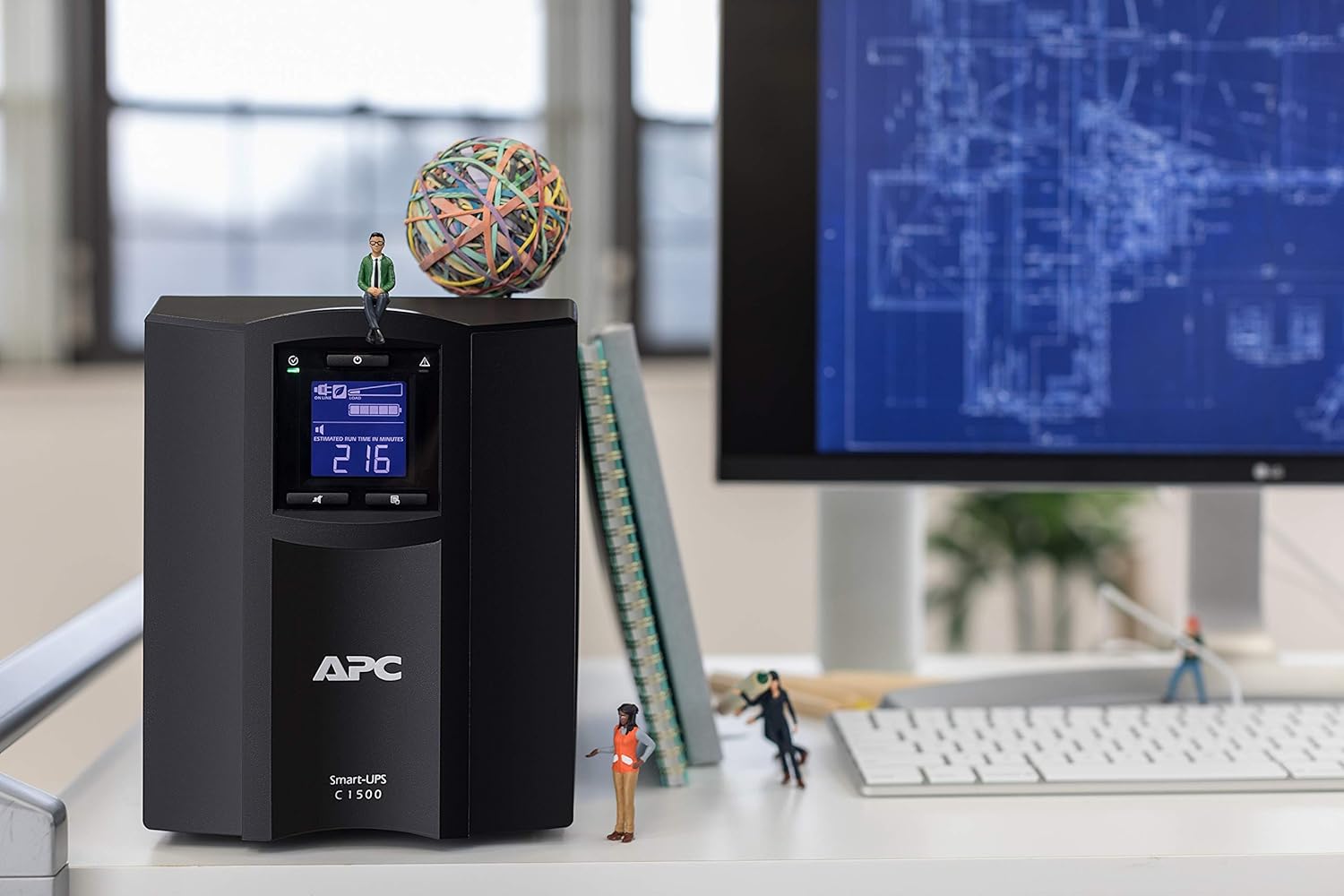
Image: A close-up of the APC SMC1500IC UPS's LCD screen, displaying 'ON LINE' status, input voltage (124V), and battery charge level, along with other status icons.
The intuitive LCD interface provides clear information and allows you to configure the UPS locally using the navigation keys. You can view various parameters such as input/output voltage、負荷率tage, battery charge level, and estimated runtime.
SmartConnect Functionality

Image: A composite image showing the APC SmartConnect dashboard interface displayed on a desktop monitor, a tablet, and a smartphone, illustrating remote monitoring capabilities.
The SMC1500IC features APC SmartConnect, allowing you to monitor the health and status of your UPS from any web-enabled device. Connect the UPS to your network via the RJ45 network port and follow the instructions provided with your unit to register it with the SmartConnect portal. This enables remote management, alerts, and firmware updates.
プログラム可能な設定
The UPS offers over 15 different programmable settings, including switched outlet group control. These settings allow for application-specific configurations, thresholds, and notifications. Refer to the detailed user manual available on the APC website for a complete list and instructions on how to adjust these settings via the LCD or SmartConnect interface.
6. メンテナンス
適切なメンテナンスを行うことで、UPS の寿命が長くなり、最適なパフォーマンスが確保されます。
- バッテリー交換: The internal lead-acid battery has a finite lifespan. When the UPS indicates a battery fault or low runtime, the battery should be replaced. Contact APC support or an authorized service provider for replacement batteries. Always ensure the UPS is powered off and disconnected from utility power before attempting battery replacement.
- クリーニング: Periodically clean the exterior of the UPS with a soft, dry cloth. Ensure ventilation openings are free from dust and debris to maintain proper airflow. Do not use liquid cleaners or solvents.
- セルフテスト: Regularly perform a self-test (usually initiated via the LCD menu) to ensure the battery and internal components are functioning correctly.
7。 トラブルシューティング
このセクションでは、UPS で発生する可能性のある一般的な問題に対する解決策を示します。
| 問題 | 考えられる原因 | 解決 |
|---|---|---|
| UPSが起動しない | Battery not connected; No utility power; Faulty unit | Ensure battery is fully connected; Check wall outlet and power cord; Contact support if issue persists. |
| UPS beeps continuously / Overload alarm | 接続された機器がUPSの容量を超えています | Disconnect non-essential equipment; Press the Overload Protector button on the rear panel to reset if tripped. |
| バッテリー駆動時間が短い | バッテリーが完全に充電されていません。バッテリーの寿命が近づいています。 | Allow UPS to charge for 3 hours; Replace battery if old or faulty. |
| UPS not communicating with computer/network | Incorrect cable; Driver issue; Network configuration | Ensure correct USB/Ethernet cable is used; Install necessary drivers; Verify network settings for SmartConnect. |
For more detailed troubleshooting or issues not listed here, refer to the comprehensive user manual on the APC website or contact APC technical support.
8. 仕様
Key technical specifications for the APC SMC1500IC UPS.
| 特徴 | 仕様 |
|---|---|
| ブランド | 航空宇宙 |
| モデル | SMC1500IC |
| 出力ワットtage | 900ワット |
| 巻tage | 300 Volts (Input/Output dependent on region) |
| 電池のタイプ | 鉛蓄電池 |
| 充電時間 | 3時間 |
| 製品寸法(奥行き×幅×高さ) | 21.9 x 43.9 x 17.1 cm |
| アイテム重量 | 20キログラム |
| 騒音レベル | 45デシベル |
| USBポート合計 | 1 |
| フォームファクター | タワー |
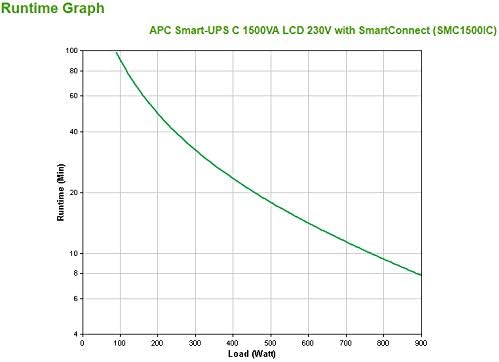
Image: A runtime graph illustrating the battery backup duration (in minutes) versus the load (in Watts) for the APC Smart-UPS C 1500VA LCD 230V with SmartConnect (SMC1500IC).
9. 保証とサポート
For warranty information, technical support, or to access the full user manual, please visit the official APC webご購入の際は、ウェブサイトをご覧いただくか、カスタマーサービスまでお問い合わせください。保証請求の際は、購入証明としてレシートを保管してください。
APC公式 Webサイト: www.apc.com


