1. はじめに
This manual provides essential information and instructions for the safe and efficient use of your Nokia 8 Sirocco TA-1005 smartphone. Please read this guide thoroughly before operating your device to ensure optimal performance and longevity. This device is designed for use with GSM, 3G, and 4G LTE networks. Compatibility with CDMA networks, including Verizon, Sprint, and US Cellular, is not supported. Verify network compatibility with your service provider prior to use.
2. 箱の中身
Upon unboxing your Nokia 8 Sirocco TA-1005, verify that all components are present:
- Nokia 8 Sirocco TA-1005 Device
- USB Type-Cケーブル
- 電源アダプター
- ヘッドセット
- SIM取り出しツール
- クイックスタートガイド
- 安全と保証に関する情報
3. デバイスのレイアウト
Familiarize yourself with the physical components of your Nokia 8 Sirocco TA-1005.
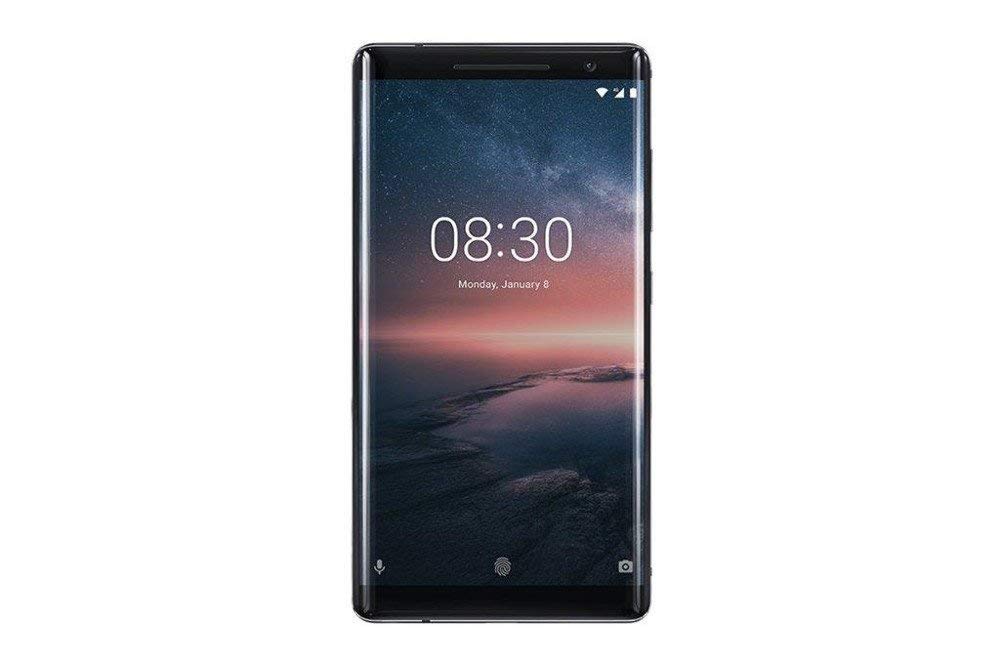
図3.1: 後方 view of the Nokia 8 Sirocco TA-1005. This image displays the dual camera setup with ZEISS optics, the circular fingerprint sensor below the camera, and the Nokia logo centrally placed. The 'androidone' branding is visible towards the bottom.
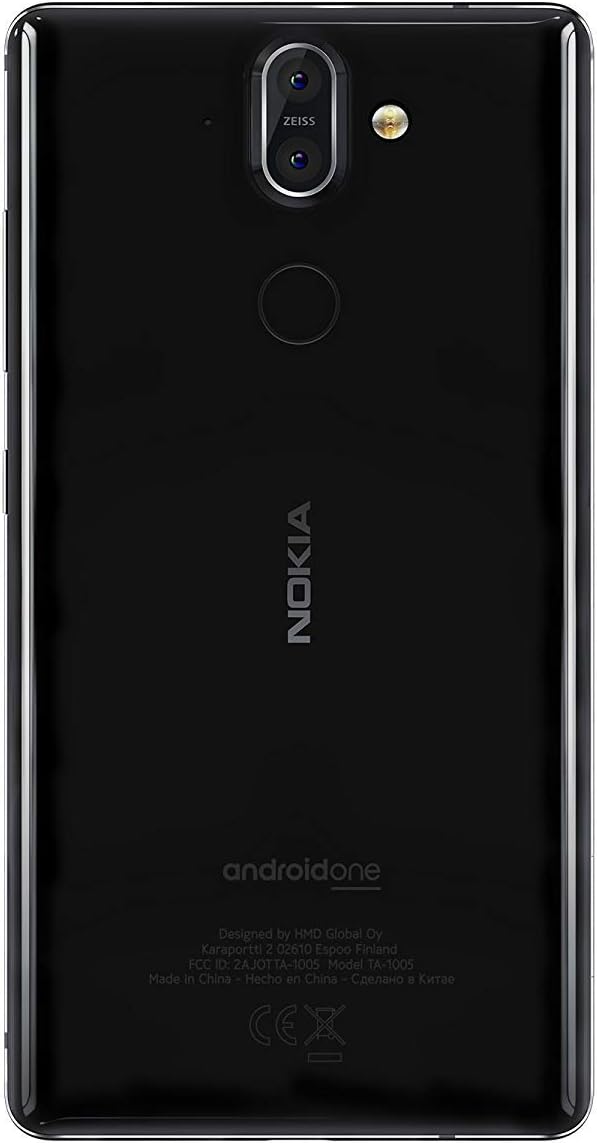
図3.2: フロント view of the Nokia 8 Sirocco TA-1005. The image highlights the 5.5-inch P-OLED curved display, the front-facing camera at the top, and the on-screen navigation buttons. The device features minimal bezels.

図3.3: 側 view of the Nokia 8 Sirocco TA-1005. This image illustrates the slim profile of the device, with the power button and volume rocker located on the right side for easy access.
主要コンポーネント:
- フロントカメラ: ディスプレイの上部にあります。
- イヤピース: For calls, located above the display.
- 画面: 5.5-inch P-OLED capacitive touchscreen.
- 音量ボタン: On the right side, to adjust audio levels.
- 電源/ロックボタン: On the right side, to power on/off or lock/unlock the screen.
- USB Type-Cポート: 下部は充電とデータ転送用です。
- マイクロフォン: Located at the bottom and top.
- スピーカー: 下部にあります。
- SIM/メモリカードトレイ: On the side, for inserting SIM cards.
- リアカメラ: Dual cameras with ZEISS optics on the back.
- フラッシュ: Dual-tone flash next to the rear cameras.
- 指紋センサー: On the back, below the rear cameras.
4. セットアップ
4.1. SIMカードの挿入
- デバイスの側面にある SIM カード トレイを見つけます。
- SIM イジェクタ ツールをトレイの小さな穴に挿入して開きます。
- Nano-SIM カードをトレイの指定されたスロットに挿入し、金色の接点が下を向くようにします。
- カチッと音がするまでトレイを慎重にデバイスに戻します。
注記: This device does not support external memory cards.
4.2. 電源のオンとオフ
- 電源を入れるには: Nokia のロゴが表示されるまで、電源/ロック ボタンを押し続けます。
- 電源を切るには: Press and hold the Power/Lock button until the power options menu appears, then select "Power off".
4.3. 初期設定
Upon first power-on, the device will guide you through the initial setup process. This includes selecting your language, connecting to a Wi-Fi network, setting up your Google account, and configuring security features like fingerprint unlock or a PIN/pattern.
5. 操作手順
5.1.電話をかける
- Open the "Phone" application.
- ダイヤルパッドを使用して電話番号を入力するか、アドレス帳から連絡先を選択します。
- 通話アイコンをタップして通話を開始します。
5.2. メッセージの送信
- Open the "Messages" application.
- 「チャットを開始」または「新しいメッセージ」アイコンをタップします。
- 受信者の番号を入力するか、連絡先から選択します。
- テキストフィールドにメッセージを入力します。
- 送信アイコンをタップします。
5.3. カメラの使用
- 「カメラ」アプリケーションを開きます。
- 被写体を画面上に収めます。
- シャッターボタンをタップして写真を撮ります。
- Switch between photo and video modes, or access advanced settings like portrait mode or panorama, as desired.
5.4.インターネット接続
- Wi-Fi: へ移動 設定 > ネットワークとインターネット > Wi-Fi. Turn Wi-Fi on and select an available network. Enter the password if required.
- モバイルデータ: へ移動 設定>ネットワークとインターネット>モバイルネットワーク. Ensure "Mobile data" is enabled.
5.5. セキュリティ機能
Your Nokia 8 Sirocco TA-1005 offers various security options:
- 指紋によるロック解除: 指紋を登録するには Settings > Security & Location > Fingerprint.
- スクリーンロック: PIN、パターン、またはパスワードを設定するには Settings > Security & Location > Screen lock.
6. メンテナンス
6.1.デバイスのクリーニング
Use a soft, lint-free cloth to clean your device. Avoid using harsh chemicals or abrasive materials, which can damage the screen or finish.
6.2. バッテリーのお手入れ
- Charge your device using only Nokia-approved chargers and cables.
- デバイスを極端な温度にさらさないでください。
- バッテリーを頻繁に完全に放電させないでください。
6.3. ソフトウェアの更新
定期的にソフトウェアアップデートを確認し、インストールして、デバイスに最新の機能、セキュリティパッチ、パフォーマンスの改善が適用されていることを確認してください。 設定 > システム > システムアップデート.
7。 トラブルシューティング
デバイスで問題が発生した場合は、次の一般的な解決策を参照してください。
| 問題 | 解決 |
|---|---|
| デバイスの電源が入らない | バッテリーが充電されていることを確認してください。充電器に30分以上接続してください。反応しない場合は、電源ボタンを10~15秒間押し続けて強制的に再起動してください。 |
| ネットワーク信号が弱い | Check SIM card insertion. Move to an area with better network coverage. Restart the device. Verify network settings in 設定>ネットワークとインターネット>モバイルネットワーク. |
| Applications are crashing | アプリのキャッシュをクリアする(設定 > アプリと通知 > [アプリ名] > ストレージとキャッシュ > キャッシュを消去)。Google Playストアからアプリを更新してください。問題が解決しない場合は、アプリをアンインストールして再インストールしてください。 |
| バッテリーの消耗が早い | 画面の明るさを下げます。使用していないバックグラウンドアプリを閉じます。使用していないときはWi-Fi、Bluetooth、GPSを無効にします。バッテリー使用量を確認します。 設定>バッテリー 電力を消費するアプリを特定します。 |
| デバイスが応答しません | Perform a force restart by holding the Power button for 10-15 seconds. If the issue continues, consider a factory reset (設定 > システム > リセット オプション > すべてのデータを消去 (工場出荷時設定にリセット)). 警告: 工場出荷時設定にリセットすると、デバイス上のすべてのデータが消去されます。続行する前に重要なデータをバックアップしてください。 |
8. 仕様
Detailed technical specifications for the Nokia 8 Sirocco TA-1005:
| 特徴 | 詳細 |
|---|---|
| モデル名 | 8 Sirocco |
| モデル番号 | TA-1005 |
| オペレーティング·システム | Android 8.0(オレオ) |
| プロセッサ | Qualcomm MSM8998 Snapdragon 835, Octa-core (4x2.5 GHz Kryo & 4x1.8 GHz Kryo) |
| グラフィックプロセッサ | アドレノ540 |
| ラム | 6ギガバイト |
| 内部ストレージ | 128ギガバイト |
| 画面 | 5.5 inches, P-OLED capacitive touchscreen, 1440 x 2560 pixels, Corning Gorilla Glass 5 |
| リアカメラ | 12MP Wide (f/1.7) + 13 MP Tele (f/2.6), dual-tone flash |
| フロントカメラ | 5MP |
| バッテリー容量 | 3250mAh |
| 充電 | 急速充電サポート |
| 接続性 | Wi-Fi 802.11a/b/g/n, Bluetooth, USB Type-C |
| 寸法 | 43.36 x 43.17 x 0.75 cm |
| 重さ | 181グラム |
| SIMタイプ | ナノSIM |
| ネットワークサポート | 2G GSM, 3G, 4G LTE (Note: Not compatible with CDMA networks) |
9. Safety and Warranty Information
9.1. 安全ガイドライン
- Do not use the device in prohibited areas, such as aircraft or hospitals.
- デバイスを水や過度の湿気にさらさないでください。
- 純正または承認されたアクセサリのみを使用してください。
- デバイスを自分で分解または修理しようとしないでください。
- デバイスとそのバッテリーは、地域の規制に従って責任を持って廃棄してください。
9.2. 保証情報
Your Nokia 8 Sirocco TA-1005 is covered by a limited manufacturer's warranty. Please refer to the separate warranty document included in your product packaging or visit the official Nokia support web詳細な利用規約については、ウェブサイトをご覧ください。保証請求のために購入証明書を保管してください。


