導入
This manual provides comprehensive instructions for the setup, operation, maintenance, and troubleshooting of your Thomson Universal 2-in-1 Zapper Remote Control ROC Z107. Please read this manual carefully before using the device to ensure optimal performance and longevity.
製品終了view
The Thomson ROC Z107 is a universal remote control designed to operate two devices, typically a Television (TV) and a Set-Top Box (STB). It features large buttons for ease of use and includes a learning function for expanded compatibility.
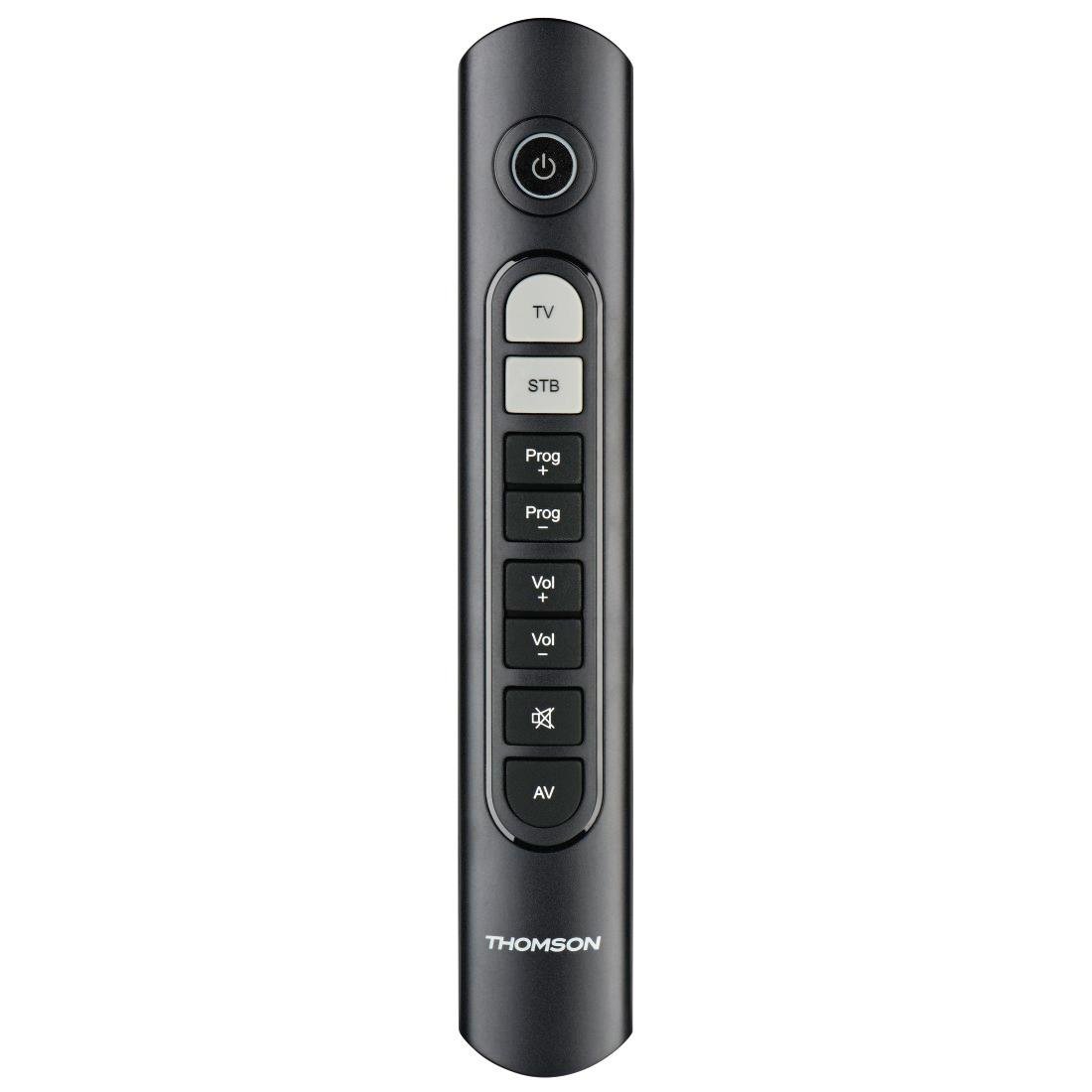
Image: Thomson Universal 2-in-1 Zapper Remote Control ROC Z107. This image displays the remote control from a slightly angled top-down perspective, highlighting its ergonomic design and the layout of its primary buttons.
設定
1. バッテリーの取り付け
- リモコンの背面にある電池コンパートメントカバーを開きます。
- Insert two AAA batteries, ensuring correct polarity (+ and -). Two AAA batteries are included with your purchase.
- 電池カバーをしっかりと閉じてください。
2. Initial Programming (Pre-programmed Devices)
The remote control is pre-programmed for many popular brands such as LG, Sony, Samsung, Sharp, and Philips. For these brands, the remote may function immediately after battery installation without further setup. Test the remote with your TV and STB.
3. Learning Function (For Unlisted or Specific Functions)
If your device is not immediately compatible or if you wish to add specific functions from your original remote, use the learning function:
- Place the Thomson remote and your original remote control head-to-head, approximately 2-5 cm apart.
- Press and hold the desired device button (TV or STB) on the Thomson remote until the indicator light blinks.
- Press the button on the Thomson remote that you wish to program. The indicator light will blink slowly.
- Press the corresponding button on your original remote control. The indicator light on the Thomson remote will blink rapidly to confirm successful learning.
- 必要に応じて他のボタンでも繰り返します。
- Press the device button (TV or STB) again to exit learning mode.
4. Master Volume and Program Selection
This feature allows you to designate which device (TV or STB) controls the volume and program channels, regardless of which device mode the remote is currently in. Refer to the full user manual for specific steps on setting up master control functions.
操作手順
The Thomson ROC Z107 remote control features a simplified button layout for essential functions.

Image: Close-up of Thomson ROC Z107 remote control buttons. This image provides a detailed view of the remote's buttons, including Power, TV, STB, Program Up/Down, Volume Up/Down, Mute, and AV input selection.
- 電源スイッチ (⏻): Turns the selected device (TV or STB) on or off.
- テレビボタン: Selects the Television control mode.
- STB Button: Selects the Set-Top Box control mode.
- Prog + / Prog - Buttons: Changes the program/channel up or down.
- Vol + / Vol - Buttons: 音量を増減します。
- ミュートボタン(🔇): 音声をミュートまたはミュート解除します。
- AVボタン: Switches the input source on the TV (e.g., HDMI 1, HDMI 2, AV).
メンテナンス
バッテリー交換
When the remote control's performance degrades or the indicator light does not respond, it is time to replace the batteries. Follow the battery installation steps outlined in the Setup section.
クリーニング
リモコンを清掃する際は、柔らかく乾いた布をご使用ください。液体クリーナーや研磨剤は使用しないでください。リモコンの表面や内部部品を損傷する恐れがあります。
トラブルシューティング
- リモコンが応答しない:
- 電池が正しく挿入され、消耗していないことを確認してください。必要に応じて交換してください。
- リモコンとデバイスの IR 受信機の間に障害物がないことを確認してください。
- Verify that the remote is in the correct device mode (TV or STB).
- 動作しない特定の機能:
- If a specific button does not work, it may not be programmed for your device or the device may not support that function. Use the learning function to program the button from your original remote.
- Some older devices may have limited compatibility with universal remotes.
- Remote range is limited:
- 電池が新しいものであることを確認してください。
- The maximum operating range is 10 meters. Operating beyond this distance may result in unreliable performance.
仕様
| ブランド | トムソン |
| モデル名 | ROC Z107 |
| モデル番号 | 00132672 |
| 材料 | プラスチック |
| 色 | 黒 |
| 伝染 ; 感染 | 赤外線(IRワイヤレス) |
| サポートされるデバイスの数 | 2 (TV, STB) |
| 互換性のある周辺機器 | Television, DTH, Set-Top Box |
| 電源 | 単2電池XNUMX本(付属) |
| 最大範囲 | 10メートル |
| 製品寸法 | 31.5 x 15.5 x 4 cm |
| アイテム重量 | 170グラム |
| ボタンの数 | 9 |
保証
This product is covered by a manufacturer's warranty. Please refer to the warranty card included in the product packaging or contact Thomson customer support for detailed warranty information and terms.
サポート
For further assistance, technical support, or inquiries regarding your Thomson Universal 2-in-1 Zapper Remote Control ROC Z107, please visit the official Thomson web公式サイトをご覧いただくか、カスタマーサービス部門にお問い合わせください。連絡先は通常、製品パッケージまたはブランドの公式ウェブサイトに記載されています。