1. はじめに
ご購入ありがとうございますasing the Sharp HT-SB140MT 2.0 150W Soundbar. This soundbar is designed to enhance your audio experience, providing clear and powerful sound for your television, music, and other media. With its sleek design and versatile connectivity options, including Bluetooth, HDMI ARC/CEC, Optical, and Auxiliary inputs, it integrates seamlessly into any home entertainment setup. This manual provides essential information for safe and effective use, including setup, operation, maintenance, and troubleshooting.
2. 安全情報
- 電源: 電源のボリュームを確認してくださいtage matches the requirements specified on the soundbar. Use only the provided power cable.
- 換気: Do not block any ventilation openings. Maintain adequate space around the soundbar for proper airflow.
- 水と湿気: Do not expose the soundbar to dripping or splashing water. Do not place objects filled with liquids, such as vases, on the apparatus.
- 熱: Do not place the soundbar near heat sources such as radiators, heat registers, stoves, or other apparatus (including amp熱を発生する装置。
- クリーニング: Unplug the soundbar from the power outlet before cleaning. Use a dry, soft cloth for cleaning. Do not use liquid cleaners or aerosol cleaners.
- サービス: この製品を自分で修理しようとしないでください。 すべてのサービスを資格のあるサービス担当者に依頼してください。
- 電池: The remote control uses a CR2 battery. Ensure correct polarity when inserting batteries. Do not mix old and new batteries.
3. パッケージ内容
パッケージにすべてのアイテムが揃っていることを確認してください:
- Sharp HT-SB140MT Soundbar
- リモートコントロール
- 電源ケーブル
- ユーザーマニュアル(このドキュメント)
4.製品オーバーview

図4.1: 前面 View
The front of the soundbar features the Sharp logo and LED indicators for source selection and status. Control buttons for power, input, and volume are located on the top panel.
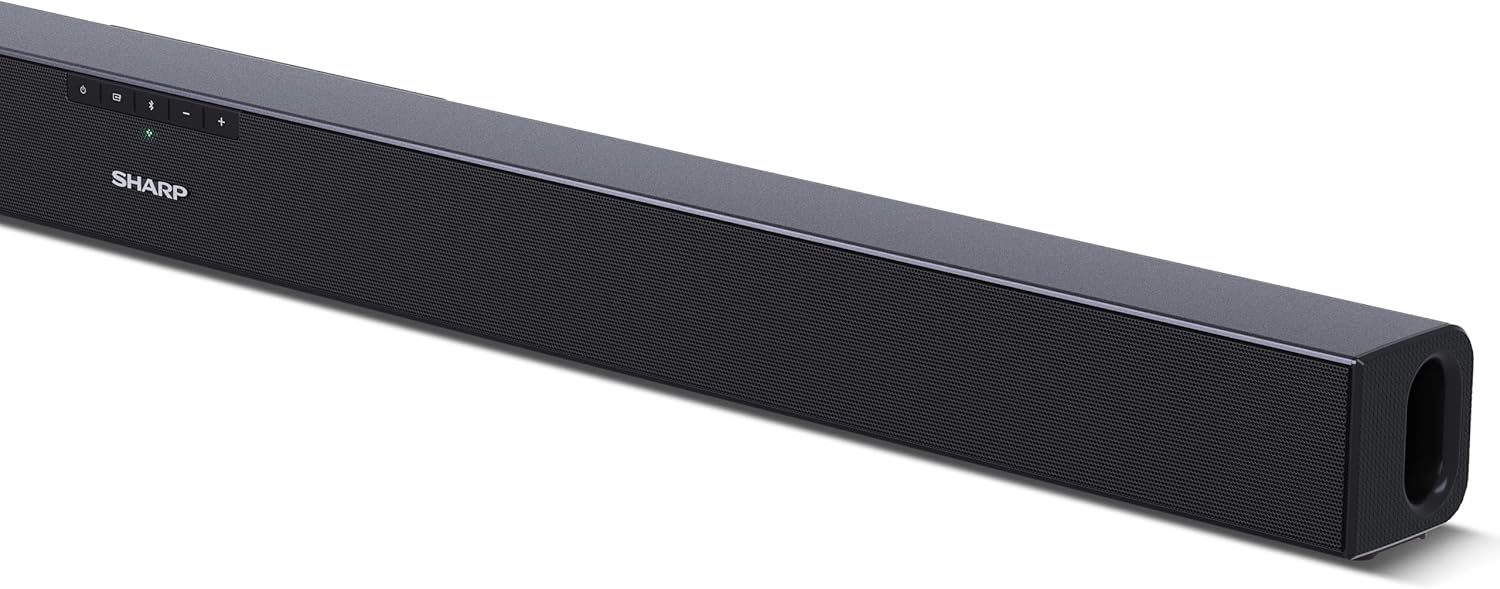
図4.2:背面 View (Connections)
The rear panel provides all necessary connection ports: HDMI ARC, Optical (S/PDIF), and Auxiliary (3.5mm) input, along with the power input.

図 4.3: リモート コントロール
The included remote control allows for convenient operation of the soundbar, including power, input selection, volume, bass, and treble adjustments.
5. セットアップ
5.1 配置
The Sharp HT-SB140MT Soundbar can be placed on a flat surface, such as a TV stand, or wall-mounted. Its slim profile of 6 cm allows it to fit easily under most TV screens without obstructing the view.

Figure 5.1: Soundbar Placement
The soundbar is ideally positioned directly in front of your television for optimal sound projection.
5.2 テレビへの接続
次の接続方法のいずれかを選択します。
- HDMI ARC/CEC(推奨): Connect an HDMI cable (not included) from the HDMI ARC port on your TV to the HDMI ARC port on the soundbar. This allows your TV remote to control the soundbar's volume and power. Ensure HDMI ARC/CEC is enabled in your TV's settings.
- Digital Optical Audio (S/PDIF): Connect an optical cable (not included) from the Optical Out port on your TV to the OPTICAL IN port on the soundbar. Select the Optical input on the soundbar.
- 補助(AUX): Connect a 3.5mm audio cable (not included) from the headphone jack or AUX Out port on your TV to the AUX IN port on the soundbar. Select the AUX input on the soundbar.
5.3電源接続
After connecting the audio cable, plug the power cable into the soundbar's power input and then into a wall outlet (220-240V / 50Hz).
6. 操作手順
6.1 電源オン/オフ
Press the Power button on the soundbar or the remote control to turn the unit on or off.
6.2 ソースの選択
Press the Input button on the soundbar or the remote control repeatedly to cycle through the available input sources: HDMI ARC, Optical, AUX, and Bluetooth. The LED indicator on the soundbar will change to reflect the selected source.
6.3 音量調整
Use the Volume Up (+) and Volume Down (-) buttons on the soundbar or the remote control to adjust the sound level.
6.4Bluetoothペアリング
Bluetoothデバイスを接続するには:
- Select Bluetooth input on the soundbar. The Bluetooth LED indicator will flash, indicating pairing mode.
- スマートデバイス(スマートフォン、タブレットなど)で Bluetooth を有効にし、利用可能なデバイスを検索します。
- Select "SHARP HT-SB140MT" from the list of devices.
- Once connected, the Bluetooth LED indicator will stop flashing and remain solid. You can now stream audio wirelessly to the soundbar.
6.5 サウンドモード(イコライザー)
The soundbar features an equalizer with different sound modes to optimize audio for various content types. Use the EQ button on the remote control to cycle through these modes (e.g., Movie, Music, News). You can also adjust Bass and Treble levels using dedicated buttons on the remote.
7. メンテナンス
7.1 クリーニング
To clean the soundbar, unplug it from the power outlet. Use a soft, dry, lint-free cloth to wipe down the surfaces. Do not use abrasive cleaners, waxes, or solvents as they may damage the finish.
7.2 ストレージ
If you plan to store the soundbar for an extended period, disconnect it from the power supply and store it in a cool, dry place, away from direct sunlight and extreme temperatures.
8。 トラブルシューティング
サウンドバーで問題が発生した場合は、次の一般的な問題と解決策を参照してください。
| 問題 | 考えられる原因 | 解決 |
|---|---|---|
| サウンドバーから音が出ません。 | サウンドバーはオフまたはミュートになっています。 間違った入力ソースが選択されました。 ケーブルが正しく接続されていません。 テレビのオーディオ出力設定が正しくありません。 | サウンドバーの電源がオンになっており、ミュートされていないことを確認します。 Select the correct input source (HDMI ARC, Optical, AUX). Check all cable connections (HDMI, Optical, AUX). Verify your TV's audio output settings are set to external speakers or the correct digital output. |
| Bluetoothデバイスを接続できません。 | Soundbar is not in pairing mode. デバイスが範囲外です。 他のデバイスからの干渉。 | Ensure the soundbar is in Bluetooth input mode and the LED is flashing. Move your Bluetooth device closer to the soundbar (within 10 meters). Turn off other Bluetooth devices nearby. Try unpairing and re-pairing. |
| リモコンが動作しません。 | Battery is low or inserted incorrectly. リモコンとサウンドバーの間に障害物があります。 Remote control is faulty. | Replace the CR2 battery and ensure correct polarity. Remove any obstructions between the remote and the soundbar's sensor. 問題が解決しない場合は、カスタマー サポートにお問い合わせください。 |
9. 仕様
| モデル名 | HT-SB140(MT) |
| スピーカータイプ | サウンドバー |
| サラウンドサウンドチャンネル構成 | 2.0 |
| 最大スピーカー出力 | 150ワット |
| 周波数応答 | 60Hz |
| 接続技術 | Bluetooth, HDMI ARC/CEC, Digital Optical Audio (S/PDIF), 3.5mm Auxiliary (AUX) |
| 無線通信技術 | ブルートゥース |
| 最大範囲(Bluetooth) | 10メートル |
| 制御方法 | リモートコントロール |
| 電源 | AC(主電源) |
| 入力ボリュームtage | 220-240ボルト |
| 色 | 黒 |
| 材料 | プラスチック、金属 |
| 取り付けタイプ | 壁掛け、卓上 |
| 製品寸法(長さ x 幅 x 高さ) | 95 x 6 x 6 cm |
| アイテム重量 | 1.5キログラム |
| 含まれるコンポーネント | リモートコントロール |
| 必要なバッテリー | 1つのCR2バッテリー |
| 防水 | いいえ |
| スペアパーツの入手可能性 | 5年 |
| ソフトウェアアップデートの保証期間 | 情報がありません |
10. 保証とサポート
The Sharp HT-SB140MT Soundbar comes with a Limited Warranty. Please refer to the warranty card included in your package for specific terms and conditions. Spare parts are available for up to 5 years from the date of purchase.
For technical support, service, or warranty claims, please contact Sharp customer service through their official website or the contact information provided in your product documentation. When contacting support, please have your product model number (HT-SB140(MT)) and purchase details ready.


