1.製品オーバーview
The Sharp EL-531TG-GY is a scientific calculator designed for students and professionals requiring advanced mathematical functions. It features a 2-line display and Multi-Line Playback, facilitating the input and review of complex equations. This model is suitable for general math, algebra, geometry, trigonometry, statistics, biology, chemistry, and general science applications.
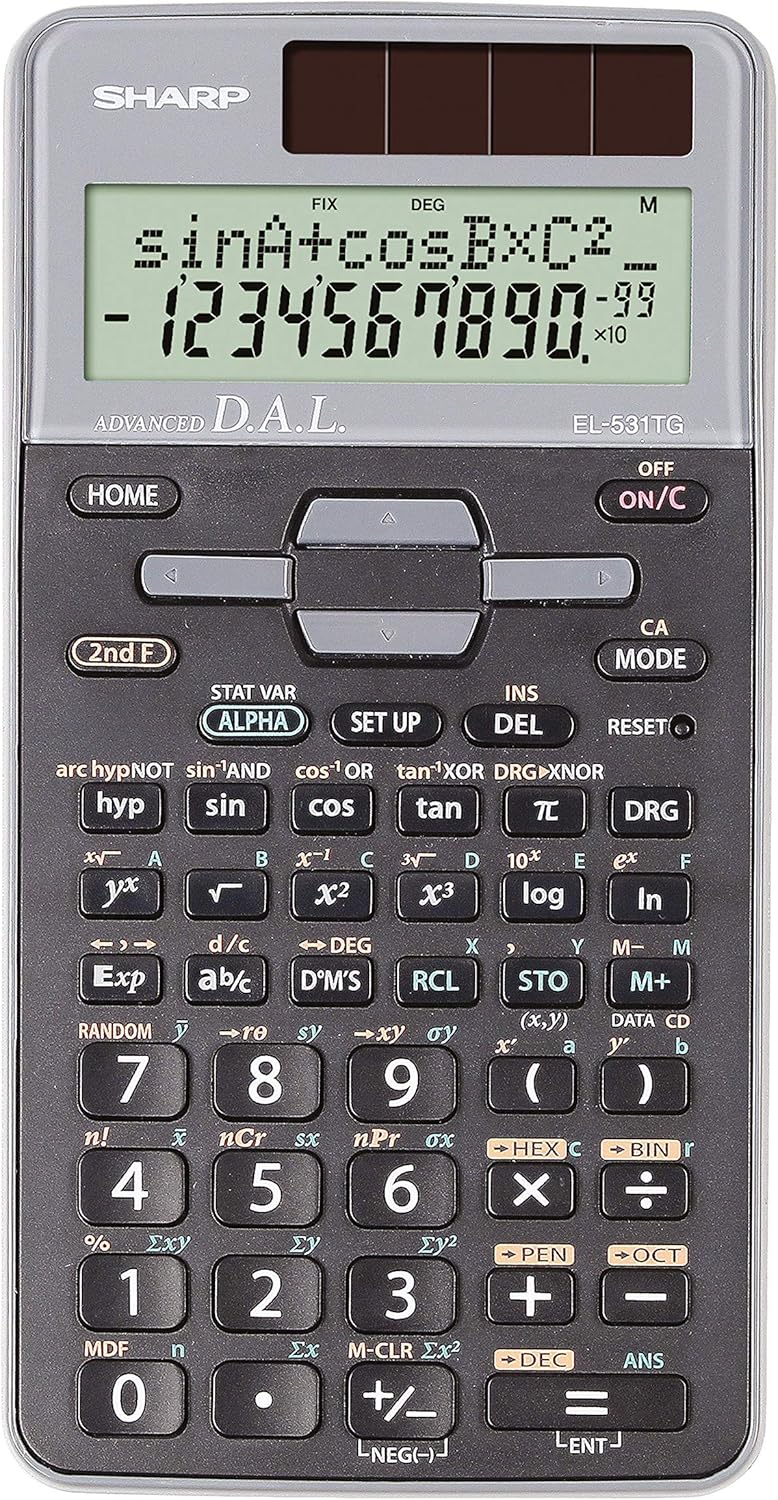
図1: 前面 view of the Sharp EL-531TG-GY Scientific Calculator, showing the display, keypad, and solar panel.
2. セットアップと初期使用
2.1 電源
The EL-531TG-GY calculator operates using both solar power and a single LR44 button cell battery. The solar panel provides power in well-lit environments, while the battery ensures operation in low-light conditions or when solar power is insufficient. An LR44 battery is included with the calculator.
2.2 電源のオン/オフ
- 電卓を動かすには ON、 オン/C 鍵。
- 電卓を動かすには オフ、 2階 キーに続いて オフ key (which is typically the same as オン/C).
2.3 初期表示設定
Upon first use or after a reset, the calculator will typically default to certain settings (e.g., DEG for angle units). Refer to Section 3.3 for details on changing mode settings.
3. 操作手順
3.1 基本的な算術演算
Enter numbers using the numeric keypad. Use the +, -, ×、 そして ÷ keys for addition, subtraction, multiplication, and division, respectively. Press = to obtain the result.
3.2 科学関数
The calculator performs over 273 advanced scientific functions. Many functions are accessed by pressing the 2階 key before the desired function key.
- 三角関数: 使用 罪, コス, 日焼け. Inverse functions (sin⁻¹, cos⁻¹, tan⁻¹) are accessed via 2階.
- 対数関数: 使用 ログ (10進数)と ln (自然対数)。
- パワーとルーツ: 使用 ײ, √, x³, ³√.
- 分数: 使用 直流 key for fraction input and conversion.
3.3 Mode Settings (DEG/RAD/GRAD)
To change the angle unit mode (Degrees, Radians, Gradians):
- を押す DRGA 鍵。
- 繰り返し押す DRGA to cycle through DEG (Degrees), RAD (Radians), and GRAD (Gradians). The current mode is indicated on the display.
3.4 メモリ機能
計算機には、値を保存および呼び出すためのメモリ機能が含まれています。
- STO(ストア): プレス STO followed by a variable key (e.g., A, B) to store the displayed value.
- RCL(リコール): プレス RCL followed by the variable key to recall the stored value.
- M+(メモリプラス): 表示されている値を独立したメモリに追加します。
- M-(メモリマイナス): 表示されている値を独立メモリから減算します。
3.5 Multi-Line Playback
The 2-line display allows for Multi-Line Playback, enabling users to review previous calculations and expressions. Use the directional arrow keys (up/down) to scroll through past entries and results. This feature is useful for checking work or re-using parts of previous calculations.
4. メンテナンス
4.1 クリーニング
To clean the calculator, wipe the surface gently with a soft, dry cloth. Do not use abrasive cleaners, solvents, or excessive moisture, as these can damage the display or internal components.
4.2 電池の交換
The calculator uses one LR44 button cell battery. If the display becomes dim or erratic in low-light conditions, the battery may need replacement. To replace the battery:
- 電卓がオフになっていることを確認してください。
- 電卓の背面にある電池ボックスを見つけます。
- コンパートメントカバーを慎重に開けます。
- 古い LR44 電池を取り外し、正しい極性 (+/-) を確認して新しい電池を挿入します。
- 電池カバーをしっかりと閉じてください。
4.3 ストレージ
When not in use, store the calculator in a cool, dry place away from direct sunlight and extreme temperatures. The hard cover included with the calculator provides protection from scratches and minor impacts.
5。 トラブルシューティング
5.1 表示の問題
- 画面が空白または暗くなる場合: Ensure sufficient light for the solar panel. If the issue persists, replace the LR44 battery.
- Erratic Display: This may indicate a low battery. Replace the LR44 battery.
5.2 Incorrect Results
- Check Mode Settings: Verify that the angle unit (DEG, RAD, GRAD) is set correctly for trigonometric calculations.
- 入力エラー: Review your input using the Multi-Line Playback feature to ensure the expression was entered correctly.
- Memory Contents: If using memory functions, ensure the stored values are correct.
5.3 電卓が応答しない
If the calculator becomes unresponsive, try performing a reset. Locate the リセット button (often a small recessed button requiring a thin object like a paperclip to press). Pressing this button will clear all memory and return the calculator to its factory default settings.
6. 仕様

図2: 前面 view of the Sharp EL-531TG-GY Scientific Calculator, illustrating its dimensions.
| 特徴 | 説明 |
|---|---|
| モデル番号 | SH-EL531TGGY |
| 表示タイプ | 2-line LCD with Multi-Line Playback |
| 機能 | Over 273 advanced scientific functions |
| 電源 | ソーラーとLR44電池1個(付属) |
| 材料 | プラスチック |
| 寸法(長さ×幅×高さ) | 16.1 x 8 x 1.5 cm(約) |
| 重さ | 100g(約) |

図3:側面 view of the Sharp EL-531TG-GY Scientific Calculator, showing its slim profile.
7. 保証とサポート
7.1 保証情報
This product is covered by a manufacturer's warranty. Please refer to the warranty card included with your purchase or visit the official Sharp webお住まいの地域に固有の詳細な保証条件については、こちらのサイトをご覧ください。
7.2 カスタマーサポート
For technical assistance, troubleshooting not covered in this manual, or service inquiries, please contact Sharp customer support. Contact information can typically be found on the Sharp official webサイトまたは製品パッケージに記載されています。


