1. はじめに
This manual provides essential instructions for the installation, operation, and maintenance of the ROGER TECHNOLOGY R30/1204 Automatic Sliding Gate Motor. This electromechanical gear motor is designed for sliding gates weighing up to 1200 kg. It features an integrated H70 series control unit, an optical encoder, and a magnetic limit switch for precise and reliable operation. Please read this manual thoroughly before installation and use to ensure safe and correct operation.
2. 安全に関する注意事項
重要: Failure to follow these safety instructions may result in serious injury or damage to property.
- Installation must be performed by qualified personnel in compliance with local electrical and safety regulations.
- 設置、メンテナンス、修理作業を行う前に、必ず電源を切ってください。
- Do not allow children to play with or near the gate motor or its controls.
- Keep hands and loose clothing clear of moving parts of the gate and motor.
- Regularly inspect the gate and motor for signs of wear, damage, or misalignment.
- Do not attempt to repair the motor yourself. Contact qualified service personnel.
3.製品オーバーview
The ROGER TECHNOLOGY R30/1204 is a robust motor designed for automating sliding gates. Its compact design houses a powerful 230V AC motor, an integrated control unit, and advanced safety features.

図3.1: 外観 view of the R30/1204 motor unit.
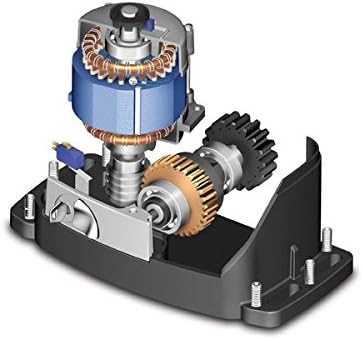
Figure 3.2: Internal components, highlighting the motor and gear mechanism.
主な特徴:
- Electromechanical gear motor for sliding gates.
- Suitable for gates up to 1200 kg.
- Integrated H70 series control unit.
- Optical encoder for precise gate positioning.
- Magnetic limit switches for accurate stop points.
- Irreversible gearbox for secure gate locking.
4. 仕様
| パラメータ | 価値 |
|---|---|
| モデル番号 | R30-1204 |
| ブランド | ロジャーテクノロジー |
| 最大ゲート重量 | 1200キロ |
| ライン電源 | 230 V AC - 50 Hz |
| モーター電源 | 230V 交流 |
| 定格出力 | 420ワット |
| デューティサイクル | 50% |
| 推力 | 800 いいえ |
| 動作温度 | -20 ~ +55 °C |
| Motor Protection Temperature | 150℃ |
| ゲート速度 | 9.5 m/分(0.16 m/秒) |
| Gearbox Type | 不可逆 |
| リミットスイッチタイプ | 磁気 |
| コントロールユニット | Integrated H70/104AC |
| エンコーダの種類 | 光学 |
| Max Product Dimensions (L x W x H) | 325 x 162 x 295 ミリメートル |
| 材料 | 金属 |
5. セットアップとインストール
Installation of the R30/1204 motor requires technical expertise and should only be performed by qualified professionals. This section provides a general overview; refer to the detailed installation manual provided with the product for specific wiring diagrams and mounting instructions.
- サイトの準備: Ensure the gate track is clean, level, and free of obstructions. Prepare a stable concrete base for the motor unit.
- モーターの取り付け: Securely fasten the motor unit to the prepared base using appropriate anchor bolts. Ensure correct alignment with the gate rack.
- ラックの取り付け: Attach the gate rack to the sliding gate, ensuring proper meshing with the motor's pinion gear. Maintain a small clearance between the rack and the pinion.
- 電気接続: Connect the motor to the 230V AC power supply. Wire the control unit (H70 series) according to the provided diagrams, including connections for safety photocells, remote controls, and other accessories.
- リミットスイッチ調整: Install and adjust the magnetic limit switches at the desired open and closed positions of the gate. These switches signal the motor to stop.
- 初期プログラミング: Power on the system and perform the initial programming steps for the control unit, which typically involves learning the gate's travel limits and setting operational parameters.
- 安全装置のテスト: Thoroughly test all safety devices, such as photocells and emergency stop buttons, to ensure they function correctly.
6. 操作手順
Once installed and programmed, the R30/1204 motor provides automated control of your sliding gate.
- リモートコントロール: Press the designated button on your remote control to open, close, or stop the gate.
- 手動リリース: In case of power failure or malfunction, the motor can be manually disengaged. Locate the manual release mechanism (usually a key-operated lever) on the motor unit, unlock it, and manually slide the gate. Remember to re-engage the motor after restoring power or resolving the issue.
- 安全機能: The optical encoder and safety photocells are designed to detect obstacles. If an obstacle is detected during closing, the gate will reverse. If detected during opening, the gate will stop.
7. メンテナンス
Regular maintenance ensures the longevity and reliable operation of your gate motor.
- 毎月:
- Inspect the gate track and wheels for debris and clear any obstructions.
- Check the gate rack for wear or damage.
- Verify the proper functioning of safety photocells and limit switches.
- 6か月ごと:
- Lubricate moving parts of the gate (wheels, bearings) as recommended by the gate manufacturer.
- すべての電気接続部の締め付け具合と腐食の兆候を点検します。
- Inspect the motor housing for any damage or water ingress.
- Annual Professional Check: It is recommended to have a qualified technician perform an annual inspection and service of the entire gate automation system.
8。 トラブルシューティング
このセクションでは、よくある問題について説明します。より複雑な問題については、資格のある技術者にご相談ください。
| 問題 | 考えられる原因 | 解決 |
|---|---|---|
| モーターがリモコンに反応しません。 | No power; remote battery dead; remote not programmed; safety device triggered. | Check power supply; replace remote battery; reprogram remote; check photocells for obstructions. |
| ゲートが突然停止します。 | Obstruction detected by photocells or encoder; limit switch faulty; motor overheating. | Clear obstructions; check limit switch connections; allow motor to cool down. |
| ゲートが部分的に開閉します。 | Limit switches incorrectly set or faulty; gate obstruction. | Re-adjust limit switches; clear any physical obstructions. |
| モーターから異音がする。 | Lack of lubrication; worn gears; foreign object in mechanism. | Lubricate moving parts; inspect gears for wear; remove any foreign objects. If noise persists, contact support. |
9. 保証とサポート
Information regarding the specific warranty period and terms for the ROGER TECHNOLOGY R30/1204 motor is typically provided with the product documentation at the time of purchase. Please refer to your purchase receipt or contact your dealer for warranty details.
For technical support, spare parts, or service, please contact your authorized ROGER TECHNOLOGY dealer or installer.
- スペアパーツの入手可能性: 情報は入手できません。
- ソフトウェアアップデート: 情報はありません。


