1. はじめに
The Sengled Smart Light Bulbs A19 are Zigbee-compatible LED bulbs designed for integration into smart home systems. These bulbs provide soft white (2700K) illumination, are dimmable, and offer control via voice commands or a mobile application when connected to a compatible Zigbee hub. This manual provides instructions for installation, setup, operation, and troubleshooting.

Image 1.1: Sengled Smart Light Bulbs A19 (4-Pack)
2. 安全情報
- 電気安全: Always ensure power is turned off at the switch before installing or removing bulbs.
- 屋内使用のみ: These bulbs are designed for indoor use in dry locations. Do not expose to water or excessive humidity.
- 動作温度: Do not install in enclosed fixtures that restrict airflow, as this may reduce bulb lifespan.
- 調光器の互換性: These bulbs are dimmable via the smart home system. Do not use with standard incandescent dimmers.
- 廃棄: 電子廃棄物は地域の規制に従って責任を持って処分してください。
3. パッケージ内容
パッケージには以下が含まれます:
- 4 x Sengled Smart LED Light Bulbs (A19, Soft White 2700K)
4. 仕様
| 特徴 | 詳細 |
|---|---|
| モデル番号 | E21-N13A |
| 電球タイプ | 導かれた |
| 電球の形状サイズ | A19 |
| 電球ベース | E26 |
| ワットtage | 9ワット |
| 白熱電球相当 | 60ワット |
| 輝度 | 800ルーメン |
| 色温度 | 2700ケルビン(ソフトホワイト) |
| 巻tage | 120 Volts (100-120V, 60Hz) |
| 制御方法 | 音声、アプリ |
| 接続性 | Zigbee Protocol (Hub Required) |
| 平均寿命 | 25,000時間 |
| 屋内/屋外での使用 | 屋内 |
| 寸法 | 幅2.4インチ x 高さ4.5インチ |
5. セットアップ手順
These Sengled Smart Light Bulbs require a compatible Zigbee hub for full functionality. Compatible hubs include Sengled Smart Hub, Amazon Echo devices with a built-in Zigbee hub (e.g., Echo 4th Gen, Echo Plus, Echo Show 10, Echo Studio), SmartThings Hub, Wink Hub, or Hubitat Hub.
5.1. 初期設定手順
- 電球を取り付けます。 Screw the Sengled Smart Light Bulb into a standard E26 light socket. Ensure the power to the fixture is turned off before installation.
- 電源オン: 照明器具の電源を入れます。電球が点灯するはずです。
- アプリをダウンロード: Download the Sengled Home App from the Apple App Store or Google Play Store. Alternatively, use the app for your chosen compatible hub (e.g., Amazon Alexa App, SmartThings App).
- 登録/ログイン: アプリを開いてアカウントを登録するか、すでにアカウントをお持ちの場合はログインします。
- デバイスを追加: Follow the in-app instructions to add a new device. This typically involves scanning a QR code on the bulb or packaging, or initiating a device search within the app.
- ハブに接続: The bulb will connect to your Zigbee hub. This process usually completes within one minute.
5.2. Hub-Specific Setup Options
The following images illustrate common setup configurations:

Image 5.1: Setup with Sengled Smart Hub

Image 5.2: Setup with Samsung SmartThings Hub

Image 5.3: Setup with Amazon Echo (Built-in Hub)
6. 操作
Once successfully paired with your smart hub, the Sengled Smart Light Bulbs offer various control options.
6.1. 音声コントロール
Control your lights hands-free using voice commands with compatible assistants like Amazon Alexa or Google Home Assistant.

Image 6.1: Voice control example with Alexa
6.2. Dimming and Remote Control
Adjust the brightness from 1% to 100% and control your lights from anywhere using the Sengled Home App or your smart home platform's app.
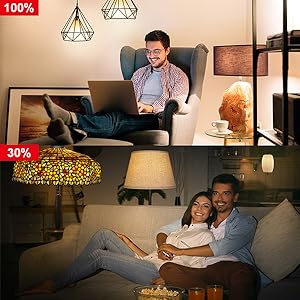
Image 6.2: Dimming functionality from 100% to 30%

Image 6.3: Remote control from any location
6.3. スケジュールとルーチン
Set schedules for your lights to turn on/off or adjust brightness at specific times, such as dusk or sunrise. Create routines for automated lighting scenarios.
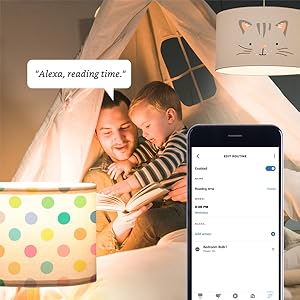
Image 6.4: Setting up a reading time routine
6.4. グループコントロール
Add multiple smart bulbs (up to 64) to your smart hub system and control them individually or as a group within the app.
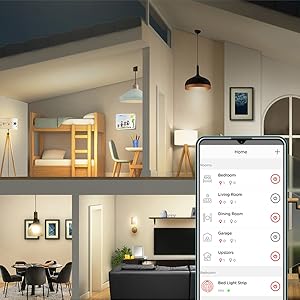
Image 6.5: Managing lights by room for group control
7. メンテナンス
- クリーニング: 清掃する前に、電球がオフになっていて冷えていることを確認してください。柔らかく乾いた布で拭いてください。液体洗剤は使用しないでください。
- ストレージ: 電球を保管する場合は、直射日光や極端な温度を避け、涼しく乾燥した場所に保管してください。
- ユーザーが修理可能な部品はありません: Do not attempt to disassemble or repair the bulb. This will void the warranty.
8。 トラブルシューティング
8.1. Bulb Not Responding/Connecting
- 電力を確認します: Ensure the light fixture switch is in the ON position and the bulb is receiving power.
- ハブ接続: Verify that your Zigbee hub is powered on and connected to your network.
- 近接性: Ensure the bulb is within range of your Zigbee hub or another Zigbee device acting as a repeater.
- 修理: If the bulb loses connection, try removing it from your app and re-pairing it according to the setup instructions. Power cycling the bulb (turning it off and on 5 times) can sometimes reset it for re-pairing.
- アプリの更新: Ensure your Sengled Home App or smart home platform app is updated to the latest version.
8.2. 音声制御の問題
- Assistant Link: Confirm that your Sengled account (or smart hub) is correctly linked to your voice assistant (Alexa, Google Home).
- デバイス検出: Ask your voice assistant to "Discover devices" to ensure all bulbs are recognized.
- Command Clarity: Speak commands clearly and ensure the device name used in the command matches the name in your app.
8.3. Unstable Connection
- Zigbee ネットワーク: A strong Zigbee mesh network is crucial. Adding more Zigbee devices (like smart plugs or other bulbs) can strengthen the network.
- 干渉: Keep your Zigbee hub away from Wi-Fi routers, microwaves, or other devices that might cause wireless interference.
9. 保証情報
Sengled Smart Light Bulbs are covered by a 3年間の限定保証 from the date of purchase. This warranty covers defects in materials and workmanship under normal use. For warranty claims or detailed terms, please refer to the official Sengled webサイトをご覧いただくか、カスタマー サポートにお問い合わせください。
10. カスタマーサポート
For further assistance, technical support, or to report issues, please visit the official Sengled support website or contact their customer service department. Contact information can typically be found on the Sengled website or within the Sengled Home App.