1. はじめに
This user manual provides comprehensive instructions for the Comix CS-3302 12-Digit Desktop Calculator. Please read this manual thoroughly before using the calculator to ensure proper operation and to maximize its lifespan. This calculator is designed for general office and school use, featuring a large LCD display, dual power source, and various calculation functions.
2. 安全情報
- Do not expose the calculator to extreme temperatures, direct sunlight, or high humidity.
- 電卓を落としたり、強い衝撃を与えたりしないでください。
- Do not attempt to disassemble or modify the calculator. This will void the warranty.
- Use a soft, dry cloth for cleaning. Do not use liquid cleaners or abrasive materials.
- 小さなお子様の手の届かない場所に保管してください。
3.製品オーバーview

図3.1: フロント view of the Comix CS-3302 Desktop Calculator, showing the large LCD display and full keypad.
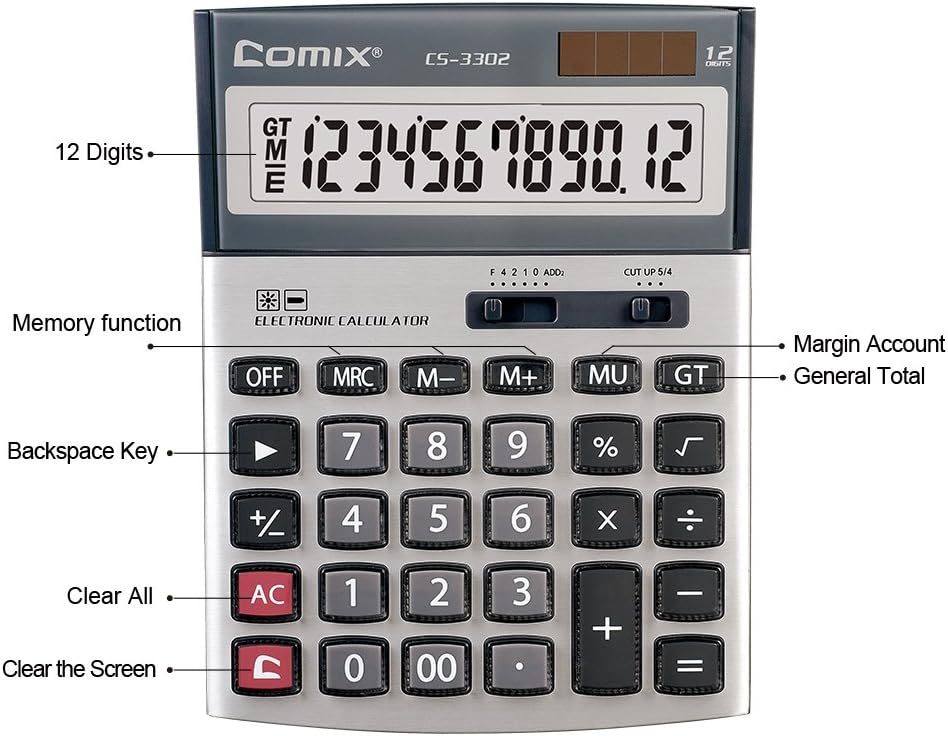
図3.2: Key functions and display features of the Comix CS-3302 Calculator, including 12 digits display, memory functions, and clear keys.

図3.3: Dimensions of the Comix CS-3302 Calculator, showing its compact and ergonomic design.

図3.4: 角度付き view of the Comix CS-3302 Calculator, highlighting its sleek profile キーレイアウトも変更しました。

図3.5: サイドプロfile of the Comix CS-3302 Calculator, showing its slim design.

図3.6: Retail packaging of the Comix CS-3302 Calculator, highlighting key features like 12 digits, dual power, and acrylic keys.
4. セットアップ
4.1 電源
The Comix CS-3302 calculator operates on a dual power system: solar and battery. The solar panel provides power in well-lit environments, while a single AA battery (not included) serves as an auxiliary power source for low-light conditions or when solar power is insufficient.
- バッテリーの取り付け: Locate the battery compartment on the back of the calculator. Open the cover and insert one AA battery, ensuring correct polarity (+/-). Close the battery compartment cover securely.
- 初回電源オン: The calculator should power on automatically when sufficient light is available or with the battery installed. If not, press the オン/交流 ボタン。
5. 操作手順
5.1 基本操作
- 加算(+): 最初の数字を入力し、 +2番目の数字を入力し、 =.
- 減算(-): 最初の数字を入力し、 -2番目の数字を入力し、 =.
- 掛け算(×): 最初の数字を入力し、 ×2番目の数字を入力し、 =.
- 割り算(÷): 最初の数字を入力し、 ÷2番目の数字を入力し、 =.
- パーセンtag(%): Enter the number, press × (または ÷), enter the percentage値を入力し、 %例えばample, to calculate 10% of 200, enter 200 × 10 %.
- 平方根(√): 番号を入力して押す √.
5.2 特殊関数
- OFF: Powers off the calculator.
- AC(クリア): すべてのエントリとメモリをクリアし、電卓を初期状態にリセットします。
- C (エントリをクリア): Clears the last entered number or the current display value without affecting previous calculations or memory.
- バックスペース(►): 最後に入力した数字を削除します。
- M+(メモリプラス): 表示されている値をメモリに追加します。
- M-(メモリマイナス): 表示されている値をメモリから減算します。
- MRC (メモリリコール/クリア): 一度押すとメモリ値が呼び出されます。二度押すとメモリが消去されます。
- MU (Mark Up / Margin Account): Used for profit margin calculations. Enter cost, press MU, enter selling price, then press = to get the profit margin.
- GT (総計): Accumulates the results of all calculations. Pressing GT displays the grand total.
- +/- (符号変更): 表示されている数値の符号を変更します (正から負、または負から正)。
5.3 Decimal and Rounding Settings
The calculator features two slide switches at the top for controlling decimal places and rounding:
- Decimal Selector (F 4 2 1 0 ADD2):
- F (Floating Decimal): Displays all available decimal places.
- 4、2、1、0: Sets the number of decimal places to 4, 2, 1, or 0 respectively.
- ADD2 (Add Mode): Automatically adds two decimal places to all results, useful for currency calculations.
- Rounding Selector (CUT UP 5/4):
- CUT (Cut Off): Truncates the number, discarding all digits beyond the set decimal places.
- UP (Round Up): Rounds up the last digit if there are any non-zero digits beyond the set decimal places.
- 5/4 (Round Half Up): Rounds up if the first discarded digit is 5 or greater, otherwise rounds down.
6. メンテナンス
- クリーニング: Wipe the calculator surface with a soft, dry cloth. For stubborn dirt, slightly dampen the cloth with water, but ensure no liquid enters the calculator. Do not use chemical cleaners.
- ストレージ: When not in use for extended periods, store the calculator in a cool, dry place away from direct sunlight and extreme temperatures.
- バッテリー交換: If the display becomes dim or unresponsive in low light, replace the AA battery. Ensure the calculator is off before replacing the battery.
7。 トラブルシューティング
| 問題 | 考えられる原因 | 解決 |
|---|---|---|
| ディスプレイが空白または暗い。 | 太陽光発電に十分な光がないか、バッテリー残量が少ない。 | 明るい場所に移動するか、単三電池を交換してください。 |
| 計算結果が正しくありません。 | Incorrect input, incorrect decimal/rounding settings, or memory interference. | プレス AC to clear all and restart. Check decimal and rounding switch positions. Ensure correct key presses. |
| キーが反応しません。 | Calculator frozen or physical damage. | を押してみてください オフ それから オン/交流. If problem persists, remove and reinsert battery. If still unresponsive, contact support. |
8. 仕様
| ブランド | コミックス |
| モデル番号 | CS-3302 (P/N: 11821063) |
| 画面 | 12桁LCD |
| 電源 | Dual Power (Solar & 1x AA Battery - not included) |
| 材料 | アクリル、金属 |
| 寸法(長さ×幅×高さ) | 約23.6 x 15.7 x 4.3 cm(9.3 x 6.2 x 1.7インチ) |
| 重さ | 約322 g(0.71ポンド) |
| 動作温度 | -25 ℃ to +60 ℃ (-13 ℉ to +140 ℉) |
| 欧州連合 | 842064102524 |
9. 保証とサポート
Comix products are designed for quality and durability. This product comes with a 3年間保証 購入日から、通常使用における材料および製造上の欠陥をカバーします。
For warranty claims, technical support, or any inquiries regarding your Comix CS-3302 calculator, please contact Comix customer service through their official website or the retailer where the product was purchased. Please have your proof of purchase and the product model number ready when contacting support.
For more information, visit the official Comix webサイト: www.comix.com