1. はじめに
The ICON iKeyboard 4X is a 37-key MIDI keyboard controller designed for music production and performance. It combines a semi-weighted piano-style keyboard with a single-channel Digital Audio Workstation (DAW) controller, all housed in a durable metal enclosure. This manual provides detailed instructions for setting up, operating, and maintaining your iKeyboard 4X, ensuring optimal performance and integration with your music software.
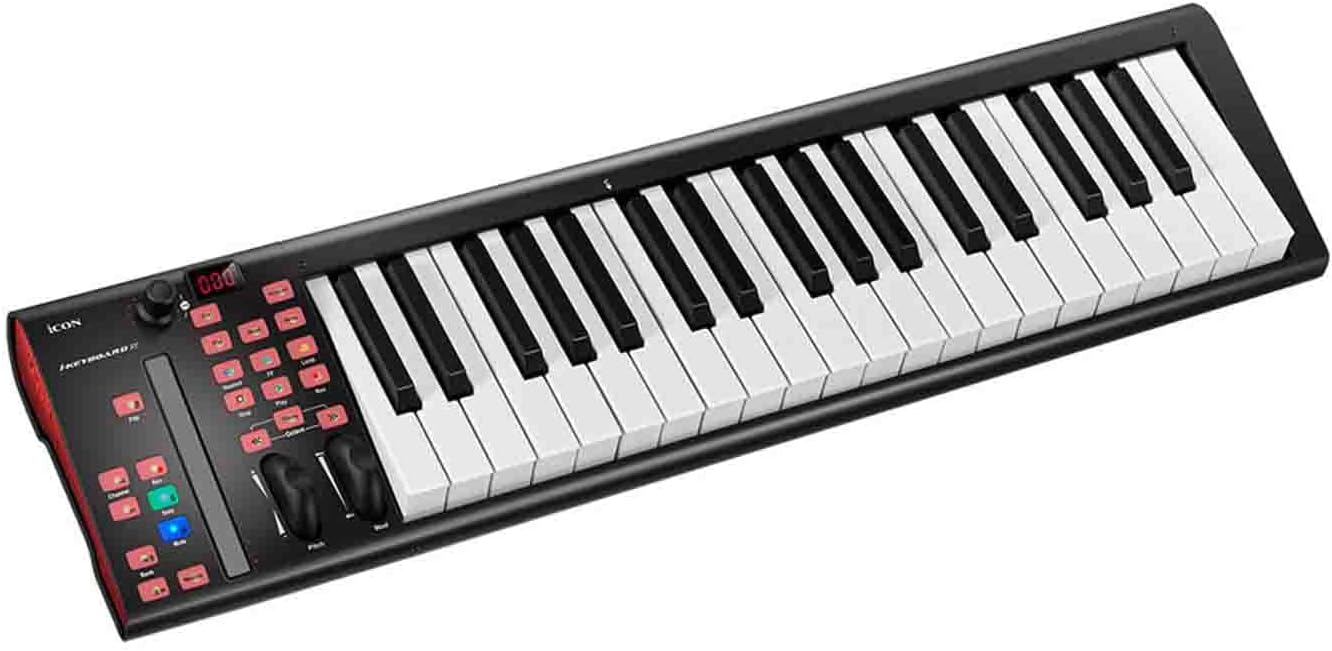
画像1.1:正面 view of the ICON iKeyboard 4X 37-Key MIDI Keyboard Controller, showcasing the 37 semi-weighted keys and integrated control panel.
2. 特徴
The iKeyboard 4X offers a comprehensive set of features for musicians and producers:
- 37個のセミウェイテッドキー: Full-sized, velocity-sensitive keys designed to provide a realistic piano feel.
- Integrated DAW Controller: Single-channel control section for your Digital Audio Workstation.
- Touch Fader with LED Feedback: Control and automate levels and parameters with real-time visual feedback.
- トランスポートコントロール: Dedicated buttons for playback, recording, looping, and automation modes.
- Large Rotary Encoder: Multi-function encoder with an LED ring for panning, send levels, and plugin parameter control.
- ピッチベンドとモジュレーションホイール: 表現力豊かなパフォーマンスを実現する標準コントロール。
- オクターブとトランスポーズボタン: Easily shift the keyboard's range.
- 耐久性のある構造: Rugged metal enclosure for enhanced longevity.
- USB接続: Class-compliant for macOS (M1 and Intel), Windows 10, and Windows 8/7 (32 & 64-bit).
- Mackie Control & HUI Protocols: Built-in support for popular DAW control protocols.
- iMap ソフトウェア: Included software for custom MIDI mapping of all controls.
- バンドルソフトウェア: Includes Cubase LE and other production software.
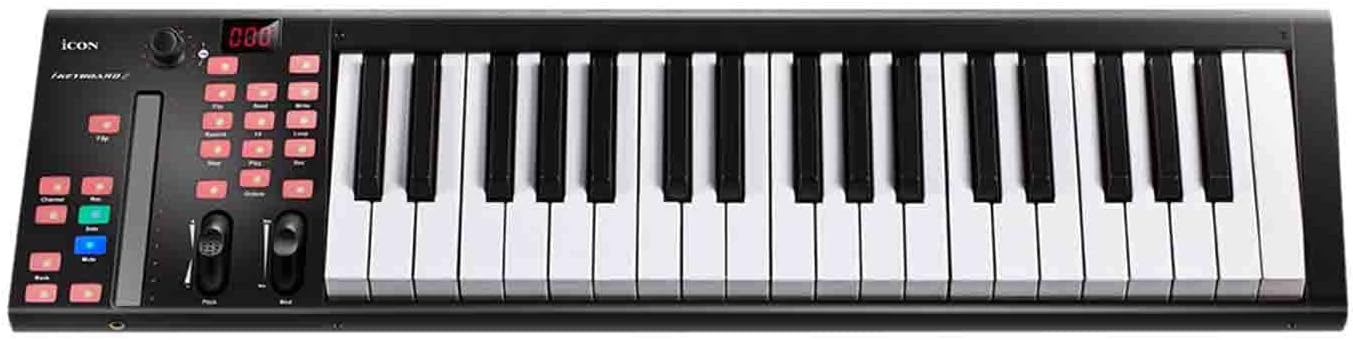
画像2.1: 上 view of the ICON iKeyboard 4X, highlighting the layout of the keys and the integrated control surface.
3. パッケージ内容
Please verify that all items are present in your iKeyboard 4X package:
- ICON iKeyboard 4X 37-Key MIDI Keyboard Controller
- USBケーブル
- Cubase LE Software (download access)
- iMap Software (download access)
- Factory Presets (for various DAWs)
- ユーザーマニュアル(このドキュメント)
4. セットアップ
4.1. 物理的な接続
- 開梱: Carefully remove the iKeyboard 4X from its packaging.
- 配置: Place the controller on a stable, flat surface.
- USB接続: Connect one end of the supplied USB cable to the USB port on the rear of the iKeyboard 4X and the other end to an available USB port on your computer. The iKeyboard 4X is USB bus-powered.
- オプションの外部電源: While the unit is USB bus-powered, for optimal stability, especially with certain computer setups or if experiencing intermittent issues, an optional external 9V DC power adapter (not included) can be connected to the DC IN port.
- MIDI Out (Optional): If connecting to external MIDI hardware, use a standard MIDI cable to connect the MIDI OUT port on the iKeyboard 4X to the MIDI IN port of your external device.

Image 4.1: Rear panel of the ICON iKeyboard 4X, illustrating the USB, MIDI OUT, and DC IN ports for connectivity.
4.2. ドライバーのインストール
The ICON iKeyboard 4X is a class-compliant device. This means that for most modern operating systems (macOS, Windows 10/8/7), no specific driver installation is required. Your computer should automatically recognize the device when connected via USB.
- ウィンドウズ: The operating system will typically install generic USB MIDI drivers automatically.
- MacOSの: The operating system provides built-in MIDI support.
For advanced customization and firmware updates, download the latest iMap software from the official ICON Pro Audio webサイト。
5. 操作手順
5.1. 基本的なキーボード機能
- キー: The 37 semi-weighted keys respond to velocity, allowing for dynamic musical expression.
- ピッチベンドホイール: Located on the left side, this wheel allows for real-time pitch modulation.
- モジュレーションホイール: Also on the left, this wheel typically controls vibrato or other assignable parameters within your software.
- オクターブアップ/ダウンボタン: Use these buttons to shift the keyboard's playable range up or down in octaves. The current octave setting is usually indicated on the display.
- トランスポーズアップ/ダウンボタン: These buttons allow you to transpose the keyboard's pitch in semitone increments.
5.2. DAW Control Section
The iKeyboard 4X features an integrated control surface for seamless interaction with your DAW.

画像5.1: 詳細 view of the iKeyboard 4X's control panel, showing the touch fader, transport controls, and rotary encoder.
- Touch Fader: This backlit LED touch fader controls channel levels, automation, and other parameters. It synchronizes with your DAW, reflecting current values when switching tracks.
- ミュート、ソロ、録音ボタン: Dedicated buttons for controlling track mute, solo, and record arm functions.
- Track/Bank Selection: Buttons to navigate between tracks or banks of tracks in your DAW.
- トランスポートコントロール: Play, Stop, Record, Loop, and other transport functions for controlling your DAW's timeline.
- Large Rotary Encoder: This versatile knob, surrounded by an LED ring, can be assigned to control various parameters such as panning, send levels, or plugin parameters. Its function often changes based on the selected mode or DAW context.
6. ソフトウェア統合
6.1. DAW Setup
The iKeyboard 4X is designed to integrate seamlessly with most major DAWs using Mackie Control and HUI protocols. Refer to your DAW's manual for specific instructions on setting up a MIDI controller and control surface.
- 一般的な手順:
- Open your DAW's preferences or settings.
- Navigate to the MIDI or Control Surfaces section.
- Add a new control surface, selecting "Mackie Control" or "HUI" if available.
- Select "iKeyboard 4X" as the input and output MIDI device for the control surface.
- Ensure "iKeyboard 4X" is also enabled as a standard MIDI input device for playing notes.
- 工場出荷時のプリセット: The iKeyboard 4X includes factory presets for popular DAWs such as Cubase, Nuendo, Logic Pro, Pro Tools, Ableton Live, Samplitude, and Studio One. These presets optimize the controller's functions for each specific DAW.
6.2. iMap Software
The iMap software allows you to customize the MIDI assignments of all controls on your iKeyboard 4X. This is useful for creating custom mappings for applications that do not fully support Mackie Control or HUI, or for personalizing your workflow.
- Download and install iMap from the ICON Pro Audio webサイト。
- Connect your iKeyboard 4X via USB.
- Launch iMap and follow the on-screen instructions to configure your controller.
6.3. Bundled Software
Your iKeyboard 4X comes with access to a suite of powerful music production software:
- Cubase LE: A streamlined version of Steinberg's popular DAW, providing essential tools for recording, editing, and mixing.
- Bitwig Studio 8-Track: A trim and effective digital audio workstation for producing, performing, and designing sounds.
- Harrison 32C Vocal Intensity Processor: A collection of features from Harrison's analog console heritage, including AVA plugins and Mixbus32C workstation.
- Tracktion DAW Essentials: A collection of 16 contemporary FX plugins for use with any DAW.
- Dotec Audio Plugins: Tools for streaming, podcasting, recording, and mixing.
Registration of your iKeyboard 4X on the ICON Pro Audio website is typically required to access these software downloads.
Image 6.1: Interface of Bitwig Studio 8-Track, included with your iKeyboard 4X.

図6.2: 例amples of Dotec Audio plugins, part of the bundled software package.
7. メンテナンス
To ensure the longevity and optimal performance of your ICON iKeyboard 4X, follow these maintenance guidelines:
- クリーニング: コントローラーの表面は、柔らかく乾いた布で拭いてください。頑固な汚れには、軽く湿らせた布で拭いてください。amp 布で拭くこともできますが、液体がデバイス内に入らないようにご注意ください。研磨剤入りの洗剤や溶剤の使用は避けてください。
- ストレージ: When not in use, store the iKeyboard 4X in a clean, dry environment, away from direct sunlight, extreme temperatures, and excessive dust.
- 取り扱い: Avoid dropping or subjecting the unit to strong impacts. Do not place heavy objects on the keyboard.
- 接続性: Always connect and disconnect USB and MIDI cables carefully to prevent damage to the ports.
8。 トラブルシューティング
If you encounter issues with your iKeyboard 4X, refer to the following common troubleshooting steps:
- 電源なし/ユニットが応答しない:
- Ensure the USB cable is securely connected to both the iKeyboard 4X and your computer.
- コンピューターの別のUSBポートに接続してみてください。
- USB ハブを使用している場合は、コンピューターに直接接続するか、電源付きの USB ハブを使用してください。
- Consider using an optional external 9V DC power adapter if available, as some USB ports may not provide sufficient power.
- サウンド/MIDI出力なし:
- Verify that the iKeyboard 4X is recognized by your operating system (check Device Manager on Windows or Audio MIDI Setup on macOS).
- In your DAW, ensure the iKeyboard 4X is selected as a MIDI input device and that the track you are playing on is armed for recording or monitoring MIDI input.
- Check that the correct virtual instrument or sound source is loaded and active in your DAW.
- Ensure the Octave and Transpose settings are not set to an extreme range that would produce inaudible notes.
- DAW Control Functions Not Working:
- Confirm that you have correctly set up the iKeyboard 4X as a Mackie Control or HUI control surface in your DAW's preferences.
- Ensure no other control surfaces are conflicting with the iKeyboard 4X.
- Check for firmware updates for the iKeyboard 4X and update if available.
- Use the iMap software to verify or reconfigure MIDI assignments if custom mapping is desired.
- Keys Feel Stiff or Unresponsive:
- The keys are semi-weighted and will have more resistance than synth-action keys. This is normal.
- Ensure no debris is lodged between the keys.
- If velocity response seems inconsistent, check your DAW's velocity curve settings or use iMap to adjust the controller's velocity response.
9. 仕様
| 特徴 | 説明 |
|---|---|
| モデル名 | iKeyboard 4X |
| キーの数 | 37 |
| キータイプ | Semi-weighted, velocity-sensitive |
| 接続性 | USB, MIDI Out |
| ハードウェアインターフェイス | USB |
| 対応デバイス | Laptop, PC, macOS (M1 and Intel), Cubase, Nuendo, Logic Pro, Pro Tools, Ableton Live, Samplitude, Studio One |
| サポートされているソフトウェア | Ableton Live, Cubase LE, Bitwig Studio 8-Track, Harrison 32C, Tracktion DAW Essentials, Dotec Audio plugins |
| 制御プロトコル | マッキーコントロール、HUI |
| 材質タイプ | 金属製筐体 |
| 色 | 黒 |
| アイテム重量 | 7ポンド(3.17kg) |
| 製品寸法 | 28 x 8 x 3 インチ (71.12 x 20.32 x 7.62 cm) |
| 力 | USB Bus-powered, optional 9V DC external power (not included) |
10. 保証とサポート
For warranty information, please refer to the warranty card included with your product or visit the official ICON Pro Audio website. ICON provides technical support for their products. If you require assistance beyond the scope of this manual, please contact ICON Pro Audio customer support through their webサイトまたは製品ドキュメントに記載されている連絡先情報を参照してください。
保証請求のための購入証明として購入レシートを保管してください。


