導入
The Extreme DM58 Dynamic Microphone is a versatile audio tool designed for voice, singing, and karaoke applications. This professional-grade microphone delivers clear and robust sound, making it suitable for various performance environments. Its durable construction and included accessories ensure reliable operation and convenient portability.
パッケージ内容
以下にリストされているすべてのアイテムがパッケージに含まれていることを確認してください。
- Extreme DM58 Dynamic Microphone
- eXtreme MS Series Pole Clamp
- Professional Balanced XLR (M) to XLR (F) Cable (3 meters, OD 7mm, black)
- ハードキャリングケース
- 保証書

Image: The Extreme DM58 microphone, XLR cable, and pole clamp, all neatly packed within the included hard carrying case.

画像: view of the Extreme DM58 microphone, its XLR cable, and the pole clamp, arranged within the custom-fit foam interior of the hard case.
設定
- コンポーネントを解凍します: Carefully remove the microphone, XLR cable, and pole clamp from the hard carrying case.
- Attach Pole Clamp: Secure the eXtreme MS Series Pole Clamp to a standard microphone stand. Ensure it is tightened sufficiently to hold the microphone securely.
- マイクを挿入: Gently insert the base of the DM58 microphone into the pole clamp。 clamp should hold the microphone firmly without excessive force.
- XLRケーブルを接続します: Connect the male end of the provided XLR cable to the XLR port at the base of the microphone. Connect the female end of the XLR cable to the microphone input of your audio mixer, amplifier, or karaoke machine. Ensure both connections are secure.
- 電源オン (該当する場合): If your audio device requires it, ensure phantom power is turned off for dynamic microphones. The DM58 does not require phantom power.
手術
The Extreme DM58 microphone is designed for straightforward operation. Follow these guidelines for optimal performance:

画像: クローズアップ view of the Extreme DM58 microphone body, highlighting the integrated ON/OFF switch.
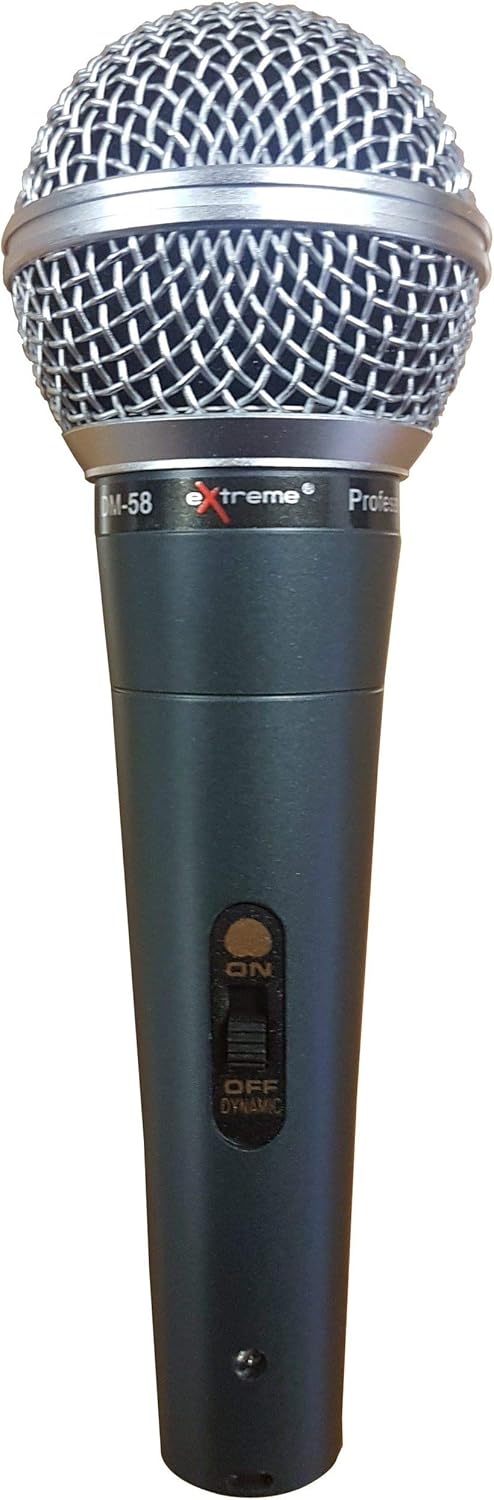
画像: 正面 view of the Extreme DM58 microphone, showcasing its silver ball grill and black body.
- 電源スイッチ: Locate the ON/OFF switch on the microphone body. Slide the switch to the "ON" position to activate the microphone. Slide it to "OFF" when not in use to prevent unwanted noise and preserve connected equipment.
- マイクの配置: For singing and voice applications, hold the microphone approximately 2-6 inches (5-15 cm) from your mouth. Experiment with distance to achieve the desired vocal presence and avoid plosive sounds.
- 極性パターン: The DM58 features a unidirectional (cardioid) polar pattern, meaning it is most sensitive to sound coming from the front and rejects sound from the sides and rear. This helps to minimize feedback and isolate the desired sound source.
- 音量コントロール: Adjust the input volume on your mixer or amplifier to a suitable level. Start with a low volume and gradually increase it to avoid clipping or distortion.
メンテナンス
Proper care will extend the life and performance of your Extreme DM58 microphone:
- クリーニング: Use a soft, dry cloth to wipe down the microphone body and grill after each use. For stubborn grime on the metal parts, a slightly damp cloth can be used, but ensure no moisture enters the microphone capsule. Do not use harsh chemicals or abrasive cleaners.
- ストレージ: Always store the microphone, cable, and clamp in the provided hard carrying case when not in use. This protects the components from dust, moisture, and physical damage.
- ケーブルのお手入れ: Avoid kinking or sharply bending the XLR cable. Coil it loosely when storing to prevent internal wire damage.
- ドロップを避ける: While durable, dropping the microphone can damage the internal components or the grill. Handle with care.
トラブルシューティング
If you encounter issues with your Extreme DM58 microphone, try the following solutions:
- サウンド出力なし:
- マイクのオン/オフスイッチが「オン」の位置にあることを確認します。
- Check that the XLR cable is securely connected to both the microphone and your audio device (mixer, amplifierなど)。
- Verify that the input volume on your audio device is turned up.
- Test the microphone with a different XLR cable if available, to rule out a faulty cable.
- Test the microphone with a different audio input on your device, or a different audio device entirely, to isolate the problem.
- 歪んだ音:
- Reduce the input volume on your audio device.
- Ensure you are not speaking or singing too close to the microphone, which can cause clipping.
- フィードバック(高音のキーキー音):
- Move the microphone further away from speakers.
- Point the microphone away from speakers.
- Reduce the overall volume or specific frequency ranges on your audio device.
仕様
| 特徴 | 仕様 |
|---|---|
| ブランド | 過激 |
| モデル番号 | 8057737498350 |
| マイクフォームファクター | ハンドヘルド |
| 接続技術 | XLR |
| コネクタタイプ | XLR |
| 極性パターン | 一方向 |
| インピーダンス | 600オーム |
| オーディオ感度 | 58デシベル |
| 信号対ノイズ比 | 58デシベル |
| 電源 | コード式電気 |
| 材料 | 金属 |
| 色 | Blue, Silver, Black |
| 推奨用途 | Canto, Karaoke |
| 対応デバイス | Ampリファイアー |
| 含まれるコンポーネント | 保証書 |
保証とサポート
Your Extreme DM58 Dynamic Microphone comes with a warranty. Please refer to the included 保証書 for specific terms, conditions, and duration of coverage. Keep your proof of purchase for any warranty claims.
For technical support or further assistance, please contact the manufacturer or your point of purchase. Ensure you have your model number (8057737498350) and a description of the issue ready when seeking support.


