1. はじめに
Thank you for choosing the Stryker SR-94HPC 10 Meter Radio. This compact and powerful radio is designed for reliable communication, featuring AM/FM modulation, a full-color TFT display, and robust construction. This manual provides essential information for the proper setup, operation, and maintenance of your SR-94HPC radio to ensure optimal performance and longevity.
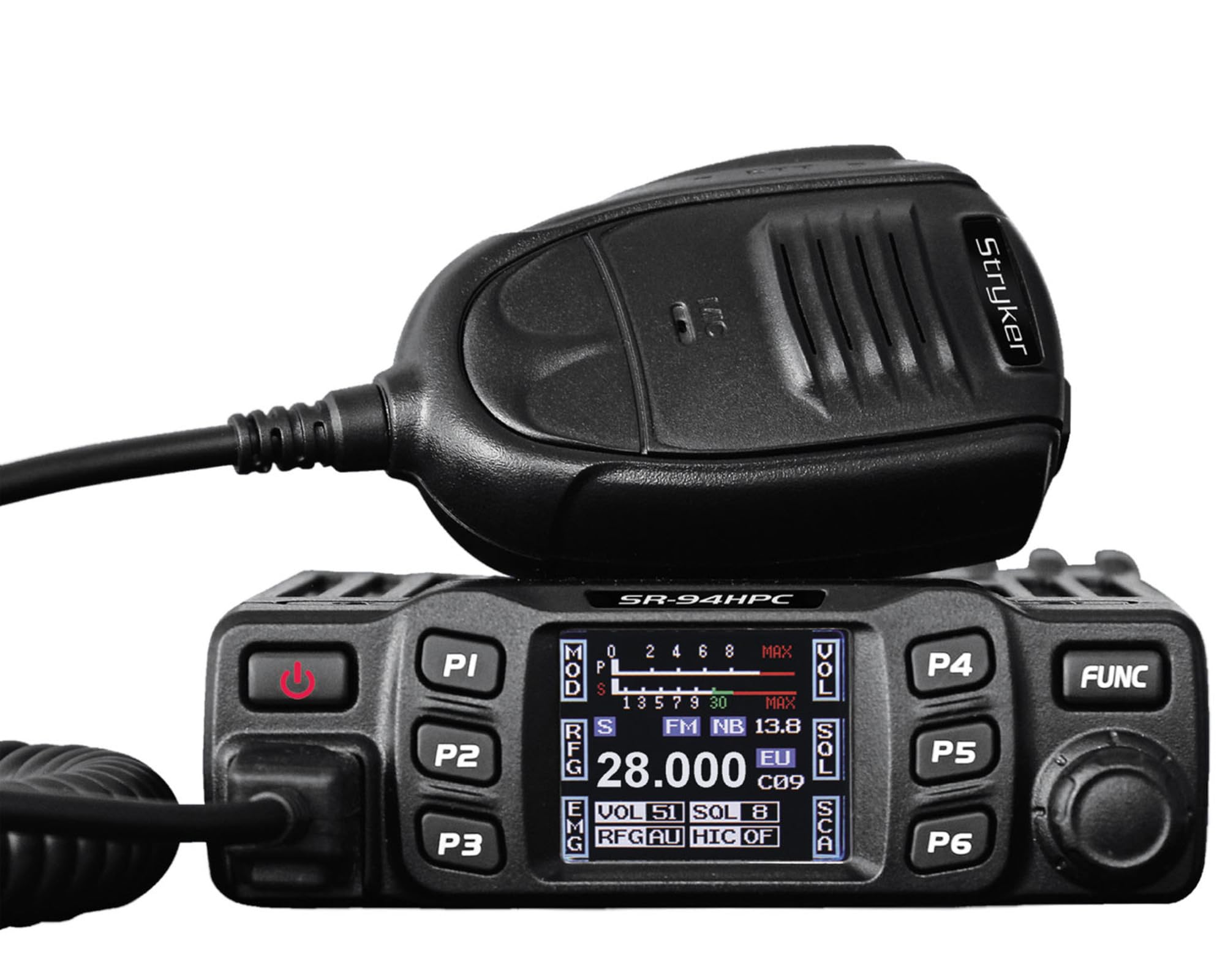
Figure 1: Stryker SR-94HPC 10 Meter Radio. This image shows the compact design of the radio, featuring its front panel with controls and the full-color TFT display.
2. 重要な安全情報
Please read and understand all safety instructions before operating the radio. Failure to do so may result in injury, damage to the radio, or voiding the warranty.
- 電源: Connect the radio only to a 12V or 24V DC power source as specified. Incorrect voltagユニットを損傷する可能性があります。
- アンテナ: Always connect a properly tuned antenna before transmitting. Transmitting without an antenna or with a poorly tuned antenna can cause damage to the radio's final transistors.
- 放熱: Ensure adequate ventilation around the radio, especially the heat sink, to prevent overheating during prolonged transmission.
- 水への露出: While the radio has some water resistance, avoid direct exposure to water or extreme moisture.
- 安全運転: 運転の妨げになるような方法でラジオを操作しないでください。道路の安全を最優先にしてください。
- 提案65の警告: 本製品には、カリフォルニア州でがん、先天性欠損症、その他の生殖機能障害を引き起こすことが知られている化学物質が含まれている可能性があります。詳細については、 www.p65warnings.ca.gov.
3. パッケージ内容
パッケージにすべてのアイテムが揃っていることを確認します。
- Stryker SR-94HPC 10 Meter Radio Unit
- マイクロフォン
- 電源ケーブル
- 取り付けブラケットとハードウェア
- ユーザーマニュアル(このドキュメント)
4. コントロールと機能
The SR-94HPC features a user-friendly interface with a full-color TFT display and intuitive controls. Familiarize yourself with the following:
- Full-Color TFT Display: 周波数、音量を表示tage, S units, functions, and other operational data. The display is designed for clarity and ease of reading while driving.
- Channel Selector/Encoder: Used to change channels and navigate menu options.
- 音量コントロール: 音声出力レベルを調整します。
- スケルチコントロール: 信号が存在しない場合にバックグラウンド ノイズを除去します。
- モードボタン: AM と FM の変調モードを切り替えます。
- 機能ボタン: Access various radio features and settings. Refer to the on-screen menu for specific functions.
- マイクコネクタ: Front-panel connection for the supplied microphone.
- PTT(プッシュ・トゥ・トーク)ボタン: Located on the microphone, used to transmit.
5. セットアップ
Follow these steps for initial setup of your SR-94HPC radio:
- 取り付け: Securely mount the radio using the provided bracket and hardware in a location that allows for good ventilation and easy access to controls. Ensure the wrap-around cast aluminum heat sink has clear airflow.
- アンテナ接続: Connect a 10-meter antenna with a UHF, SO-239 connector to the antenna port on the rear of the radio. Ensure the antenna is properly tuned for the 28.000 ~ 29.700MHz frequency range to prevent damage to the radio.
- 電源接続: Connect the supplied power cable to the radio's power input. Connect the other end to a stable 12V or 24V DC power source in your vehicle or base station. Observe correct polarity (red to positive, black to negative).
- マイク接続: Plug the microphone into the dedicated microphone jack on the front panel of the radio.
- 初回電源オン: Once all connections are secure, turn on the radio. The TFT display should illuminate, showing the current operating status.
6. 操作手順
This section details the basic operation of your Stryker SR-94HPC radio.
6.1 電源オン/オフ
Press and hold the power button (usually integrated with the volume knob or a dedicated button) to turn the radio on or off. A quick tap of the power button may mute the audio.
6.2チャンネルの選択
Rotate the Channel Selector knob to change the operating frequency or channel. The selected channel will be displayed on the TFT screen.
6.3 Modulation Mode
Press the Mode button to toggle between AM (Amplitude Modulation) and FM (Frequency Modulation) modes. The active mode will be indicated on the display.
6.4 音量とスケルチの調整
- 音量: 音量ノブを希望のリスニングレベルに調整します。
- スケルチ: Rotate the Squelch knob clockwise until background noise disappears. Rotate counter-clockwise to hear weaker signals. The SR-94HPC may also feature an automatic squelch control (ASC) setting, which can be adjusted via the menu.
6.5 送信
To transmit, press and hold the PTT button on the microphone. Speak clearly into the microphone. Release the PTT button to receive. Ensure the antenna is properly connected and tuned before transmitting to avoid damage.
6.6 表示情報
The full-color TFT display provides real-time information, including:
- Frequency/Channel: Current operating frequency or channel number.
- 巻tage: 入力ボリュームtage to the radio.
- S Units: Signal strength indicator for received signals.
- 出力: Indication of transmitted power.
- 周波数: Standing Wave Ratio, indicating antenna tuning efficiency.
7. メンテナンス
Proper maintenance ensures the longevity and reliable operation of your SR-94HPC radio.
- クリーニング: Use a soft, dry cloth to clean the radio's exterior and display. Avoid abrasive cleaners or solvents.
- アンテナシステム: Regularly check your antenna and coaxial cable for damage. Periodically verify your antenna's SWR (Standing Wave Ratio) to ensure efficient power transfer and prevent damage to the radio. An SWR meter can be used for this purpose.
- ヒートシンク: Ensure the wrap-around cast aluminum heat sink on the rear of the radio remains free of obstructions to allow for proper heat dissipation, especially during high-power transmissions.
- 接続: すべてのケーブル接続(電源、アンテナ、マイク)が安全で腐食がないことを定期的に確認してください。
8。 トラブルシューティング
SR-94HPC で問題が発生した場合は、次の一般的な問題と解決策を参照してください。
| 問題 | 考えられる原因 | 解決 |
|---|---|---|
| ラジオの電源が入りません。 | 電源接続なし、音量が正しくありませんtage; ヒューズが切れた。 | Check power cable connections; verify 12V/24V DC source; inspect and replace fuse if necessary. |
| スピーカーから音声が聞こえません。 | Volume too low; squelch set too high; speaker disconnected. | Increase volume; decrease squelch; check speaker connection. |
| "Error" message on display during transmission. | High SWR (Standing Wave Ratio); antenna not connected or poorly tuned. | Check antenna connection; tune antenna using an SWR meter. Do not transmit until SWR is acceptable. |
| Poor transmission or reception range. | Antenna issues; environmental interference; low power setting. | Verify antenna tuning and condition; check for local interference; ensure power output is set correctly. |
If the problem persists after attempting these solutions, please contact Stryker customer support for assistance.
9. 仕様
Detailed technical specifications for the Stryker SR-94HPC 10 Meter Radio:
| 特徴 | 仕様 |
|---|---|
| 変調モード | FM/AM |
| 周波数範囲 | 28.000 ~ 29.700MHz (FM), 28.000 ~ 29.700MHz (AM) |
| 周波数許容範囲 | ±5.0ppm |
| 入力ボリュームtage | 12V / 24V DC |
| 周波数制御 | PLLシンセサイザ |
| 動作温度範囲 | -4°F ~ +131°F (-20°C ~ +55°C) |
| アンテナコネクタ | UHF、SO-239 |
| 出力 | 4 Watts FM/AM / 10 Watts AM/FM (PEP up to 45+ watts) |
| 伝送干渉 | 4nW (-54dBm) より劣る |
| 周波数応答 | 300-3000Hz |
| 変調信号歪み | 5%未満 |
| 出力インピーダンス | 50オーム |
| 画像除去 | 70デシベル |
| 隣接チャネル除去 | 60デシベル |
| IF周波数 | 1st: 10.695MHz, 2nd: 455KHz |
| 寸法(幅x奥行きx高さ) | 4.88” x 6.42” x 1.54” (12.4cm x 16.3cm x 3.9cm) |
| 重さ | 約1.48ポンド(0.67kg) |
| 特集 | Backlit Keys, Full-color TFT Display |
10. 保証とサポート
Stryker Radios are manufactured to high-quality standards. For warranty information, please refer to the warranty card included with your product or visit the official Stryker Radios webサイトでご確認ください。購入証明として購入レシートを保管してください。
For technical support, troubleshooting assistance beyond this manual, or service inquiries, please contact Stryker customer support through their official channels. Contact information can typically be found on the manufacturer's webサイト。