導入
This manual provides instructions for the proper setup, operation, maintenance, and troubleshooting of your Excalibur Deluxe Virtual Casino 5-in-1 Video Game. Please read this manual thoroughly before using the device to ensure optimal performance and longevity.
The Excalibur Deluxe Virtual Casino is a handheld electronic gaming device featuring five classic casino games: Poker, Blackjack, Slots, Craps, and Roulette. It is designed for portable entertainment.
設定
1. バッテリーの取り付け
The Excalibur Deluxe Virtual Casino requires 3 AAA batteries (not included) for operation.
- デバイスの背面にある電池ボックスのカバーを見つけます。
- 矢印で示された方向にカバーをスライドさせて開きます。
- Insert 3 AAA batteries, ensuring the correct polarity (+ and -) as marked inside the compartment.
- 電池ボックスのカバーを元に戻し、カチッと音がしてしっかりと固定されていることを確認します。
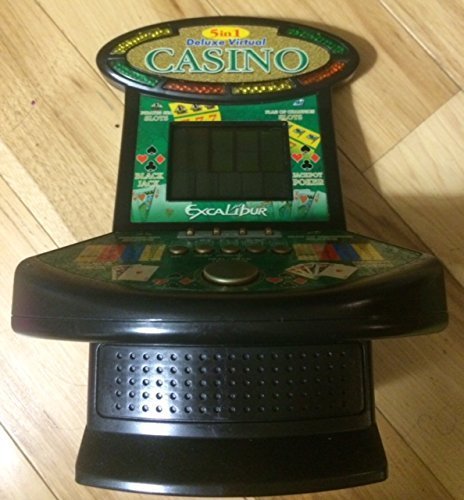
図1: Excalibur Deluxe Virtual Casino handheld device. This image shows the front of the device, featuring the LED display and control buttons, which include a directional pad and action buttons.
2. 初回電源投入
After installing batteries, press the 力 button, usually located on the top or front of the device, to turn it on. The screen should illuminate, displaying the main menu or game selection screen.
操作手順
コントロールオーバーview
- 方向パッド(Dパッド): Used for navigating menus and making selections within games.
- SELECT/MENU Button: Typically used to confirm selections or access in-game menus.
- ACTION Buttons (A, B, C, etc.): Used for specific game actions, such as dealing cards, spinning reels, or placing bets. Refer to individual game instructions for specific button functions.
- SOUND/VOLUME Button: Adjusts the device's sound level or mutes audio.
- 電源スイッチ: デバイスの電源をオンまたはオフにします。
ゲームの選択
From the main menu, use the Dパッド to highlight your desired game (Poker, Blackjack, Slots, Craps, or Roulette). Press the 選択 button to confirm your choice and start the game.
Basic Gameplay (General)
- Placing Bets: 使用 Dパッド to select bet amounts or areas on the table (for Craps/Roulette). Confirm with an アクション ボタン。
- Game Actions: Follow on-screen prompts. For example, in Poker/Blackjack, use アクション buttons to "Hit," "Stand," "Deal," or "Fold." In Slots, press an アクション button to "Spin."
- Viewing Rules: Some games may have an option to view rules within their respective menus. Access this via the メニュー ボタンが使用可能な場合はクリックします。
メンテナンス
クリーニング
To clean the device, gently wipe the exterior with a soft, dry cloth. Do not use abrasive cleaners, solvents, or immerse the device in water. For the screen, use a soft, lint-free cloth specifically designed for electronics displays.
バッテリーのケアと保管
- 長期間使用しない場合は、液漏れを防ぐため電池を取り外してください。
- デバイスは直射日光や極端な温度を避け、涼しく乾燥した場所に保管してください。
- 古い電池と新しい電池、または異なる種類の電池を混ぜないでください。
トラブルシューティング
| 問題 | 考えられる原因 | 解決 |
|---|---|---|
| デバイスの電源が入らない。 | 電池が切れているか、正しく取り付けられていない。 | 電池の極性を確認してください。新しい単4電池と交換してください。 |
| 画面が空白またはちらつきます。 | 電池残量が少ないか、一時的なソフトウェアの不具合です。 | 電池を交換してください。デバイスの電源をオフにしてから再度オンにしてください。 |
| ボタンが反応しません。 | Low batteries or a software issue. | Replace batteries. Turn the device off and on again. Ensure buttons are not stuck. |
| 音が出ません。 | 音量がミュートされているか、低く設定されすぎています。 | を押す SOUND/VOLUME button to adjust volume or unmute. |
仕様
- モデル: B01GGZSPTA
- ブランド: エクスカリバー
- 表示タイプ: 導かれた
- フォームファクター: ハンドヘルド
- 電源: 3 x AAA電池(別売)
- 含まれるゲーム: Poker, Blackjack, Slots, Craps, Roulette
保証とサポート
Excalibur products are designed for quality and reliability. For information regarding warranty coverage, please refer to the warranty card included with your purchase or visit the official Excalibur webサイト。
For technical support or customer service inquiries, please contact Excalibur customer support through their official channels. Contact details are typically available on the product packaging or the manufacturer's webサイト。