導入
ご購入ありがとうございますasing the Amazon Basics Portable Wireless, 2.1 Bluetooth Speaker. This manual provides important information regarding the setup, operation, maintenance, and troubleshooting of your new speaker. Please read it thoroughly before use and retain it for future reference.
製品終了view
The Amazon Basics Portable Wireless, 2.1 Bluetooth Speaker offers high-quality sound with a portable design. It features Bluetooth connectivity for wireless audio streaming, a 3.5mm aux-in jack for wired connections, and a built-in microphone for hands-free calling.
パッケージ内容
- Amazon Basics Portable Wireless, 2.1 Bluetooth Speaker
- USB充電ケーブル
- 取扱説明書
スピーカーコンポーネント
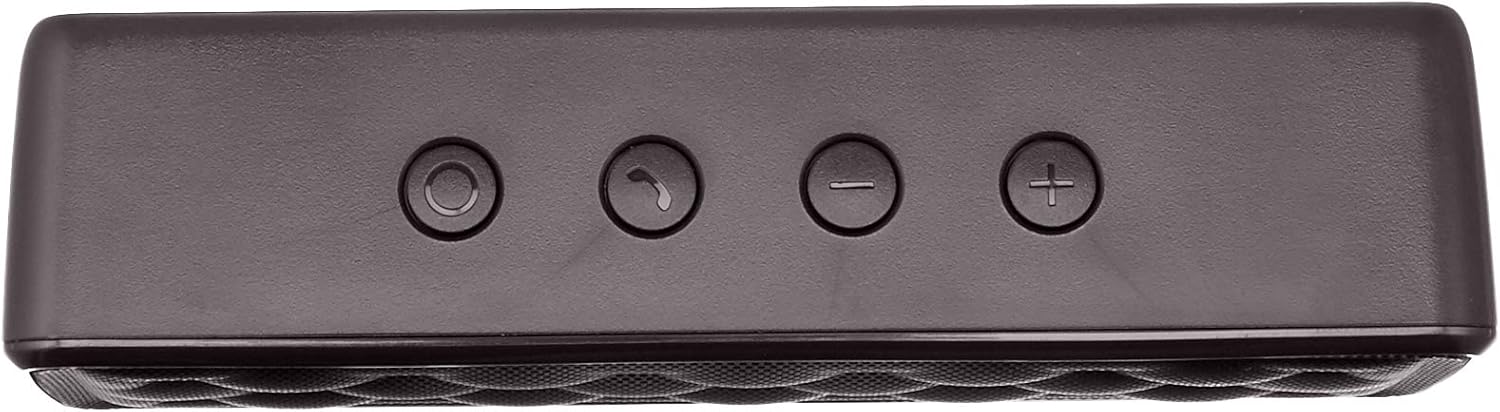


設定
1.スピーカーの充電
Before first use, fully charge the speaker. Connect the supplied USB charging cable to the Micro USB port on the speaker and the other end to a USB power source (e.g., computer USB port, USB wall adapter). The charging indicator light will illuminate during charging and turn off when fully charged. A full charge takes approximately 3 hours.
2.電源のオン/オフ
To power on the speaker, slide the ON/OFF switch located on the rear panel to the "ON" position. To power off, slide the switch to the "OFF" position.
操作手順
Bluetoothペアリング
- スピーカーの電源がオンになっており、Bluetooth 対応デバイスから 33 フィート (10 メートル) 以内にあることを確認します。
- The speaker will automatically enter pairing mode, indicated by a flashing blue LED light.
- デバイスで Bluetooth 設定に移動し、利用可能なデバイスを検索します。
- Select "Amazon Basics Speaker" from the list.
- Once paired, the blue LED light will stop flashing and remain solid. You can now stream audio wirelessly.
Note: If pairing fails, turn off the speaker and your device's Bluetooth, then repeat the steps. The speaker will attempt to reconnect to the last paired device automatically when powered on.
オーディオ再生
- 音量コントロール: Use the '+' and '-' buttons on the top panel of the speaker to adjust the volume. You can also control the volume from your connected device.
- 再生/一時停止: Use the controls on your connected device to play or pause audio.
ハンズフリー通話
Bluetooth 経由で接続すると、スピーカーの内蔵マイクを使用してハンズフリー通話が可能になります。
- 通話の応答/終了: Press the Call/Bluetooth button once to answer an incoming call or end an ongoing call.
- 通話を拒否: Press and hold the Call/Bluetooth button for 2 seconds to reject an incoming call.
- リダイヤル: Double-press the Call/Bluetooth button to redial the last number.
AUX入力モード
To connect non-Bluetooth audio devices, use the 3.5mm AUX input jack on the rear panel. Connect one end of a 3.5mm audio cable (not included) to the speaker's AUX port and the other end to your audio device's headphone jack. The speaker will automatically switch to AUX mode when a cable is inserted.

メンテナンス
- スピーカーは柔らかく乾いた布で拭いてください。研磨剤入りの洗剤や溶剤は使用しないでください。
- スピーカーを極端な温度、湿度、直射日光にさらさないでください。
- スピーカーは防水仕様ではないため、水に浸さないでください。
- 長期間使用しない場合は、スピーカーを涼しく乾燥した場所に保管してください。
トラブルシューティング
| 問題 | 考えられる原因 | 解決 |
|---|---|---|
| スピーカーの電源が入りません。 | 電池が消耗しています。 | 付属のUSBケーブルを使用してスピーカーを充電します。 |
| Bluetooth経由でペアリングできません。 | デバイスの Bluetooth がオフになっている、スピーカーが範囲外である、スピーカーがすでに別のデバイスとペアリングされている。 | Ensure Bluetooth is enabled on your device. Move the speaker closer to your device (within 33 feet). Disconnect from other devices or restart the speaker to enter pairing mode. |
| 音が出ない、または音量が低い。 | Volume is too low on speaker or device; incorrect input mode. | Increase volume on both the speaker and your connected device. Ensure the correct input mode (Bluetooth or AUX) is active. |
| 音の歪み。 | Volume is too high; speaker is too far from the device. | Reduce the volume on the speaker and/or your device. Move the speaker closer to your device. |
仕様
| モデル名 | BSK30BK |
| 接続技術 | Bluetooth、補助 |
| ワイヤレス範囲 | 最大33フィート(10メートル) |
| スピーカー出力 | 2 x 2.5 Watts (5 Watts total) |
| バッテリー寿命 | 最大8時間(フル充電時) |
| 充電時間 | 約3時間 |
| 寸法(長さ×幅×高さ) | 6.3インチ x 1.5インチ x 2.6インチ (16 cm x 3.8 cm x 6.6 cm) |
| 重さ | 8.1オンス(0.23 kg) |
| 内蔵マイク | はい |
| 防水 | いいえ |
保証情報
This product is covered by a Limited Warranty. For detailed information regarding warranty terms and conditions, please refer to the documentation included with your purchase or visit the Amazon Basics official webサイト。
カスタマーサポート
For further assistance, troubleshooting, or product information, please visit the Amazon Basics support page or contact customer service through your Amazon account.
重要な安全情報
- 製品を分解、修理、改造しないでください。
- Keep the product away from water and high humidity.
- 直射日光や極度の熱に長時間さらされることは避けてください。
- 製品を落としたり、強い衝撃を与えたりしないでください。
- 製品とそのバッテリーは、地域の規制に従って責任を持って廃棄してください。
製品ビデオ
No official instructional videos from the seller are available for this product at this time.


