導入
This manual provides detailed instructions for the setup, operation, and maintenance of your Acer R271 bid 27-inch IPS Full HD (1920 x 1080) Display. Please read this manual thoroughly before using your monitor to ensure proper functionality and to maximize your viewing の経験。

フロント view of the Acer R271 bid 27-inch IPS Full HD Display.
設定
パッケージ内容
パッケージにすべてのコンポーネントが含まれていることを確認します。
- Acer R271 bid 27-inch Display
- モニタースタンド
- 電源コード
- HDMIケーブル(地域によって異なる場合があります)
- VGAケーブル(地域によって異なる場合があります)
モニターの組み立て
To assemble the monitor, carefully attach the stand to the back of the display panel. Ensure it clicks securely into place. Place the monitor on a stable, flat surface.
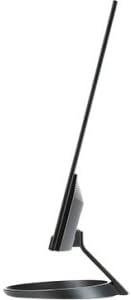
側 view illustrating the slim design of the Acer R271 bid monitor.
モニターの接続
The Acer R271 bid monitor supports multiple input options. Connect the appropriate cable from your computer or device to the corresponding port on the monitor.
- HDMI: 高解像度のデジタルビデオとオーディオ用。
- DVI (w/HDCP): デジタルビデオ接続用。
- VGA: アナログビデオ接続用。
After connecting the video cable, connect the power cord to the monitor and then to a power outlet.
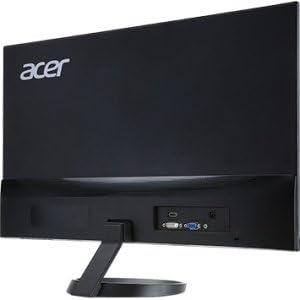
後方 view of the Acer R271 bid monitor, highlighting the HDMI, DVI, and VGA input ports.
電源オン
Press the power button, usually located on the bottom right side of the monitor, to turn on the display. The monitor will automatically detect the active input source.
操作手順
基本機能
Use the buttons located on the bottom bezel of the monitor to navigate the On-Screen Display (OSD) menu. These buttons typically allow you to:
- Power On/Off the monitor.
- Select input source (HDMI, DVI, VGA).
- Adjust volume (if applicable).
- Access the OSD menu for advanced settings.
表示設定
The OSD menu provides options to customize your display. Common adjustments include:
- 輝度: 画面全体の明るさを調整します。
- 対比: 明るい部分と暗い部分の差を修正します。
- 色の設定: 色温度、ガンマ、個々の RGB レベルを微調整します。
- 画像モード: さまざまなコンテンツ タイプ (標準、ムービー、ゲームなど) のプリセット モードを選択します。
主な特徴
The Acer R271 bid monitor incorporates several features designed to enhance your view経験:
- IPSテクノロジー: Provides clear and bright colors from wide viewing angles (up to 178 degrees).
- ゼロフレームデザイン: An edge-to-edge display that minimizes bezels, ideal for multi-monitor setups.
- アイプロテクトテクノロジー: Includes features like Blue Light Filter, Flicker-less, and ComfyView 長時間使用時の目の疲れを軽減します。
公式製品ビデオショーasing the Acer R1 Series monitor's features, including ZeroFrame design, Full HD resolution, IPS technology for wide viewing angles, and Eye Protect technology for user comfort.
メンテナンスとケア
モニターの掃除
画面をきれいにするには、柔らかく糸くずの出ない布で優しく拭いてください。頑固な汚れには、amp布に低刺激性で研磨剤を含まないスクリーンクリーナーを塗布してください。アルコールベースのクリーナーの使用や、スクリーンに直接液体を吹き付けることは避けてください。
一般的なケア
Keep the monitor away from direct sunlight, excessive heat, and moisture. Do not block the ventilation openings. Avoid placing heavy objects on the monitor or its cables.
トラブルシューティング
No Display or "No Signal" Message
- 電源ケーブルがモニターと電源コンセントの両方にしっかりと接続されていることを確認してください。
- Verify that the video cable (HDMI, DVI, or VGA) is firmly connected to both the monitor and your computer.
- Check if the correct input source is selected on the monitor using the OSD menu.
- コンピュータの電源がオンになっており、スリープ モードではないことを確認します。
画質が悪い
- OSD メニューから明るさ、コントラスト、色の設定を調整します。
- コンピューターのディスプレイ解像度がモニターのネイティブ解像度 (1920 x 1080) に設定されていることを確認します。
- ビデオ ケーブルまたはポートに物理的な損傷がないか確認します。
仕様
| 特徴 | 仕様 |
|---|---|
| 画面サイズ | 27インチ |
| 画面解像度 | 1920 x 1080 (フルHD) |
| パネルタイプ | IPS |
| 応答時間 | 4ミリ秒 |
| ピクセルピッチ | 0.311mm |
| 輝度 | 250ニット |
| 信号入力 | 1 x HDMI, 1 x DVI (w/HDCP), 1 x VGA |
| アスペクト比 | 16:9 |
| アイテム重量 | 8.05ポンド |
| 製品寸法(長さx幅x高さ) | 24.8 x 18.1 x 9.4インチ |
| 色 | 黒 |

Detailed dimensions of the Acer R271 bid monitor.
保証情報
The Acer R271 bid monitor typically comes with a 3-year limited warranty. Please refer to the warranty card included with your product or visit the official Acer website for specific terms and conditions, as warranty details may vary by region and retailer.
カスタマーサポート
さらに詳しいサポート、テクニカルサポート、または最新のドライバーやソフトウェアのダウンロードについては、Acerの公式サポートサイトをご覧ください。 webサイト:
You may also contact Acer customer service directly for personalized support.


