1. はじめに
This manual provides detailed instructions for the installation, operation, and maintenance of your Alpine CDE-163BT Advanced Bluetooth CD Receiver. Please read this manual thoroughly before using the unit to ensure proper operation and to prevent damage. Keep this manual for future reference.
The Alpine CDE-163BT is a versatile car stereo receiver featuring advanced Bluetooth connectivity for hands-free calling and audio streaming, CD playback, USB input, and FM/AM tuner capabilities. It is designed to deliver high-quality audio performance and user-friendly control.
2. セットアップとインストール
2.1 パッケージ内容
インストールを開始する前に、すべてのコンポーネントが揃っていることを確認してください。
- Alpine CDE-163BT Head Unit
- ワイヤハーネス
- Mounting Sleeve and Trim Ring
- Bluetoothハンズフリー通話用マイク
- 取扱説明書(本書)
- 取り付け金具(ネジ、ブラケット)
2.2 配線図
Refer to the wiring diagram provided with the unit's installation guide for specific connections. Key connections include:
- 力: Yellow (constant 12V), Red (switched 12V), Black (ground).
- 講演者: White/White-Black (Front Left), Gray/Gray-Black (Front Right), Green/Green-Black (Rear Left), Purple/Purple-Black (Rear Right).
- アンテナ: Blue (power antenna/amplifier remote turn-on).
- マイクロフォン: Connect the supplied microphone to the dedicated input for hands-free calling.
注意: Incorrect wiring can cause damage to the unit or vehicle's electrical system. If you are unsure about any wiring connections, consult a qualified professional installer.
2.3初期電源オン
インストール後、車両のイグニッションをオンにしてください。ユニットの電源が入ります。言語の選択や時計の設定など、画面に表示される初期設定の指示に従ってください。
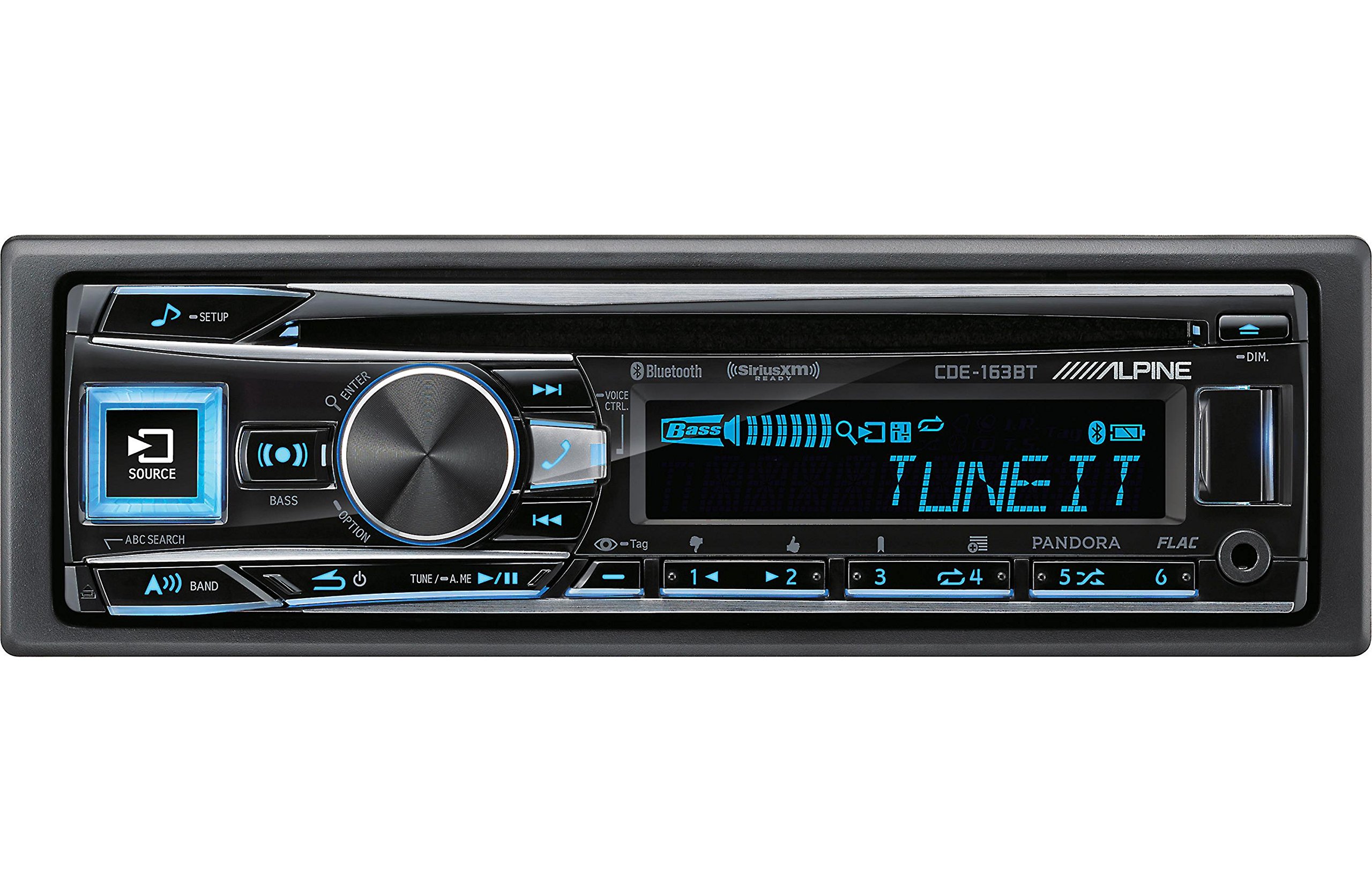
Figure 2.3.1: Front panel of the Alpine CDE-163BT receiver. This image displays the main controls, including the large rotary knob, source button, setup button, and display screen showing "TUNEIT" and "Bass" indicators.
3. 操作
3.1 フロントパネルのコントロールview
フロントパネルの主なコントロールについて理解しておきましょう。
図3.1.1:詳細 view of the Alpine CDE-163BT front panel. Key controls include the SOURCE button (left, illuminated), SETUP button (top left), large central rotary knob for volume and selection, BASS/OPTION button, VOICE CTRL button, and various preset/track skip buttons along the bottom.
- ソースボタン: Selects the audio source (CD, Tuner, USB, Bluetooth Audio, AUX).
- セットアップボタン: Accesses the main setup menu for system adjustments.
- Rotary Knob (Volume/ENTER): Turns to adjust volume. Press to confirm selections in menus.
- BASS/OPTION Button: Provides quick access to bass settings or other options depending on the current mode.
- 音声コントロールボタン: Activates voice control features on connected smartphones.
- バンドボタン: Switches between FM1, FM2, FM3, and AM bands in tuner mode.
- TUNE/A.ME/II Buttons: Used for manual tuning, auto memory, and play/pause functions.
- Track Skip/Preset Buttons (1-6): Used for skipping tracks or selecting radio presets.
- DIMボタン: ディスプレイの明るさを調整します。
3.2 電源のオン/オフとソースの選択
- ユニットを回すには ON, press any button (e.g., SOURCE or the Rotary Knob).
- ユニットを回すには オフ, press and hold the power button (often integrated with the TUNE/A.ME button).
- を押す ソース button repeatedly to cycle through available audio sources: CD, Tuner, USB, Bluetooth Audio, AUX.
3.3 ボリュームコントロール
大きな中央部分を回転させる ロータリーノブ 時計回りに回すと音量が上がり、反時計回りに回すと音量が下がります。
3.4 オーディオ設定
を押す BASS/OPTION button or navigate through the SETUP menu to adjust audio settings such as Bass, Treble, Balance (left/right), and Fader (front/rear). Use the Rotary Knob to adjust values and press it to confirm.
3.5 ラジオの操作(FM/AMチューナー)
- Select "Tuner" as the source using the ソース ボタン。
- を押す バンド FM1、FM2、FM3、AM バンドを切り替えるボタン。
- 手動チューニング: を押す チューニング buttons (◀ / ▶) to manually tune frequencies.
- シークチューニング: を押し続けます チューニング 次の強力な放送局を自動的に探すボタンです。
- プリセットステーション: To store a station, tune to the desired frequency, then press and hold one of the numbered preset buttons (1-6) until you hear a beep. To recall a preset, simply press the corresponding numbered button.
3.6 CD再生
- ディスクスロットにCDを挿入します。自動的にCDソースに切り替わり、再生を開始します。
- Use the ◀ / ▶ buttons to skip tracks.
- を押す TUNE/A.ME/II button for Play/Pause.
- を押す ABC SEARCH button to search for tracks by name.
3.7 Bluetooth接続
The CDE-163BT features built-in Bluetooth for hands-free calling and audio streaming.
3.7.1 Bluetoothデバイスのペアリング
- モバイルデバイスでBluetoothが有効になっていることを確認します。
- On the CDE-163BT, go to the SETUP menu and select "Bluetooth Setup".
- Choose "Pairing" or "Device Search".
- On your mobile device, search for available Bluetooth devices and select "Alpine CDE-163BT".
- Confirm the pairing code if prompted. Once paired, the Bluetooth icon on the receiver's display will illuminate.
3.7.2 ハンズフリー通話
- 電話がかかってくると、発信者番号が表示されます。 入力 button (Rotary Knob) to answer.
- 通話を終了するには、を押します 入力 もう一度ボタンを押します。
- Use the supplied microphone for clear communication.
- を押す 音声コントロール button to activate your smartphone's voice assistant.
3.7.3 Bluetoothオーディオストリーミング
- Select "Bluetooth Audio" as the source.
- Start playback on your paired mobile device. Audio will stream through the receiver.
- Use the ◀ / ▶ buttons on the receiver to skip tracks.
3.8 USB再生
- Connect a USB storage device (e.g., USB flash drive) to the USB port.
- Select "USB" as the source. The unit will automatically detect and begin playing compatible audio files (including FLAC format).
- Use the ◀ / ▶ buttons to skip tracks.
- The unit supports various audio formats.
3.9 Pandora and SiriusXM Ready
- パンドラ: Connect your iPhone or Android smartphone via USB or Bluetooth and launch the Pandora app. Select Pandora as the source on the receiver to control the app.
- シリウスXM: This unit is SiriusXM Ready. An optional SiriusXM Connect Vehicle Tuner and subscription are required for satellite radio reception. Connect the tuner and select SiriusXM as the source.
3.10 表示設定
- を押す 暗い ディスプレイの明るさを調整するボタン。
- Access the SETUP menu to customize display colors for buttons and the screen.
4. メンテナンス
4.1 ユニットのクリーニング
フロントパネルは柔らかく乾いた布で拭いてください。頑固な汚れには、ampen the cloth lightly with water. Avoid using harsh chemicals, abrasive cleaners, or solvents as they can damage the finish.
4.2 ディスクケア
Handle CDs by their edges. Keep discs clean and free of scratches. If a disc is dirty, wipe it gently from the center outwards with a soft, lint-free cloth. Do not use solvents or abrasive cleaners on discs.
5。 トラブルシューティング
If you experience issues with your CDE-163BT, refer to the table below for common problems and solutions.
| 問題 | 考えられる原因 | 解決 |
|---|---|---|
| 電源なし | 配線が間違っている、ヒューズが切れている、車両の点火装置がオフになっている。 | 電源接続を確認し、ヒューズを交換し、車両のイグニッションをオンにします。 |
| 音が出ない | 音量が低すぎる、ミュートが有効、スピーカーの配線が間違っている、 Ampリファイアオフ。 | Increase volume; Deactivate mute; Check speaker connections; Check ampライフパワー。 |
| Bluetoothが接続されない | デバイスがペアリング モードになっていません。電話の Bluetooth がオフになっています。干渉が発生しています。 | Ensure phone Bluetooth is on and discoverable; Re-attempt pairing; Move closer to unit. |
| CDがスキップしたり再生されない | Dirty or scratched disc; Disc inserted incorrectly. | Clean disc; Insert disc correctly; Try a different disc. |
| USBデバイスが認識されません | 互換性のないフォーマット、USB デバイスの破損、接続不良。 | 確保する files are compatible; Try a different USB device; Reconnect USB device. |
If the problem persists after attempting these solutions, please contact Alpine customer support.
6. 仕様
Below are the technical specifications for the Alpine CDE-163BT Advanced Bluetooth CD Receiver:
- モデル番号: 79380
- 製品寸法: 5 x 11 x 10インチ
- 商品の重量: 4.05ポンド(4.1ポンド)
- 無線通信技術: ブルートゥース
- 接続テクノロジー: ブルートゥース
- 特別な機能: Built-In Bluetooth, FM Tuner
- その他の表示機能: 無線
- 色: 黒
- メーカー: 高山
- 接続技術: ブルートゥース
- 対応デバイス: スマートフォン
- コネクタタイプ: 3.5mmジャック、USB
- オーディオ出力モード: モノラル、ステレオ
- サラウンド サウンド チャネル構成: 4チャンネル
- ワットtage: 200ワット
- 発売日: 19年2016月XNUMX日
7. 保証と顧客サポート
7.1 保証情報
Alpine products are manufactured to the highest quality standards. This product is covered by a limited warranty. Please refer to the separate warranty card included with your purchase for specific terms, conditions, and duration of coverage. Retain your proof of purchase for warranty claims.
7.2 カスタマーサポート
For technical assistance, troubleshooting beyond this manual, or warranty service, please contact Alpine customer support:
- Webサイト: アルパインの公式ウェブサイトをご覧ください webサポート リソース、FAQ、お問い合わせフォームのサイト。
- 電話: アルパインを参照 website or your warranty card for regional customer service phone numbers.
- 認定サービスセンター: For repairs, locate an authorized Alpine service center through the official webサイト。
When contacting support, please have your product model number (CDE-163BT) and serial number ready.


