1. はじめに
The AJA V2Analog is a compact, high-quality mini-converter designed to convert HD/SD-SDI signals to analog component or composite video. This device is engineered for professional video workflows, providing reliable signal conversion for various applications.
Its versatility allows for complete integration into any workflow, making it a valuable asset in any video production environment.

図1: 前面と側面 view of the AJA V2Analog Mini-Converter, highlighting input and output ports.
2. 安全情報
Please read all safety instructions carefully before operating the device. Keep this manual for future reference.
- ユニットを雨、湿気、または極端な温度にさらさないでください。
- 過熱を防ぐために適切な換気を確保してください。
- Use only the specified power supply (5-20 VDC).
- ユニットを落としたり、強い衝撃を与えたりしないでください。
- すべてのメンテナンスは資格のあるサービス担当者に依頼してください。
3. セットアップと接続
Follow these steps to set up your AJA V2Analog converter:
- 電源接続: Connect the appropriate power supply (5-20 VDC) to the "POWER" input on the converter.
- SDI入力: Connect your HD/SD-SDI source to the "SDI IN" BNC connector.
- アナログ出力: Connect the Y/G, Pb/B, and Pr/R BNC outputs to your analog component or composite display/device. Ensure correct color component matching (Y/G for Luminance/Green, Pb/B for Blue Difference, Pr/R for Red Difference).
- USB接続(オプション): For firmware updates or configuration, connect a USB cable from the "USB" port on the converter to your computer.
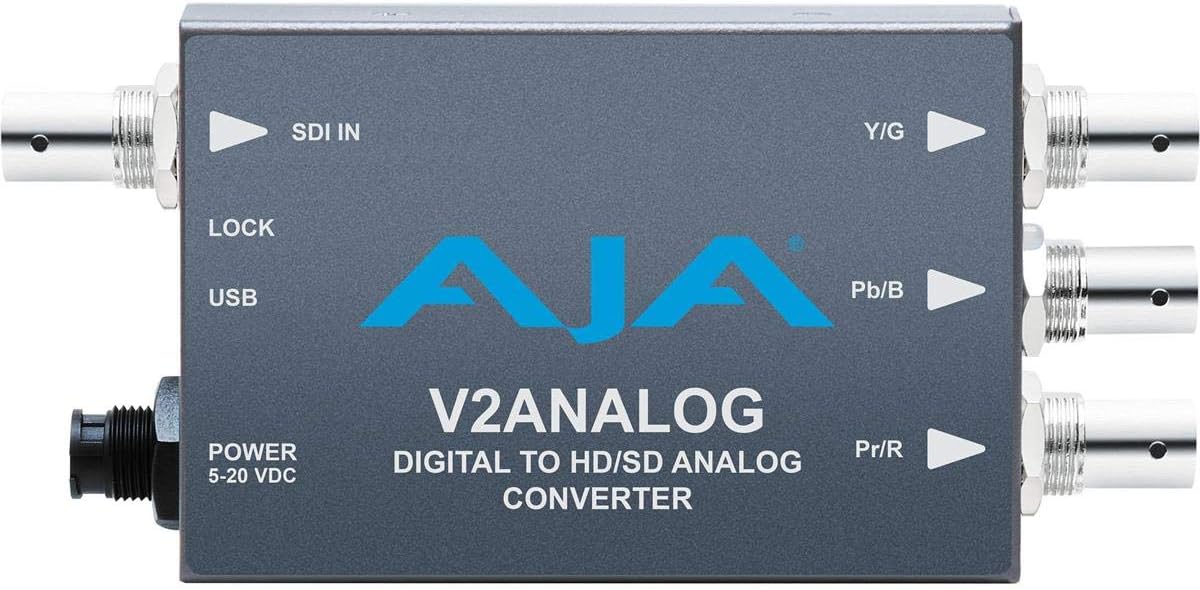
図2:上 view of the AJA V2Analog Mini-Converter, illustrating port labels for connection.
4. 操作手順
Once all connections are made, power on the device. The V2Analog will automatically detect the incoming SDI signal format and convert it to the appropriate analog output. The "LOCK" LED indicator will illuminate when a stable SDI signal is detected and locked.
4.1. Signal Compatibility
The V2Analog supports various HD and SD SDI formats. It is designed to convert these digital signals to standard analog component (YPbPr) or composite (CVBS) outputs.
4.2. Configuration (Advanced)
Advanced configuration options, such as output format selection or color space adjustments, may be available via AJA's Mini-Config software, accessible through the USB port. Refer to the AJA web最新のソフトウェアと詳細な構成ガイドについては、こちらのサイトをご覧ください。
5. メンテナンス
The AJA V2Analog is designed for reliable operation with minimal maintenance. Follow these guidelines:
- クリーニング: 本体の外装を清掃する際は、柔らかく乾いた布をご使用ください。液体洗剤やエアゾール洗剤は使用しないでください。
- ファームウェアの更新: Periodically check the AJA website for firmware updates. Keeping the firmware current ensures optimal performance and compatibility.
- ストレージ: 長期間使用しない場合は、直射日光や極端な温度を避け、涼しく乾燥した場所に保管してください。
6。 トラブルシューティング
If you encounter issues with your V2Analog, refer to the following common problems and solutions:
| 問題 | 考えられる原因 | 解決 |
|---|---|---|
| ビデオ出力なし | No power; Incorrect SDI input; Incorrect analog output connection; No signal lock. | Check power supply; Verify SDI source is active and connected to "SDI IN"; Ensure Y/G, Pb/B, Pr/R are connected correctly to display; Check "LOCK" LED. |
| Distorted or colored video | Incorrect analog output format; Loose connections. | Ensure display is set to correct input type (component/composite); Tighten all BNC connections. |
| "LOCK" LED not illuminated | No valid SDI input signal. | Verify SDI source is active and sending a compatible signal. Check SDI cable integrity. |
If the problem persists, contact AJA Technical Support for further assistance.
7. 仕様
| 特徴 | 詳細 |
|---|---|
| モデル | V2ANALOG |
| ブランド | アジャ |
| 入力 | HD/SD-SDI (BNC) |
| 出力 | Component (Y/G, Pb/B, Pr/R BNC), Composite (selectable) |
| インターフェースタイプ | USB, SDI, Component |
| 力 | 5~20VDC |
| 寸法(長さ×幅×高さ) | 7.2 x 5.7 x 4.2インチ |
| 重さ | 1.35ポンド |
| 欧州連合 | 091131246023 |
8.サポートと保証
For technical support, product registration, or warranty information, please visit the official AJA website or contact their customer service department. Specific warranty terms and conditions may vary by region and purchase date.
アジャ Webサイト: www.aja.com


