導入
The Miops Smart Digital Camera Trigger is an advanced device designed to expand the capabilities of your DSLR or mirrorless camera. It offers various triggering modes, including lightning, sound, laser, and timelapse, allowing photographers to capture unique moments with precision. This manual provides detailed instructions for setup, operation, and maintenance to ensure optimal performance of your Miops device.
安全情報
- デバイスを水や過度の湿気にさらさないでください。
- 極端な温度を避けてください。
- ご自身でデバイスの分解や修理を試みないでください。資格のあるサービス担当者にご相談ください。
- お子様の手の届かない場所に保管してください。
- 指定された充電ケーブルと電源のみを使用してください。
パッケージ内容
パッケージにすべてのアイテムが揃っていることを確認します。
- Miops Smart Digital Camera Trigger device
- USB充電ケーブル
- Camera connection cable (specific to your camera model, may be sold separately)
- クイックスタートガイド

図1: Miops Smart Digital Camera Trigger product box, showing the device and key features.
製品終了view
The Miops Smart Trigger features a compact design with an LCD screen and intuitive controls. It connects wirelessly to your smartphone via Bluetooth for advanced control and mode selection.

図2: The Miops Smart Digital Camera Trigger device shown alongside a DSLR camera, illustrating its compact size and purpose.
設定
1. デバイスの充電
Before first use, fully charge your Miops device using the provided USB cable. Connect the cable to the device's charging port and a standard USB power adapter (not included) or a computer USB port. The charging indicator will show the charging status.
2. カメラへの接続
Connect the Miops device to your camera's remote port using the appropriate camera connection cable. Ensure the cable is securely plugged into both the Miops unit and your camera.
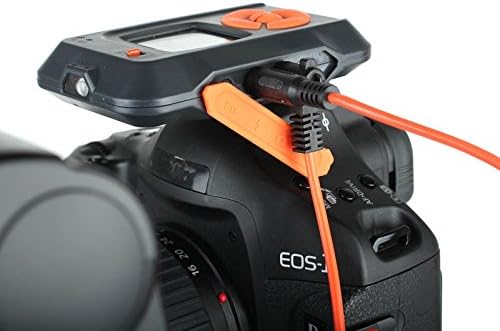
図3: The Miops device connected to a camera's remote port using a dedicated cable, ready for operation.
3. アプリのインストールとペアリング
- Download the Miops app from your smartphone's app store (iOS or Android).
- Turn on the Miops device.
- スマートフォンでBluetoothを有効にします。
- Open the Miops app and follow the on-screen instructions to pair with your device. The app will search for available Miops devices.
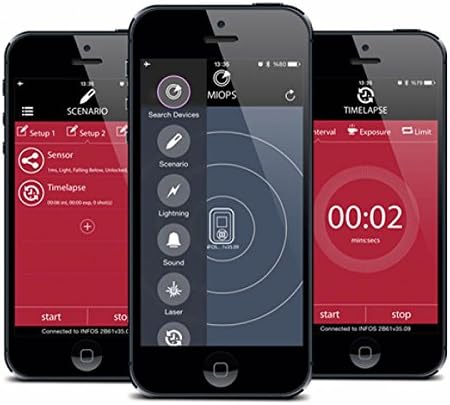
図4: Screenshots of the Miops smartphone application interface, demonstrating its intuitive design for controlling the trigger.
動作モード
The Miops Smart Trigger offers various modes for different photographic scenarios, controllable via the mobile app.
ライトニングモード
This mode is designed to capture lightning strikes. The device detects sudden changes in light and triggers the camera instantly. Adjust sensitivity settings in the app for optimal performance.

図5: 元ample photograph captured using the Miops Smart Trigger's lightning mode, showing multiple lightning bolts over a city.
サウンドモード
The sound mode triggers the camera when a sound above a set threshold is detected. Ideal for capturing breaking objects, balloons popping, or other sound-activated events.
レーザーモード
Utilizes a laser beam to detect movement. When the laser beam is broken, the camera is triggered. Useful for wildlife photography or capturing fast-moving subjects.
Timelapse Mode
Allows you to set intervals and exposure times for creating stunning timelapse sequences. Configure the number of shots, interval, and exposure duration directly from the app.

図6: The Miops device mounted on a camera, demonstrating its use in capturing high-speed events, such as shattering glass.

図7: A high-speed photograph illustrating the Miops trigger's capability to capture precise moments, such as an egg breaking upon impact.
メンテナンス
- クリーニング: デバイスの清掃には、柔らかく乾いた布をご使用ください。液体クリーナーや溶剤は使用しないでください。
- ストレージ: デバイスは直射日光や極端な温度を避け、涼しく乾燥した場所に保管してください。
- バッテリー: 長期保管の場合は、バッテリーの寿命を延ばすために、バッテリーが部分的に(約 50%)充電されていることを確認してください。
トラブルシューティング
| 問題 | 考えられる原因 | 解決 |
|---|---|---|
| デバイスの電源が入らない。 | バッテリー残量が少なくなりました。 | デバイスを完全に充電します。 |
| スマートフォンとペアリングできません。 | Bluetooth がオフになっています。デバイスがペアリング モードではありません。干渉があります。 | Ensure Bluetooth is on; restart both devices; try pairing in a different location. |
| カメラが作動しません。 | Incorrect cable connection; camera settings; trigger sensitivity. | Check cable connection; ensure camera is in remote trigger mode; adjust sensitivity in the app. |
仕様
| 特徴 | 詳細 |
|---|---|
| ブランド | Miops |
| モデル名 | Miops |
| 接続技術 | ブルートゥース |
| 対応デバイス | カメラ |
| 特集 | Digital display, Rechargeable |
| 最大範囲 | 10メートル |
| 電池のタイプ | 1個のリチウムイオン電池が必要です |
保証とサポート
For warranty information and technical support, please refer to the official Miops web購入サイトをご覧いただくか、カスタマーサービスまでお問い合わせください。保証請求のために購入証明書を保管してください。
メーカー: Miops