導入
Thank you for choosing the Casio Collection SGW-450H watch. This timepiece combines analog and digital displays with advanced sensor technology, including an altimeter, barometer, and thermometer, making it ideal for outdoor activities and daily wear. To ensure proper operation and longevity, please read this manual carefully before using your watch.
This manual provides detailed instructions on setting up your watch, understanding its various modes and functions, performing routine maintenance, and troubleshooting common issues.
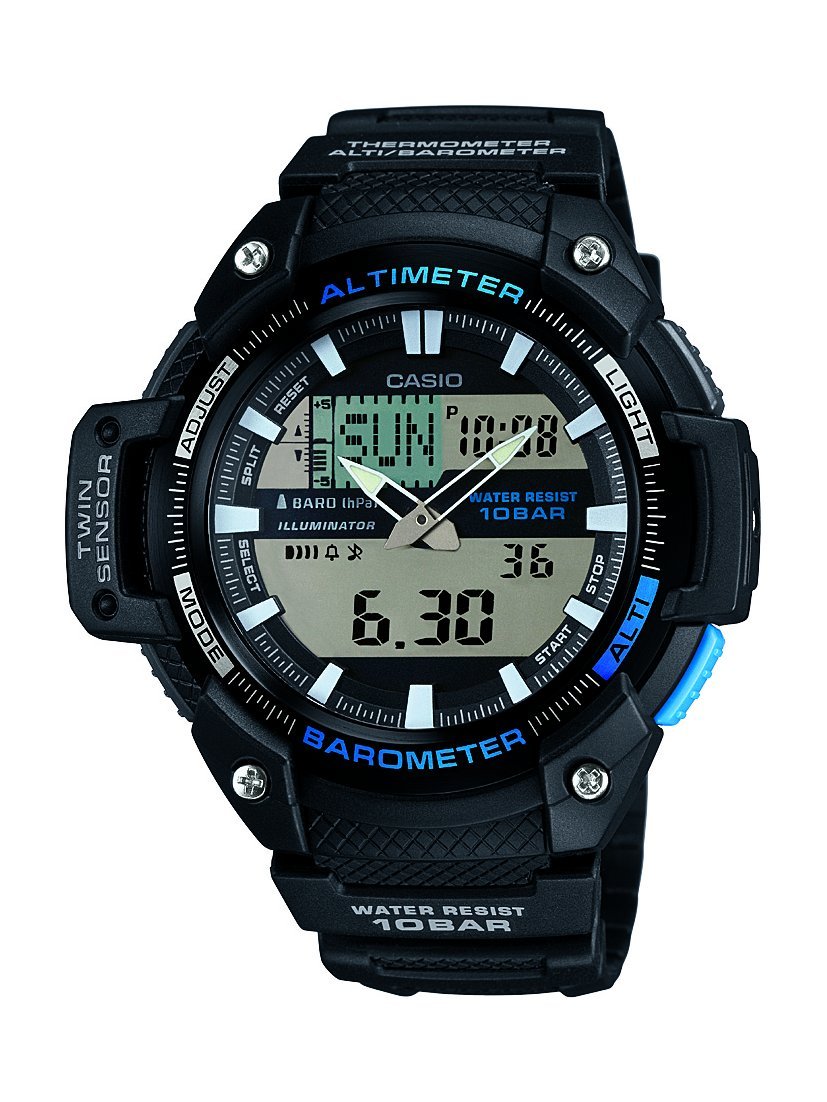
フロント view of the Casio Collection SGW-450H watch, highlighting its dual display and sensor indicators.
設定
1. 初期時間設定
Upon first use or after a battery change, you will need to set both the analog and digital times. Refer to the watch's specific button layout for 'ADJUST' and 'MODE' buttons.
- デジタル時間: In Timekeeping Mode, press and hold the 'ADJUST' button until the city code starts flashing. Use the 'MODE' and 'SEARCH' buttons to navigate and adjust settings like city code, DST (Daylight Saving Time), 12/24-hour format, hour, minute, year, month, and day. Press 'ADJUST' again to exit.
- アナログ時間: If the analog hands do not match the digital time, enter the Hand Setting Mode (usually by holding 'ADJUST' in Timekeeping Mode and then pressing 'MODE' multiple times until 'H.SET' appears). Use the 'SEARCH' button to advance the analog hands. Press 'ADJUST' to synchronize.
2. センサーのキャリブレーション
The altimeter, barometer, and thermometer require calibration for accurate readings. Perform calibration in a stable environment or against known values.
- 高度計: In Altimeter Mode, press and hold 'ADJUST' until the current altitude value flashes. Use 'SEARCH' to adjust the altitude to a known reference point.
- バロメーター: In Barometer Mode, press and hold 'ADJUST' until the current barometric pressure value flashes. Adjust to a known local pressure reading.
- 温度計: The thermometer is integrated. For accurate temperature readings, remove the watch from your wrist for at least 20-30 minutes to avoid body heat interference.
3. Battery Installation/Reset
If the watch hands are stuck or not moving, a battery reset may be required. This involves temporarily removing and reinserting the battery.
- Carefully remove the four screws from the back cover of the watch.
- Gently lift out the battery.
- Replace the battery back into its position.
- Re-attach the back cover and screws, ensuring a secure fit to maintain water resistance.
- Set the analog hands as per the manual's instructions (Step 1. above).
時計の操作
The SGW-450H features multiple modes accessible via the 'MODE' button. Press 'MODE' to cycle through the following functions:
- 計時モード: 現在の時刻、曜日、日付を表示します。
- 高度計モード: Measures and displays current altitude. The watch can store altitude data for tracking.
- バロメーターモード: Displays barometric pressure and a pressure tendency graph, which can indicate upcoming weather changes.
- 温度計モード: 現在の温度を表示します。
- ストップウォッチモード: 経過時間、スプリットタイム、2回の完走を測定します。
- アラームモード: 毎日のアラームを設定します。
- ワールドタイムモード: 世界中のさまざまな都市の現在の時刻を表示します。
光を使う
Press the 'LIGHT' button (usually located on the upper right side) to illuminate the digital display for visibility in low-light conditions.
耐水性
This watch is water-resistant up to 100 meters (10 BAR). It is suitable for swimming and snorkeling but not for scuba diving. Do not operate buttons while the watch is wet or submerged to prevent water ingress.
メンテナンス
クリーニング
Regularly clean your watch with a soft, dry cloth. For resin bands and cases, a mild soap solution and a soft brush can be used, followed by thorough rinsing with fresh water and drying. Avoid harsh chemicals or abrasive cleaners.
バッテリー交換
The watch is powered by a battery. When the display becomes dim or functions become erratic, it may be time for a battery replacement. It is recommended to have the battery replaced by a qualified watch technician to ensure proper sealing and maintain water resistance.
ストレージ
長期間使用しない場合は、直射日光や極端な温度を避け、涼しく乾燥した場所に保管してください。また、強い磁場にさらさないでください。
トラブルシューティング
- Digital Display Difficult to Read: In some lighting conditions, the negative LCD display may be less visible. Adjust the viewing angle or use the built-in light.
- 不正確なセンサー読み取り: Ensure sensors are calibrated regularly, especially the altimeter and barometer, against known reference points. Temperature readings are affected by body heat; remove the watch for 20-30 minutes for accurate ambient temperature.
- Analog Hands Not Moving or Incorrect: Perform the battery reset procedure as described in the Setup section (remove and reinsert battery), then manually set the analog hands.
- 時計が機能しない: Check if the battery needs replacement. If issues persist after battery replacement and reset, contact Casio customer support.
仕様
| 特徴 | 仕様 |
|---|---|
| ブランド | カシオ |
| モデル番号 | SGW-450H-1AER |
| 商品型番 | SGW-450H-1AER |
| 表示タイプ | アナログ - デジタル |
| 時計のムーブメントタイプ | 石英 |
| 電源 | 電池駆動 |
| 耐水深度 | 100メートル(10BAR) |
| スポーツタイプ | ランニング |
| 留め具タイプ | バックル |
| スタイル | スポーティー |
| アイテムの形状 | ラウンド |
| バンドカラー | 黒 |
| 文字盤カラー | 液晶 |
| 年齢範囲の説明 | アダルト |
| モデル名 | スポーツ |
| 国際商品コード(EAN/UPC) | 04971850036418 |
| バンド素材タイプ | 樹脂 |
| ケース素材の種類 | プラスチック |
| 文字盤窓素材タイプ | ミネラル |
| ケース直径 | 52ミリメートル |
| バンド幅 | 18ミリメートル |
| ケースの厚さ | 15ミリメートル |
| 製品寸法(長さ x 幅 x 高さ) | 5.18 x 1.5 x 5.08 cm; 45 グラム |
保証とサポート
カシオの時計には、材質および製造上の欠陥に対するメーカー保証が付いています。保証期間や保証内容など、具体的な条件については、ご購入時に付属の保証書をご覧ください。
For technical assistance, repairs, or further inquiries, please contact Casio customer support. You can find contact information on the official Casio webサイトまたはお近くのカシオ正規販売店にお問い合わせください。

The Casio product box, typically containing the watch, warranty information, and a more detailed manual.


