1.製品オーバーview
The Virutex PF700 Router Template is a precision tool designed for woodworking enthusiasts and professionals. It facilitates accurate routing operations, ensuring consistent results for various applications.
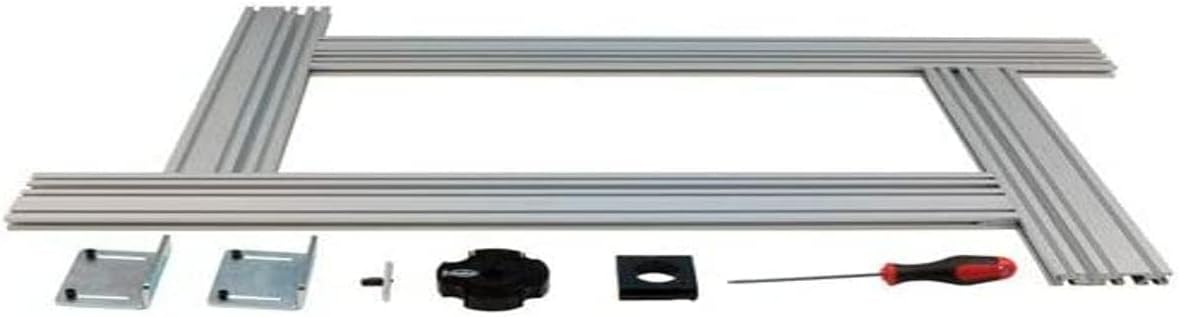
This image displays all the components of the Virutex PF700 Router Template. It includes several long, silver aluminum profiles that form the main frame, two metal mounting brackets, a black adjustment knob, a black square insert, and a small screwdriver with a red and black handle. These parts are laid out on a white background, indicating the complete set for assembly.
主な特徴:
- 耐久性に優れた高品質な構造。
- Easy to use design for efficient operation.
- Durable material ensures long-lasting performance.
- Suitable for both amateur and professional use.
2. 安全情報
Always observe basic safety precautions when using power tools and accessories. Failure to do so may result in serious injury or damage to the product.
- 使用する前に、すべての指示を読んで理解してください。
- 目の保護具や聴覚保護具などの適切な個人用保護具 (PPE) を着用してください。
- ワークピースがしっかりと固定されていることを確認しますclampルーティング前にed。
- Keep hands and fingers away from the router bit during operation.
- 調整やビットの変更を行う前に、ルータの電源を切断してください。
- Store the template in a safe, dry place when not in use.
3. パッケージ内容
Verify that all items are present and undamaged upon opening the package. If any parts are missing or damaged, contact customer support.
- Virutex PF700 Router Template Frame Components (Aluminum Profiles)
- 取り付けブラケット(2個)
- 調整ノブ
- Square Insert
- Assembly Screwdriver
- ユーザーマニュアル(このドキュメント)
4. セットアップ
Follow these steps to assemble and set up your Virutex PF700 Router Template:
- コンポーネントを解凍します: すべてのコンポーネントをパッケージから慎重に取り出し、清潔で平らな面に広げます。
- フレームを組み立てる: アルミプロを接続するfiles to form the desired template shape. Ensure all connections are secure and aligned.
- 取り付けブラケットを取り付ける: Securely fasten the mounting brackets to the template frame using the provided hardware. These brackets will be used to attach the template to your workpiece or workbench.
- Insert Adjustment Knob and Square Insert: Place the square insert into its designated slot on the template. Then, thread the adjustment knob into place, ensuring it can freely move and lock the insert as needed.
- アセンブリの検査: Before use, double-check all connections and ensure the template is stable and rigid.
5. 操作手順
The PF700 Router Template is designed to guide your router for precise cuts. Here are general operating guidelines:
- 安全なワークピース: しっかりとamp your workpiece to a stable surface.
- Attach Template: Securely attach the PF700 template to your workpiece using the mounting brackets. Ensure it is positioned correctly for your desired cut.
- ルーターのセットアップ: Install the appropriate router bit and guide bushing (if required by your router) into your router. Ensure the guide bushing fits snugly within the template's guide channels.
- 深さを調整: Set the routing depth on your router according to your project requirements.
- カットを実行: With the router powered on and the bit spinning, carefully guide the router along the template's edges. Maintain steady pressure and a consistent feed rate.
- 掃除: After routing, turn off the router and allow the bit to stop completely before removing it. Clean any dust and debris from the workpiece and template.
6. メンテナンス
Proper maintenance will extend the life of your Virutex PF700 Router Template:
- クリーニング: After each use, wipe down the template with a dry cloth to remove sawdust and debris. For stubborn residue, use a mild cleaner and dry thoroughly.
- 検査: Periodically inspect the aluminum profiles, brackets, and adjustment mechanisms for any signs of wear, damage, or bending. Ensure all fasteners are tight.
- ストレージ: Store the template in a clean, dry environment, away from direct sunlight and extreme temperatures. Protect it from impacts that could deform the frame.
- 潤滑: Lightly lubricate moving parts, such as the adjustment knob mechanism, with a dry lubricant if they become stiff.
7。 トラブルシューティング
If you encounter issues with your PF700 Router Template, refer to the following common problems and solutions:
| 問題 | 考えられる原因 | 解決 |
|---|---|---|
| Inaccurate Cuts | Template not securely fastened; Router guide bushing loose or incorrect size; Template deformed. | Ensure template is clamped tightly; Check guide bushing for proper fit; Inspect template for damage and replace if necessary. |
| Template Movement During Routing | 不十分なclamping force; Workpiece not stable. | clを増やすamping pressure on the template and workpiece; Use additional clamp■必要に応じて。 |
| Difficulty Adjusting Knob | Dust or debris in mechanism; Lack of lubrication. | Clean the adjustment mechanism; Apply a small amount of dry lubricant. |
8. 仕様
| 仕様 | 詳細 |
|---|---|
| ブランド | ヴィルテックス |
| モデル番号 | PF700 |
| 色 | 黒 |
| 製品寸法(長さ x 幅 x 高さ) | 1 x 1 x 1 cm |
| アイテム重量 | 3キログラム |
| ASIN | B01085VSKW |
| メーカー | ヴィルテックス |
9. 保証情報
Specific warranty details for the Virutex PF700 Router Template are not provided in this manual. Please refer to the product packaging, the manufacturer's official website, or contact your point of purchase for comprehensive warranty terms and conditions.
10. カスタマーサポート
For technical assistance, spare parts, or any inquiries regarding your Virutex PF700 Router Template, please contact Virutex customer support directly. Contact information can typically be found on the product packaging or the official Virutex webサイト。
Virutex Official Webサイト: www.virtex.com (Please note: This link is provided as a general reference and may not be specific to your region.)


