導入
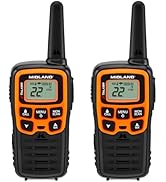
This manual provides comprehensive instructions for the setup, operation, maintenance, and troubleshooting of your Midland T10 X-TALKER Two-Way Radios. These radios offer reliable communication with 22 FRS channels and 38 privacy codes, along with NOAA Weather Alert capabilities, making them suitable for various outdoor activities and general use.
箱の中身
Your Midland T10 X-TALKER package includes the following items:
- Two (2) Midland T10 X-TALKER Two-Way Radios
- Two (2) Belt Clips
- 取扱説明書1部

画像の説明: トップダウン view of the package contents, showing two black Midland X-TALKER radios, two black belt clips, and an owner's manual, all neatly arranged.
上の機能view
The Midland T10 X-TALKER radios are designed for clear and efficient communication with several key features:
- 22 FRS チャネル: 幅広い通信オプションを提供します。
- 38 CTCSS Privacy Codes: Enhances communication privacy by filtering out unwanted transmissions.
- NOAA天気スキャン+アラート: Automatically scans 10 weather band channels and alerts you to severe weather.
- eVOX (Easy Voice and Sound Activated Transmission): ハンズフリー操作が可能になります。
- 長距離通信: Optimized for extended range in open areas.
- コンパクトで軽量なデザイン: 持ち運びや取り扱いも簡単です。
- バックライト付きLCDディスプレイ: 暗い場所でも視認性を確保します。

画像の説明: クローズアップ view of the Midland T10 X-TALKER radio, with key features labeled: Push to Talk Button, Channel Display, VOX - Hands-Free Communication, Battery Meter, Menu, Scan, Silent Operation, and WX (Weather) button.
設定
バッテリーの取り付け
The Midland T10 radios are designed to operate with a rechargeable Li-ion battery (Model: BL-10C, 3.7V/1200mAh). To install the battery:
- Remove the belt clip by pinching the release tab and sliding the clip upwards.
- ラジオの背面にある電池ケースのカバーを開きます。
- Insert the BL-10C Li-ion battery into the compartment, ensuring correct polarity.
- 電池カバーを元に戻し、ベルトクリップを取り付けます。
バッテリーの充電
To charge your Midland T10 radio:
- Locate the USB-C charging port on the side of the radio, protected by a rubber flap.
- 付属の USB-C 充電ケーブルをラジオの充電ポートに接続します。
- USB ケーブルのもう一方の端を互換性のある USB 電源 (壁のアダプタ、コンピュータの USB ポートなど) に接続します。
- LCD ディスプレイのバッテリー インジケーターに充電状態が表示されます。
ビデオの説明: A user demonstrates how to remove the belt clip, open the battery compartment, insert the rechargeable Li-ion battery, and then connect the USB-C charging cable to the radio. The video also shows the battery specifications on the battery itself.
基本操作
電源オン/オフ
ラジオの電源をオンまたはオフにするには、 メニュー/電源 ディスプレイの下にあるボタン。
ボリュームコントロール
を使用して音量を調整します UP そして 下 arrow buttons. The current volume level will be displayed on the screen.
チャンネル選択
チャネルを選択するには:
- を押す メニュー ボタンを一度押します。チャンネル番号が点滅します。
- 使用 UP or 下 矢印ボタンを使用して、希望のチャンネル (1 ~ 22) を選択します。
- を押す メニュー button again to confirm your selection, or wait a few seconds for the radio to automatically confirm.
プッシュツートーク(PTT)
送信するには、 PTTT button located on the left side of the radio. Speak clearly into the microphone. Release the PTTT button to receive transmissions.
高度な機能
プライバシーコード(CTCSS)
The T10 radios feature 38 CTCSS (Continuous Tone Coded Squelch System) Privacy Codes to minimize interference from other users on the same channel. To set a privacy code:
- を押す メニュー ボタンを2回押します。プライバシーコード番号が点滅します。
- 使用 UP or 下 矢印ボタンを使用して、希望するプライバシー コード (1 ~ 38) を選択します。
- を押す メニュー button again to confirm, or wait for automatic confirmation.
注意: 通信するには、両方の無線が同じチャネルとプライバシー コードを使用している必要があります。
NOAA 天気スキャン + アラート
Stay informed about weather conditions with the NOAA Weather Scan and Alert feature:
- 天気スキャン: を押し続けます WX button to activate NOAA Weather Scan. The radio will automatically scan through 10 available weather (WX) band channels and lock onto the strongest weather channel.
- 天気警報: When activated, the NOAA Weather Alert will sound an alarm indicating a risk of severe weather in your area. NOAA Weather Radio also broadcasts AMBER alerts.
eVOX(ハンズフリー操作)
The eVOX feature allows you to transmit without pressing the PTT button. The radio detects your voice and automatically transmits. Refer to the owner's manual for detailed eVOX sensitivity settings.
範囲とパフォーマンス
The Midland T10 X-TALKER radios offer varying ranges depending on terrain and obstructions:
- No Obstruction: Up to 20 miles in open areas with clear line of sight.
- Partial Obstruction: 2-5 miles in areas with some trees or light buildings.
- 妨害: Less than 1 mile in urban areas with heavy buildings or dense foliage.
画像の説明: A diagram showing three scenarios for radio range: 'No Obstruction' (up to 20 miles), 'Partial Obstruction' (2-5 miles with trees), and 'Obstructed' (less than 1 mile with city buildings). Actual distance may vary.
ビデオの説明: 公式製品ビデオショーasing the Midland X-TALKER T10 walkie-talkie, highlighting its features and ease of use for various communication needs.
メンテナンス
To ensure optimal performance and longevity of your Midland T10 radios:
- クリーニング: 柔らかくてamp ラジオの外装を拭く際は布を使用してください。刺激の強い化学薬品や研磨剤入りの洗剤は使用しないでください。
- バッテリーのケア: Fully charge batteries before extended storage. If storing for long periods, remove batteries.
- ストレージ: ラジオは、極端な温度や直射日光を避け、涼しく乾燥した場所に保管してください。
- 耐水性: The radios are water resistant. Avoid submerging them in water. Ensure the USB-C port cover is securely closed when not charging.
トラブルシューティング
If you experience issues with your Midland T10 radios, try the following:
- 電源なし: Check battery charge level. Ensure batteries are correctly installed.
- 送受信できません: Verify both radios are on the same channel and privacy code. Ensure the PTT button is fully pressed when transmitting. Check for obstructions if range is limited.
- Static/Poor Audio: Move to an area with fewer obstructions. Adjust volume. Try a different channel.
- キーパッドがロックされています: If the keypad is locked, press and hold the lock button (usually the MENU button) until the lock icon disappears from the display.
仕様
| アイテム重量 | 2.7オンス |
| 製品寸法 | 2 x 1.2 x 5.5インチ |
| 商品型番 | T10 |
| 電池のタイプ | Rechargeable Li-ion (BL-10C, 3.7V/1200mAh) |
| チャンネル数 | 22 |
| 周波数範囲 | 400-512 MHz |
| 通話範囲最大 | 20 Miles (in optimal conditions) |
| 耐水性レベル | 耐水性 |
| メーカー | ミッドランド |
保証とサポート
The Midland T10 X-TALKER Two-Way Radios come with a Three Year Warranty. For warranty claims, technical support, or additional information, please refer to the contact details provided in your owner's manual or visit the official Midland webサイト。


