導入
This manual provides comprehensive instructions for the setup, operation, and maintenance of your InFocus IN126x WXGA Network Projector. Designed for both business presentations and home cinema, this projector delivers 4200 lumens and excellent image quality with high contrast and BrilliantColor technology. Its compact and lightweight design ensures portability while maintaining powerful performance.

Figure 1: InFocus IN126x Projector Front View
This image displays the InFocus IN126x projector from a front-right angle, highlighting its main lens and the sleek black casing. The top panel features control buttons and the InFocus logo.
重要な安全情報
Please read all safety instructions carefully before operating the projector. Failure to follow these instructions may result in fire, electric shock, or other injuries.
- 電源: Use only the power adapter supplied with the projector. Ensure the power outlet matches the voltag要件。
- 換気: 通気口を塞がないでください。過熱を防ぐには、十分な空気の流れが不可欠です。
- 熱: プロジェクターlamp and surrounding areas can become very hot during operation. Avoid touching these areas.
- Lamp 警告: Lamp contains mercury. Dispose of lamps according to local regulations. Do not open the lamp compartment until the projector has cooled down.
- 液体への暴露: プロジェクターを雨、湿気、その他の液体にさらさないでください。
- サービス: この製品を自分で修理しようとしないでください。 すべてのサービスを資格のあるサービス担当者に依頼してください。

Figure 2: Projector Bottom Panel with Warning Labels
This image shows the underside of the InFocus IN126x projector, displaying various regulatory and safety labels. Notable warnings include information about mercury in the lamp and instructions for lamp replacement, emphasizing the need to allow the unit to cool down before servicing.
セットアップガイド
1. 開梱と設置
Carefully remove the projector and all accessories from the packaging. Place the projector on a stable, flat surface or mount it securely. Ensure there is adequate space around the projector for proper ventilation.

図3: プロジェクターの寸法
This image illustrates the physical dimensions of the InFocus IN126x projector. The measurements are approximately 29.2 cm (length), 22.1 cm (width), and 9.8 cm (height), providing a clear understanding of its compact size for placement considerations.
2. 電源の接続
Connect the power cord to the projector's power inlet and then plug the other end into a grounded electrical outlet.
3. 入力ソースの接続
The InFocus IN126x projector supports various input sources. Connect your device (e.g., laptop, Blu-ray player) to the appropriate port on the projector's rear panel.
- HDMI: 高解像度のデジタルビデオとオーディオ用。
- VGA(コンピューター1/2): アナログコンピュータのビデオ入力用。
- S-Video/Video: 標準解像度のビデオ用。
- Audio In (Audio 1/2): アナログオーディオ入力用。
- USB-A/USB-B: For service or specific data transfer.
- LAN: ネットワーク接続用。
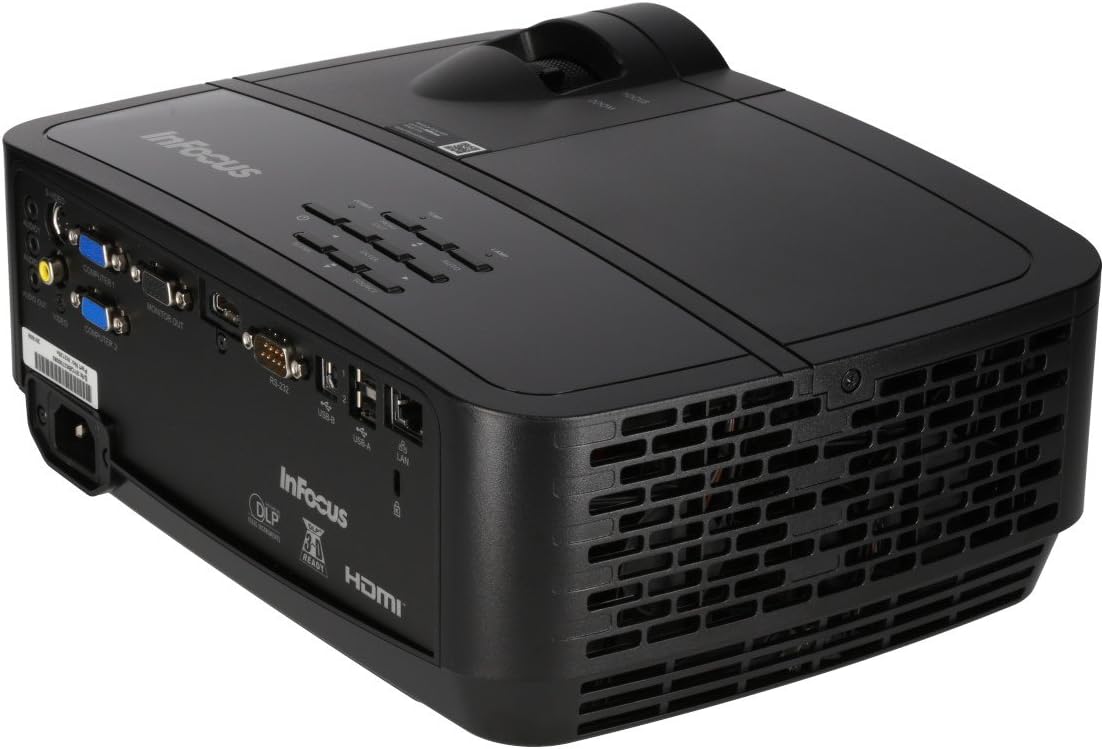
Figure 4: Projector Rear Panel Connectivity
この画像は詳細な view of the rear panel of the InFocus IN126x projector, clearly showing all available input and output ports. These include HDMI, VGA (Computer 1 and 2), S-Video, Video, Audio In (Audio 1 and 2), Monitor Out, RS-232, USB-B, USB-A, and LAN ports, facilitating diverse connectivity options.
4. 初回電源投入と調整
Press the power button on the projector or remote control. The projector will power on and display the input source. Use the focus and zoom rings on the lens to adjust the image clarity and size to your desired projection area.

Figure 5: Projector Top Panel Controls
This image shows the top surface of the InFocus IN126x projector, highlighting the control panel with various buttons for navigation and settings adjustment. The focus and zoom rings on the lens are also visible, used for fine-tuning the projected image.
操作手順
基本操作
プロジェクターは、本体上部のコントロール パネルまたは付属のリモコンを使用して操作できます。
- 電源ボタン: プロジェクターの電源をオンまたはオフにします。
- ソースボタン: Cycles through available input sources (HDMI, VGA, etc.).
- メニューボタン: Opens the On-Screen Display (OSD) menu.
- ナビゲーションボタン: メニュー オプションを移動したり設定を調整したりするために使用します。
- 入力ボタン: メニューの選択を確定します。
メニューのナビゲーションと設定
Press the Menu button to access the OSD. Use the navigation buttons to select categories such as Picture, Display, Setup, and Advanced. Within each category, you can adjust settings like:
- 輝度コントラスト: Optimize image visibility.
- Color & Tint: Fine-tune color accuracy.
- アスペクト比: Select between 4:3, 16:9, or other ratios to match your content.
- キーストーン補正: Adjust image shape if the projector is not perfectly perpendicular to the screen.
- BrilliantColor Technology: Enhance color vibrancy and detail.
高度な機能
The IN126x supports a superior viewing experience, including 3D home cinema (3D Glasses sold separately). For enhanced connectivity, the projector can easily connect to your phone or iPad with a LightCast Key (sold separately).
メンテナンス
Lamp 交換
プロジェクターlamp has a lifespan of over 5,000 hours. When the lamp reaches the end of its life, a warning message may appear, or the lamp indicator light may illuminate. Always allow the projector to cool down completely (at least 60 minutes) before attempting to replace the lamp. Refer to the safety information on the bottom of the projector for specific warnings regarding mercury content and replacement procedures.
クリーニング
- レンズ: 光学レンズ専用の柔らかく糸くずの出ない布を使用してください。研磨剤入りのクリーナーは使用しないでください。
- プロジェクターCasing: 柔らかい布で拭いてください。amp 布。刺激の強い化学物質は避けてください。
- 通気口: Regularly check and clean the air vents to ensure proper airflow and prevent overheating. Use a soft brush or compressed air to remove dust.

Figure 6: Projector Side Ventilation
This image displays the side of the InFocus IN126x projector, prominently featuring the ventilation grilles. These grilles are crucial for dissipating heat generated during operation, and keeping them clear of obstructions is vital for the projector's longevity and performance.
トラブルシューティング
| 問題 | 考えられる原因 | 解決 |
|---|---|---|
| 画面に画像がありません |
|
|
| Image is dim or poor quality |
|
|
| 音が出ない |
|
|
仕様
| 特徴 | 詳細 |
|---|---|
| ブランド | フォーカス |
| モデル番号 | F321717 (IN126x) |
| 製品寸法 | 18.58 x 20.67 x 7.44インチ |
| アイテム重量 | 5.5ポンド |
| ディスプレイ解像度 | 1280 x 800 (WXGA) |
| 接続技術 | HDMI, VGA, S-Video, USB, LAN |
| Lamp 人生 | 5,000時間以上 |
| 特集 | ポータブル |
| 初回利用可能日 | 7年2016月XNUMX日 |
保証情報
The InFocus IN126x Projector comes with a 2年間保証. InFocus stands behind its products and provides customer service for any issues you may encounter. Please retain your proof of purchase for warranty claims.
カスタマーサポート
For technical assistance, troubleshooting beyond this manual, or warranty inquiries, please contact InFocus customer support. Visit the official InFocus web電話番号やオンライン サポート リソースなどの最新の連絡先情報については、こちらのサイトをご覧ください。
You can also refer to the official InFocus website for additional resources and FAQs: www.infocus.com