導入
This manual provides detailed instructions for the installation, programming, and operation of the Grasslin by Intermatic FM1D14-AV-U Digital Timer. This one-circuit panel mount timer is designed for 24-hour or 7-day applications, offering precise control over electrical loads. Please read this manual thoroughly before installation and use to ensure proper function and safety.
安全情報
WARNING: Risk of electric shock. Disconnect power at the circuit breaker or fuse box before installing or servicing. All wiring should be performed by a qualified electrician and comply with local and national electrical codes.
- Do not exceed the electrical ratings of the device.
- すべての接続が安全かつ適切に絶縁されていることを確認してください。
- This device is intended for indoor use in a dry location unless otherwise specified by its enclosure rating.
- Keep children away from electrical devices.
製品終了view
The FM1D14-AV-U is a versatile digital timer featuring a single circuit for controlling various electrical applications. Key features include:
- 14 Set Point Programs: Allows for flexible scheduling over 24 hours or 7 days.
- 手動オーバーライド: Provides temporary control without altering programmed settings.
- 充電式バッテリーバックアップ: Maintains time and program settings during power outag最大2500時間持続します。
- 5 Preset Adjustable Block Programs: Simplifies common scheduling needs.
- 巻tage互換性: 120~277VAC、50/60Hzで動作します。
- 取り付け: Designed for panel mounting.

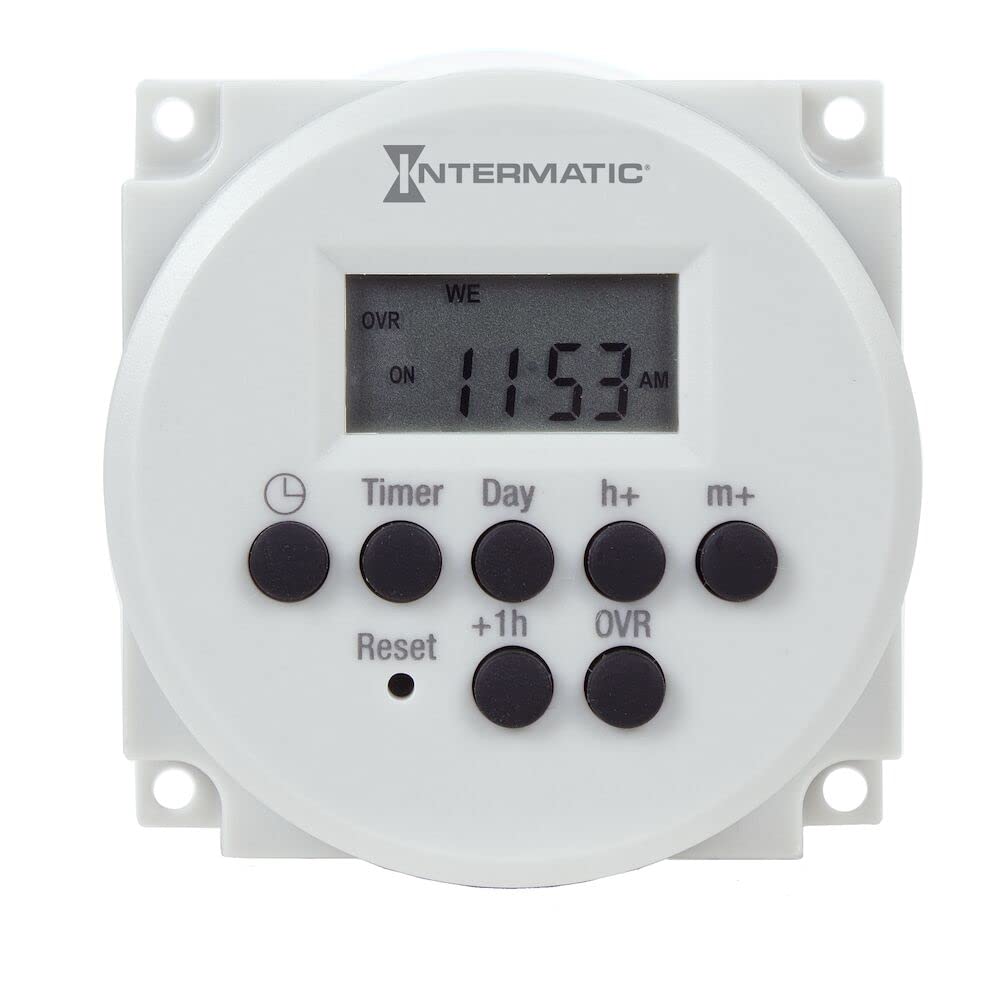
画像: 正面 view of the FM1D14-AV-U Digital Timer, showing the display and control buttons. This timer is designed for panel mounting and offers digital programming capabilities.
セットアップとインストール
The FM1D14-AV-U timer is designed for panel mounting. Follow these general steps for installation. Refer to the wiring diagram provided with the product for specific connection details.
- 電源切断: Before beginning any installation, ensure that power to the circuit is completely disconnected at the main service panel (breaker or fuse box). Verify with a voltageテスター。
- 取り付け: Mount the timer securely into a suitable panel cutout. Ensure adequate clearance for wiring and ventilation. The timer's dimensions are approximately 1.26"D x 2.36"W x 2.36"H.
- 配線: Connect the timer according to the wiring diagram. This device supports 120-277VAC, 50/60Hz. Ensure proper connection of line, load, and neutral wires. The timer features a SPDT (Single Pole Double Throw) switch style.
- バッテリーのアクティベーション: The internal rechargeable battery provides backup for settings. It will charge automatically once power is applied to the timer.
- 電力の回復: すべての接続が安全で検証されたら、回路への電力を復元します。
For detailed wiring diagrams, consult the documentation included in the product packaging or visit the official Intermatic support webサイト。
操作手順
The FM1D14-AV-U timer offers intuitive programming for various scheduling needs.
現在の時刻と日付の設定
最初の電源投入時または長時間の電源切断後tage (beyond battery backup), you may need to set the current time and date. Refer to the on-screen prompts or the specific button sequence outlined in the full product manual.
Programming ON/OFF Events (14 Set Points)
The timer allows for up to 14 individual ON/OFF programs. Each program can be set for specific times and days of the week.
- Access the programming mode using the designated button (e.g., "PROG" or "MENU").
- Select a program number (P1-P14).
- Set the desired ON time for the program.
- Select the days of the week for this ON event (e.g., Mon-Fri, Daily, or specific days).
- Set the desired OFF time for the same program.
- Select the days of the week for this OFF event.
- 必要に応じて追加のプログラムを繰り返します。
- 設定を保存するには、プログラミング モードを終了します。
Using Preset Adjustable Block Programs
The timer includes 5 preset block programs for common scheduling patterns. These can be adjusted to fit specific requirements.
- Consult the full manual for details on selecting and customizing these block programs.
手動オーバーライド
To temporarily change the timer's output state without affecting the programmed schedule, use the manual override function. This is typically done via a dedicated button (e.g., "MANUAL" or "OVERRIDE"). The display will usually indicate the current status (ON/OFF) and if it's in manual override mode.
メンテナンス
The Grasslin by Intermatic FM1D14-AV-U Digital Timer requires minimal maintenance.
- クリーニング: タイマーの外側は、定期的に柔らかく乾いた布で拭いてください。研磨剤入りの洗剤や溶剤は使用しないでください。
- バッテリー: The internal rechargeable battery is designed for long life and typically does not require replacement. If the timer consistently loses time or program settings during power outages, the battery may be nearing the end of its life. Contact customer support for service options.
- 検査: Annually inspect the timer and its wiring for any signs of damage, loose connections, or overheating.
トラブルシューティング
| 問題 | 考えられる原因 | 解決 |
|---|---|---|
| タイマー表示が空白です。 | No power to the timer; internal battery discharged. | Check circuit breaker. Ensure proper wiring. Allow time for battery to charge once power is restored. |
| タイマーはプログラムされた時間にオン/オフを切り替えません。 | Incorrect programming; manual override active; incorrect time/date setting. | Review program settings. Check if manual override is engaged. Verify current time and date. |
| ディスプレイが暗かったり、読みにくかったりします。 | Environmental factors (e.g., high temperature); aging LCD. | Ensure timer is not exposed to excessive heat. If problem persists, contact customer support. |
| 電源を切るとタイマーの設定が失われるtage. | Internal rechargeable battery is no longer holding a charge. | The battery may need replacement. Contact customer support. |
仕様
| 特徴 | 詳細 |
|---|---|
| モデル番号 | FM1D14-AV-U |
| ブランド | インターマティック |
| 巻tage | 120-277VAC、50/60Hz |
| 設定数 | 14 (set point programs) |
| 取り付けタイプ | パネルマウント |
| スイッチスタイル | SPDT(単極双投) |
| 製品寸法(奥行き×幅×高さ) | 奥行き1.26インチ x 幅2.36インチ x 高さ2.36インチ |
| アイテム重量 | 0.3ポンド(約4.8オンス) |
| バッテリーバックアップ | Rechargeable, 2500 hour carryover |
| 含まれるコンポーネント | Intermatic Fm1D14-Av-U Timer Switch, 120-277V 24 Hour/7 Day Electronic Module |
| 原産国 | 中国 |
保証とサポート
For warranty information, technical support, or service inquiries, please contact Intermatic customer service. Keep your purchase receipt as proof of purchase.
Intermatic Contact Information:
- Refer to the official Intermatic web最新の連絡先情報については、サイトまたは製品パッケージをご覧ください。
- Online resources, FAQs, and additional documentation may be available on the manufacturer's webサイト。