1. はじめに
This user manual provides comprehensive instructions for the setup, operation, maintenance, and troubleshooting of your TSC TDP-225 Label Printer. Please read this manual thoroughly before using the printer to ensure proper functionality and to prevent damage.
2. 安全情報
火災、感電、人への傷害のリスクを軽減するために、この製品を使用するときは常に基本的な安全上の注意事項に従ってください。
- プリンターを不安定な場所に置かないでください。
- プリンターを水や湿気にさらさないでください。
- Use only the power adapter and cables supplied or recommended by the manufacturer.
- 清掃やメンテナンスを行う前に、プリンターの電源プラグをコンセントから抜いてください。
- プリンターを熱源や直射日光から遠ざけてください。
3. パッケージ内容
下記のすべての品目がパッケージに含まれていることをご確認ください。不足または破損している品目がある場合は、販売店までご連絡ください。
- TSC TDP-225 Label Printer
- 電源アダプター
- 電源ケーブル
- USBケーブル
- クイックスタートガイド(このマニュアルには含まれていません)

Image: The TSC TDP-225 Label Printer shown with its power adapter, power cable, USB cable, and a roll of labels.
4.製品オーバーview
4.1フロント View

画像: 正面 view of the TSC TDP-225 printer, highlighting the control panel and label output slot.
4.2 リア View およびポート
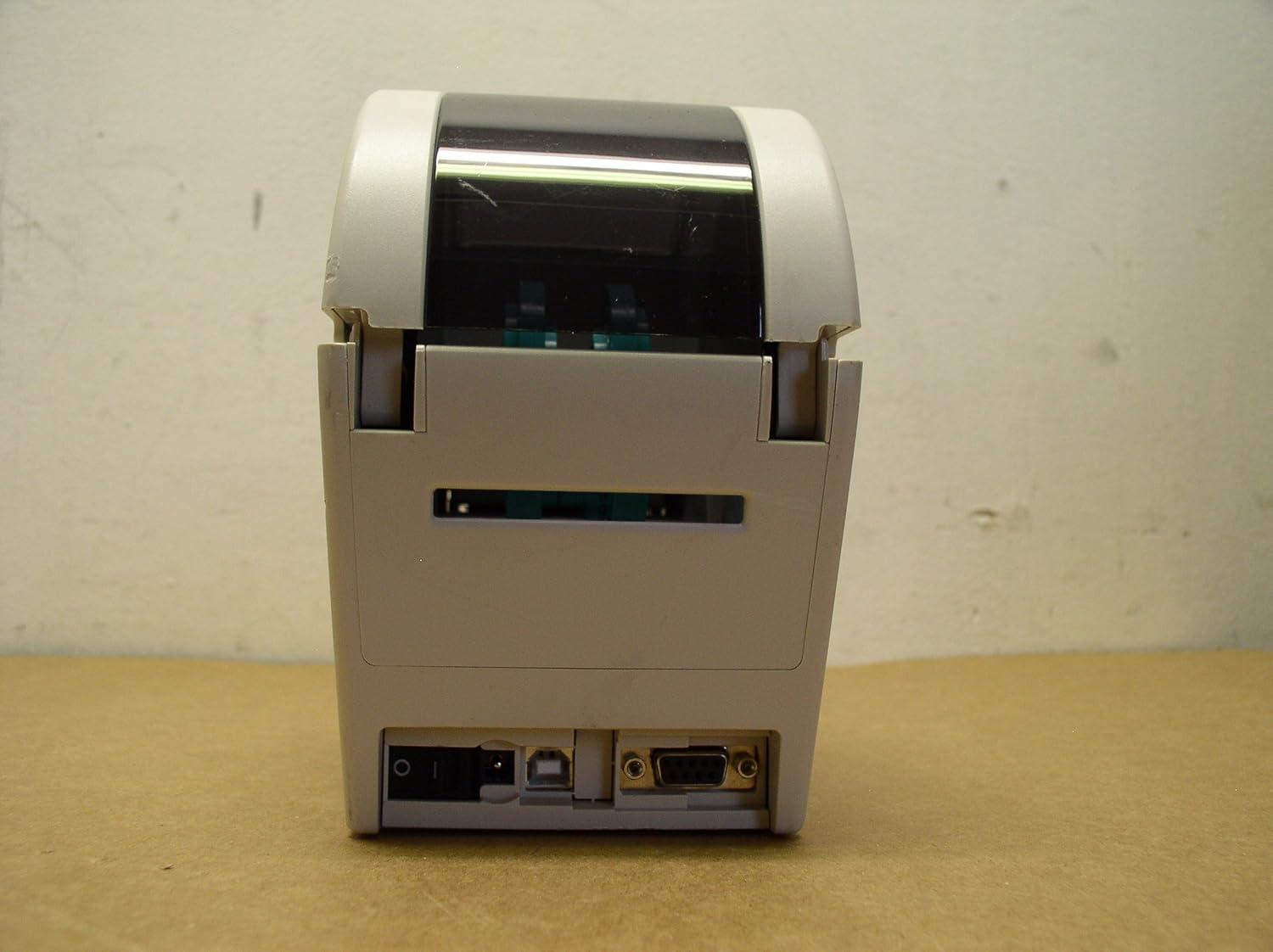
画像: 背面 view of the TSC TDP-225 printer, showing the power input, USB port, and serial port.
4.3 下部 View

画像: 下 view of the TSC TDP-225 printer, displaying the model number, serial number, and regulatory compliance information.
5. セットアップ
5.1 電源の接続
- 電源ケーブルを電源アダプタに接続します。
- Plug the power adapter into the power input port on the rear of the printer.
- 電源ケーブルを接地されたコンセントに差し込みます。
5.2コンピューターへの接続
The TSC TDP-225 printer supports USB connectivity.
- Connect one end of the USB cable to the USB port on the rear of the printer.
- USB ケーブルのもう一方の端をコンピューターの使用可能な USB ポートに接続します。
5.3 ラベルの読み込み
Proper label loading is crucial for optimal print quality and printer longevity.

画像: 内部 view of the TSC TDP-225 printer with the top cover open, illustrating the label roll compartment and feed mechanism.
- プリンタの上部カバーを開きます。
- Place the label roll onto the media supply spindle, ensuring the labels feed from the bottom.
- Feed the leading edge of the labels through the media guides until it extends past the print head.
- Adjust the media guides to fit the width of your labels snugly, but without restricting movement.
- 上カバーをしっかりと閉めてください。
5.4 ドライバのインストール
Before printing, you must install the appropriate printer drivers on your computer. Drivers are typically provided on a CD with the printer or can be downloaded from the official TSC webサイトを参照してください。インストールプロセス中は画面の指示に従ってください。
6. プリンターの操作
6.1 基本的な印刷
- プリンタの電源がオンになっており、コンピューターに接続されていることを確認します。
- Open the document or application from which you wish to print labels.
- アプリケーションのメニューから「印刷」を選択します。
- Choose the "TSC TDP-225" as your printer.
- Adjust print settings (e.g., label size, orientation, darkness) as needed in the printer preferences.
- 「印刷」をクリックしてジョブをプリンターに送信します。
6.2 テスト印刷
A test print can help verify printer functionality and driver installation.

画像: A sample label printed by the TSC TDP-225, displaying printer information such as serial port, speed, and memory details.
Refer to your printer driver's documentation for instructions on how to perform a test print from your operating system.
7. メンテナンス
7.1 プリントヘッドのクリーニング
プリントヘッドを定期的にクリーニングすると、最適な印刷品質が確保され、プリンターの寿命が延びます。
- プリンタの電源をオフにして、電源コンセントからプラグを抜きます。
- 上部カバーを開きます。
- Gently wipe the print head surface with a lint-free cloth moistened with isopropyl alcohol.
- カバーを閉じて電源を再接続する前に、プリント ヘッドが完全に乾くまでお待ちください。
7.2一般的なクリーニング
プリンタの外側を柔らかくて乾いた布で拭いてください。amp 布で拭いてください。研磨剤や溶剤は使用しないでください。
8。 トラブルシューティング
| 問題 | 考えられる原因 | 解決 |
|---|---|---|
| プリンターの電源が入らない | 電源ケーブルが接続されていない; 電源コンセントの問題 | 電源ケーブルがしっかりと接続されていることを確認し、別の電源コンセントを試してください。 |
| 印刷出力なし | Printer not connected to computer; Incorrect driver installed; Labels not loaded correctly | Check USB connection; Reinstall printer drivers; Verify label loading as per Section 5.3. |
| 印刷品質が悪い | Dirty print head; Incorrect darkness setting; Low quality labels | Clean the print head (Section 7.1); Adjust darkness setting in printer preferences; Use recommended labels. |
| ラベル詰まり | Labels not aligned; Damaged labels; Media guides too tight | Re-align labels; Use undamaged labels; Adjust media guides. |
9. 仕様
| 特徴 | 詳細 |
|---|---|
| ブランド | TSSC について |
| モデル名 | TDP225 |
| 商品型番 | 99-039A001-00LF |
| 印刷技術 | サーマル |
| 接続技術 | USB |
| プリンタ出力 | モノクロ |
| 最大印刷速度 モノクロ | 1ppm |
| 解決 | 300 x 300 dpi (Max copy resolution black-white: 203 dpi) |
| 最大メディアサイズ | 5インチ |
| シートサイズ | 2インチ |
| メモリストレージ容量 | 8MB |
| アイテム重量 | 4.6 ポンド (2.09 キログラム) |
| 製品寸法 | 6.93 x 7.56 x 30.24インチ |
| 含まれるコンポーネント | 電源ケーブル |
10. 保証とサポート
10.1 保証情報
The TSC TDP-225 Label Printer comes with a limited warranty. Please refer to the warranty card included with your product or visit the official TSC web詳細な保証条件については、サイトをご覧ください。
10.2 テクニカルサポート
For technical assistance, driver downloads, or further product information, please visit the official TSC support webメーカーのウェブサイトをご覧いただくか、カスタマーサービス部門にお問い合わせください。連絡先は通常、メーカーのウェブサイトに記載されています。 webサイトまたは製品のパッケージ内。


