1. はじめに
This manual provides essential instructions for the safe and efficient use of your Kyocera EBVK-2650 Engine Blower Vacuum. Please read this manual thoroughly before operating the machine and keep it for future reference. The EBVK-2650 is designed for blowing and vacuuming leaves and light debris in outdoor environments.
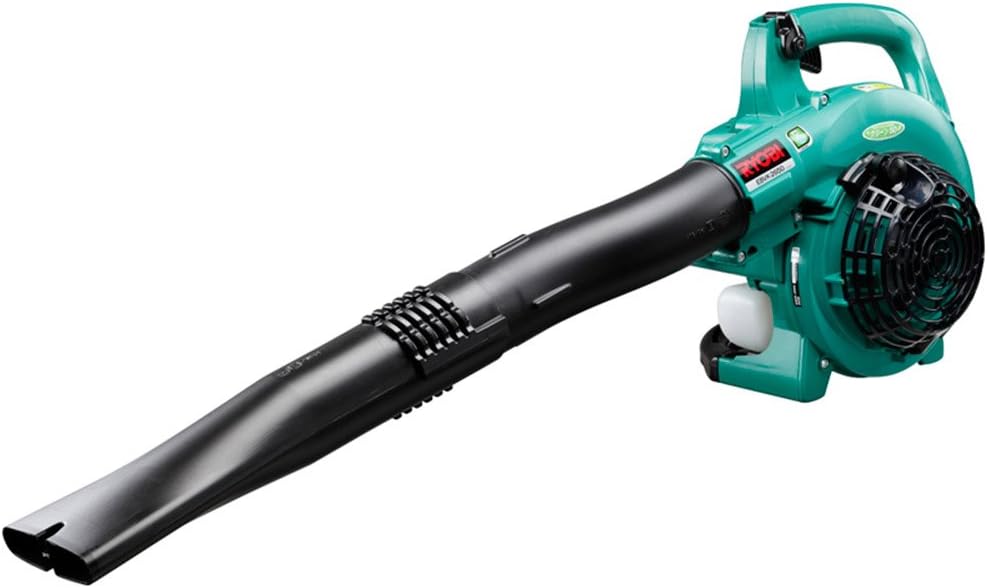
Image 1.1: The Kyocera EBVK-2650 Engine Blower Vacuum in its primary blower configuration. This image shows the main unit with the straight nozzle attached, ready for blowing leaves and debris.
2. 安全情報
電動工具を使用する際は、常に安全を最優先にしてください。これらの指示に従わない場合、重傷や物的損害が発生する可能性があります。
2.1一般的な安全規則
- 機械を操作する前に、すべての指示を読んで理解してください。
- 目の保護具、聴覚保護具、手袋、丈夫な履物などの適切な個人用保護具 (PPE) を着用してください。
- Do not operate the machine in wet conditions or in the presence of flammable liquids or gases.
- 子供、傍観者、ペットを操作エリアから安全な距離(少なくとも 15 メートル / 50 フィート)に保ってください。
- Inspect the machine for loose parts, damage, or wear before each use. Do not operate a damaged machine.
- Ensure proper ventilation when operating the engine, as exhaust fumes contain carbon monoxide.
- 送風ノズルを人や動物に向けないでください。
- Turn off the engine and allow it to cool before refueling, cleaning, or performing maintenance.
- 本機は子供の手の届かない、乾燥した安全な場所に保管してください。
2.2 燃料の安全性
- Use only the recommended fuel mixture: unleaded gasoline and 2-cycle engine oil at a 50:1 ratio.
- 燃料を混ぜる際は、火花や炎から離れた換気の良い場所で行ってください。
- Do not smoke while mixing or refueling.
- こぼれた燃料はすぐに拭き取ってください。
- 燃料は承認された容器に入れて涼しく乾燥した場所に保管してください。
3. パッケージの内容と構成
開梱時にすべてのコンポーネントが揃っていて損傷がないことを確認してください。
3.1付属のアクセサリ
- Main Unit (Engine Blower Vacuum)
- ストレートノズル
- 湾曲したノズル
- 吸入管
- ファンノズル
- ゴミ袋
- Socket Wrench (13x19mm)
- 取扱説明書
3.2 主要コンポーネントview
Familiarize yourself with the main parts of the EBVK-2650.

Image 3.1: The Kyocera EBVK-2650 configured for vacuuming. This view shows the suction pipe and the dust bag attached, ready to collect leaves and debris.
- エンジンユニット: The core power source.
- 燃料タンク: For mixed fuel.
- スターターハンドル: For manual engine start.
- スロットルレバー: エンジン速度を制御します。
- 停止スイッチ: エンジンを停止します。
- エアフィルターカバー: エアフィルターを保護します。
- 点火プラグ: For ignition.
- Blower/Vacuum Port: Where nozzles or suction pipe attach.
- Dust Bag Connection: For attaching the collection bag in vacuum mode.
4. セットアップと組み立て
4.1 Assembling for Blower Mode
- エンジンがオフになっており、冷えていることを確認してください。
- Attach the desired nozzle (straight or curved) to the blower port. Twist until securely locked.
- Confirm all connections are tight before use.

画像4.1: クローズアップ view of the Kyocera EBVK-2650 in operation, demonstrating the blower function. The user is holding the unit, directing the airflow.
4.2 Assembling for Vacuum/Mulching Mode
- エンジンがオフになっており、冷えていることを確認してください。
- Remove any blower nozzles from the blower port.
- Attach the suction pipe to the intake port. Secure it firmly.
- Connect the dust bag to the exhaust port. Ensure the bag is properly sealed to prevent debris leakage.
- Confirm all connections are tight before use.

Image 4.2: The Kyocera EBVK-2650 being used in vacuum mode. The suction pipe is directed towards leaves, and the dust bag is visible, collecting the mulched debris.
4.3 Fuel Preparation and Filling
The EBVK-2650 uses a 2-cycle engine. It requires a specific mixture of unleaded gasoline and 2-cycle engine oil.
- Fuel Ratio: Unleaded Gasoline : 2-Cycle Engine Oil = 50:1
- Use high-quality 2-cycle engine oil specifically designed for air-cooled engines.
- Mix the fuel in a separate, approved fuel container. Shake well before filling.
- Open the fuel tank cap slowly to release pressure.
- Fill the fuel tank (capacity 0.47 L) carefully, avoiding overfilling.
- 燃料タンクのキャップをしっかり閉めてください。
5. 操作手順
5.1 エンジンの始動
- 機械を平らで安定した場所に置いてください。
- 停止スイッチが「ON」の位置にあることを確認してください。
- チョーク レバーを作動させます (コールド スタートの場合)。
- 燃料が見えるまでプライマーバルブを数回押します。
- Pull the starter handle firmly and smoothly until the engine starts. Do not pull the rope to its full extension.
- エンジンが始動したら、チョークを徐々に解除します。
- Allow the engine to warm up for a few moments before applying full throttle.

Image 5.1: A user demonstrating the engine starting procedure for the Kyocera EBVK-2650. The starter handle is being pulled to ignite the engine.
5.2 送風機の操作
- Hold the machine firmly with both hands.
- 移動させたいゴミにノズルを向けます。
- Gradually increase the throttle to achieve the desired airflow.
- 掃くような動きで葉やゴミを山に集めます。

Image 5.2: A user operating the Kyocera EBVK-2650 in blower mode, clearing leaves from a path. The machine is held comfortably, directing the airflow.
5.3 Vacuum/Mulching Operation
- Ensure the machine is correctly assembled for vacuum mode with the dust bag attached.
- Hold the machine firmly, guiding the suction pipe over the leaves.
- Move slowly and steadily to allow the machine to pick up and mulch debris.
- Monitor the dust bag and empty it when it becomes full to maintain optimal performance.
- Note: Mulching performance varies based on leaf type, size, and moisture content. Avoid vacuuming wet leaves or large, hard objects.

Image 5.3: A user operating the Kyocera EBVK-2650 in vacuum mode, actively collecting leaves from a paved area. The dust bag is visible, indicating collection.
5.4 エンジンの停止
- Release the throttle lever to allow the engine to idle.
- Move the stop switch to the "OFF" position.
- Allow the machine to cool down before storage or maintenance.
6. メンテナンス
Regular maintenance ensures optimal performance and extends the lifespan of your EBVK-2650. Always ensure the engine is off and cool before performing any maintenance.
6.1 エアフィルターの清掃
- エアフィルターカバーを取り外します。
- エアフィルターエレメントを慎重に取り外します。
- Clean the filter by tapping it gently or using compressed air. If heavily soiled, wash with warm, soapy water, rinse thoroughly, and allow to dry completely before reinstallation.
- エアフィルターカバーを交換してください。
6.2 Spark Plug Inspection and Replacement
- スパークプラグキャップを取り外します。
- Use the provided socket wrench to remove the spark plug (NGK BPM8Y).
- Inspect the spark plug for wear, carbon buildup, or damage. Clean if necessary.
- Check the electrode gap and adjust if needed.
- Replace with a new spark plug of the recommended type if worn or damaged.
- Reinstall the spark plug and cap securely.
6.3 燃料フィルター
The fuel filter is located inside the fuel tank. Inspect it periodically for debris. If clogged, replace it. This procedure may require professional assistance.
6.4 キャブレターの調整
Carburetor adjustments should ideally be performed by a qualified service technician. Incorrect adjustments can lead to engine damage or poor performance.
6.5 ストレージ
- For long-term storage, drain all fuel from the tank and run the engine until it stops to clear the carburetor.
- 機械の外側を清掃します。
- Store in a dry, dust-free location, away from direct sunlight and extreme temperatures.
7。 トラブルシューティング
このセクションでは、発生する可能性のある一般的な問題について説明します。ここに記載されていない問題については、カスタマーサポートにお問い合わせください。
| 問題 | 考えられる原因 | 解決 |
|---|---|---|
| エンジンが始動しない |
|
|
| エンジンは動くがパワーが足りない |
|
|
| 過度の振動 |
|
|
8. 仕様
| 特徴 | 詳細 |
|---|---|
| ブランド | 京セラ |
| モデル番号 | EBVK-2650 |
| エンジンタイプ | Air-cooled 2-cycle single cylinder gasoline engine |
| 変位 | 25.4ml |
| Average Air Volume | 8.7 m³/分 |
| 最大風量 | 67.5 m³/分 |
| 着火方法 | Electronic ignition (Flywheel magnet) |
| スパークプラグ | NGK BPM8Y |
| キャブレタータイプ | ダイヤフラムタイプ |
| 燃料 | Mixed fuel (Unleaded gasoline: 2-cycle engine oil = 50:1) |
| 燃料タンク容量 | 0.47リットル |
| Dimensions (L x W x H, excluding nozzle) | 330 x 270 x 345 ミリメートル |
| Weight (excluding nozzle, fuel) | 4.2キロ |
| 付属品 | Straight nozzle, Curved nozzle, Suction pipe, Fan nozzle, Dust bag, Socket wrench (13x19mm) |
| 推奨用途 | Dust cleaning, Leaf cleaning |
Note: Product specifications are subject to change without notice for improvement. The listed weight of 8.1 kg in some product descriptions likely includes packaging and all accessories, while 4.2 kg refers to the bare unit.
9. 保証とサポート
For warranty information, service, or technical support, please refer to the warranty card included with your product or visit the official Kyocera webサイトでご確認ください。保証請求に備えて購入証明書を保管してください。
Kyocera Customer Support: Please visit the official Kyocera website or contact your local dealer for assistance.


