1. はじめに
1.1。 オーバーview
The Hager WITTY charging station is designed for charging electric vehicles in accordance with Mode 3 (IEC 61851-1) and Mode 2 standards. It supports both Type 3 and standard socket connections, offering flexible charging solutions for various electric vehicles. This device operates on a 3-phase + Neutral, 32A electrical supply, delivering power from 4 kW to 22 kW.
1.2. 安全に関する注意事項
- 設置は、地域および国の電気規則に従って、資格のある電気技師が行う必要があります。
- Do not attempt to open or repair the charging station yourself. Contact qualified service personnel.
- 充電ステーションが適切に接地されていることを確認してください。
- Do not use the charging station if it is damaged or shows signs of malfunction.
- Keep children and unauthorized persons away from the charging station during operation.
- Avoid exposing the charging station to extreme temperatures, direct sunlight for prolonged periods, or corrosive substances.
2. 製品の説明
2.1. 特徴
- Compatible with Mode 3 (Type 3) and Mode 2 charging.
- Free access operation.
- Power output: 4 kW to 22 kW.
- Input: 3-phase + Neutral, 32A.
- Integrated status indicator light.
2.2。 構成部品
The Hager WITTY charging station typically includes:
- Charging station unit
- 取り付け金具(ネジ、アンカー)
- ユーザーマニュアル(この文書)

図1: フロント view of the Hager WITTY charging station with a green operational light, mounted on a textured wall.
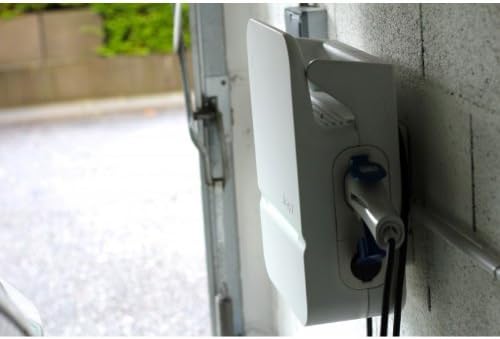
図2: 側 view of the Hager WITTY charging station, illustrating the cable connection point and the unit's profile.
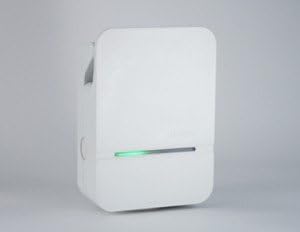
図3: 詳細なフロント view of the Hager WITTY charging station, emphasizing the integrated green status light.
3. セットアップ
3.1. 設置場所
Choose a suitable location that is protected from direct impact, excessive moisture, and extreme temperatures. Ensure adequate ventilation and accessibility for maintenance.
3.2. 取り付け
- Mark the drilling points on the wall using the provided template (if applicable) or by measuring the mounting holes on the unit.
- 穴を開けて適切な壁アンカーを挿入します。
- Secure the charging station to the wall using the provided screws.
3.3。 電気接続
警告: 電気設備の設置は資格を持った電気技師が行う必要があります。
- Ensure the main power supply is disconnected before beginning any electrical work.
- Connect the 3-phase + Neutral (3Ph+N) 32A power supply to the designated terminals inside the charging station.
- Ensure proper grounding is established.
- Verify all connections are secure and correctly wired according to the wiring diagram provided with the unit (refer to the separate installation guide for detailed diagrams).
- Close the charging station cover securely.
4.運用
4.1. 充電の開始
- Ensure the charging station is powered on and the status indicator light is green (ready).
- Connect the charging cable to your electric vehicle's charging port.
- Connect the other end of the charging cable to the charging station's outlet (Type 3 or Mode 2 socket).
- The charging station will automatically initiate the charging process. The status indicator light may change to blue or flashing green, depending on the charging status.
4.2. Stopping a Charge
- Disconnect the charging cable from your electric vehicle first.
- Disconnect the charging cable from the charging station.
- The charging station will return to a ready state (green indicator light).
4.3. ステータスインジケーター
- 緑色のライト: 充電準備完了。
- Blue Light (or flashing green): 充電中です。
- Red Light (or flashing red): Error or fault detected. Refer to the Troubleshooting section.
- 光なし: Power off or system fault.
5. メンテナンス
5.1. 清掃
充電ステーションの外側を柔らかくて乾いた布で拭いてください。amp 布で拭いてください。研磨剤入りの洗剤、溶剤、または刺激の強い化学薬品は使用しないでください。清掃する前に、必ず本体の電源を切ってください。
5.2. 検査
Periodically inspect the charging station for any signs of damage, wear, or loose connections. Check the charging cable for fraying or damage. If any damage is found, discontinue use and contact a qualified technician.
6。 トラブルシューティング
| 問題 | 考えられる原因 | 解決 |
|---|---|---|
| No power/No light | Power supply disconnected; Circuit breaker tripped. | Check power supply; Reset circuit breaker. If problem persists, contact a qualified electrician. |
| 赤色表示灯 | Internal fault; Overcurrent; Ground fault. | Disconnect and reconnect the vehicle. If the error persists, power cycle the unit. If still red, contact service. |
| 充電が始まらない | Cable not properly connected; Vehicle not ready to charge; Charging station fault. | Ensure cable is securely connected to both vehicle and station. Check vehicle's charging status. Power cycle the charging station. |
7. 仕様
| 特徴 | 詳細 |
|---|---|
| モデル | XEV103 |
| 充電モード | Mode 3 (IEC 61851-1), Mode 2 |
| コネクタタイプ | Type 3 / Standard Socket |
| 入力ボリュームtage | 3-phase + Neutral |
| 最大電流 | 32A |
| 出力 | 4kW~22kW |
| アクセス | 無料アクセス |
| ASIN | B00CSJUVKA |
8. 保証とサポート
保証情報およびテクニカルサポートについては、Hagerの公式ウェブサイトをご覧ください。 website or contact your local Hager distributor. Keep your purchase receipt for warranty claims.
Spare parts availability: Information not available.


