導入
This manual provides instructions for the Vivanco RR 220 remote control, designed for compatibility with Samsung Smart TVs. Please read this manual thoroughly before using the device to ensure proper operation and to understand its features.
パッケージ内容
- Vivanco RR 220 Remote Control
- このユーザーマニュアル
注意: 電池は付属しておりませんので別途ご購入ください。
設定
1. バッテリーの取り付け
- リモコンの背面にある電池収納部を見つけます。
- バッテリーカバーを下方向にスライドするか、ラッチを押して持ち上げて開きます。
- 単4電池2本を挿入し、プラス(+)とマイナス(-)の端子がコンパートメント内のマークと一致していることを確認します。
- 電池カバーを元に戻し、カチッと音がしてしっかりと固定されていることを確認します。
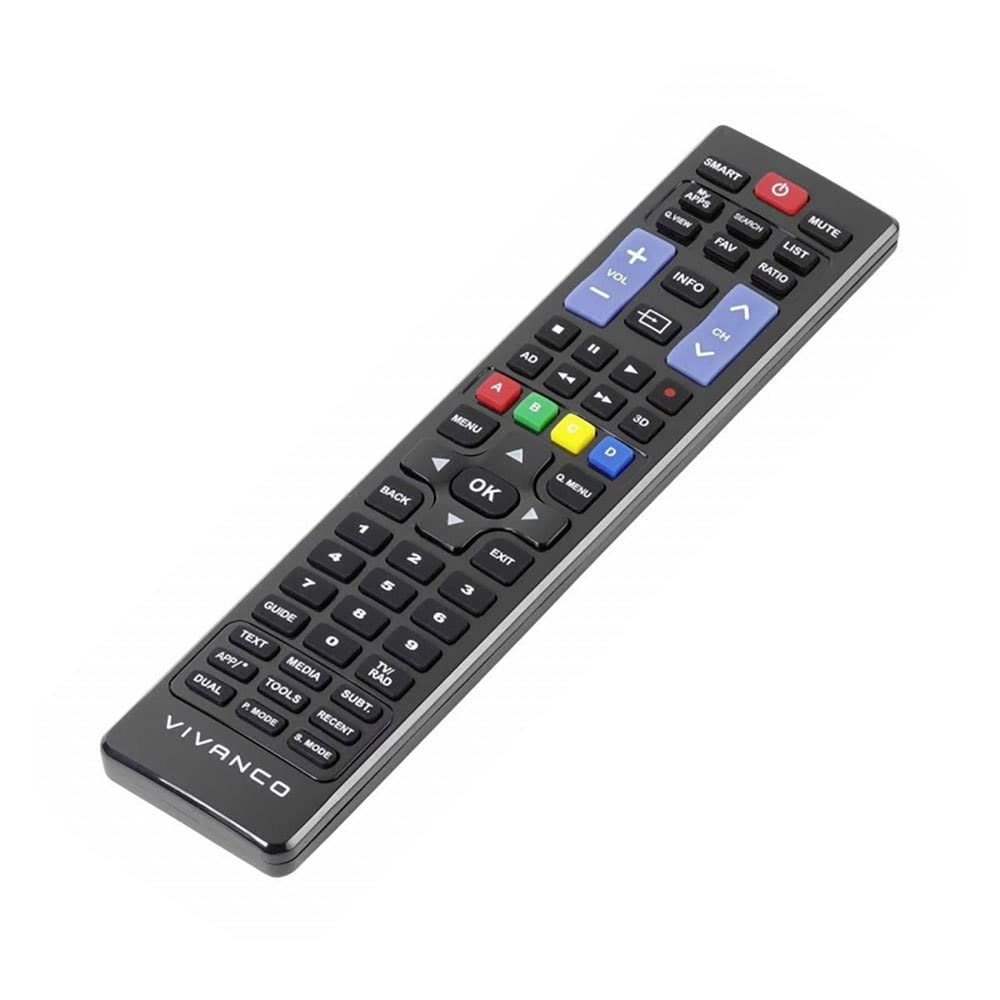
画像1: Vivanco RR 220 remote control. This image displays the front of the remote control, highlighting its 57 buttons and ergonomic design. The battery compartment is located on the reverse side.
2.初期使用
The Vivanco RR 220 is pre-programmed for Samsung Smart TVs. No additional setup or pairing is typically required. Once batteries are installed, point the remote control towards your Samsung Smart TV and press the Power button to test functionality.
操作手順
The remote control features 57 buttons, providing comprehensive control over your Samsung Smart TV and compatible devices. Below are common button functions:
- 電源ボタン: テレビの電源をオンまたはオフにします。
- 数字ボタン(0-9): For direct channel selection or data input.
- 音量を上げる/下げる: オーディオの音量を調整します。
- チャンネルアップ/ダウン: テレビのチャンネルを変更します。
- 消音ボタン: テレビの音声を消音します。
- ナビゲーション パッド (上、下、左、右、Enter): メニューを移動したりオプションを選択したりするために使用します。
- 戻る/戻るボタン: 前の画面またはメニューに戻ります。
- Smart Hub/Home Button: Accesses the Smart Hub or main menu of your Samsung Smart TV.
- ソース/入力ボタン: 入力ソース(HDMI、AVなど)を選択します。
- カラーボタン(赤、緑、黄、青): For specific functions within certain applications or menus, as indicated on-screen.
- 再生コントロール (再生、一時停止、停止、早送り、巻き戻し): Controls media playback on compatible devices or apps.
For specific functions related to your TV model, refer to your Samsung TV's user manual.
メンテナンス
リモコンのクリーニング
- リモコンの表面を乾いた柔らかい布で拭いてください。
- 頑固な汚れには、軽くamp布に水または刺激の少ない非研磨性の洗剤をつけて拭いてください。
- 強力な化学薬品、溶剤、研磨剤入りのクリーニングパッドは使用しないでください。リモコンの仕上げや内部コンポーネントが損傷する可能性があります。
- Ensure no liquid enters the remote control through button gaps or the battery compartment.
バッテリー交換
Replace batteries when the remote's response becomes sluggish or it stops functioning. Always replace both batteries simultaneously with new AAA alkaline batteries. Do not mix old and new batteries or different types of batteries.
トラブルシューティング
| 問題 | 考えられる原因 | 解決 |
|---|---|---|
| リモコンが機能しない。 |
|
|
| 一部のボタンが機能しません。 |
|
|
仕様
- ブランド: Vivanco
- モデル名: RR 220
- 製品モデル番号: 38016
- 対応デバイス: Home cinema, DVD/Blu-ray player, Television (Samsung Smart TV compatible)
- 接続技術: Wireless IR (Infrared)
- ボタンの数: 57
- 電池のタイプ: 単4電池2本(アルカリ電池推奨)
- 電池付属: いいえ
- 製品寸法: 18 x 4.8 x 2.3 cm
- 製品重量: 80グラム
- 最大範囲: 15メートル
- 特別な機能: IPTV, DVB-T, HDTV compatibility


