1. はじめにview
This manual provides comprehensive instructions for the setup, operation, maintenance, and troubleshooting of your InFocus IN3124 Projector. Designed for clarity and ease of use, this guide will help you maximize your projector's performance and longevity.
The InFocus IN3124 is a high-performance projector featuring XGA (1024 x 868) native resolution, 4800 lumens of brightness, and a 3000:1 contrast ratio, making it suitable for various presentation environments. Its portable design allows for flexible placement and usage.
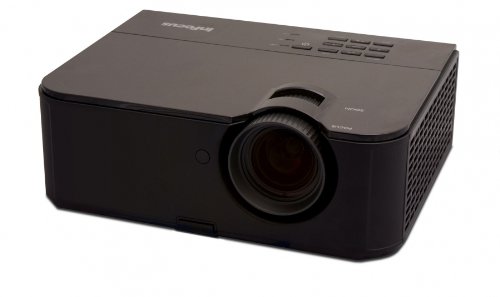
図1: 前面 view of the InFocus IN3124 Projector, highlighting the main lens and the top-mounted control panel.
2. セットアップ
2.1 開梱
Carefully remove the projector and all accessories from the packaging. Verify that all components listed in the packing list are present. Retain the original packaging for future transport or storage.
2.2 配置
Position the projector on a stable, level surface. Ensure adequate ventilation around the unit to prevent overheating. Maintain a clear path between the projector lens and the projection screen or surface. The optimal projection distance will vary based on the desired screen size.
2.3 電源の接続
- 電源コードをプロジェクターの電源入力に接続します。
- 電源コードのもう一方の端を接地されたコンセントに差し込みます。
2.4 入力ソースの接続
The IN3124 projector supports various input sources. Connect your video source (e.g., computer, DVD player) to the appropriate input port on the projector. Common ports include VGA and HDMI (if available on your specific model).
- VGA: Use a VGA cable to connect to a computer's video output.
- HDMI: Use an HDMI cable for digital video and audio (check projector for HDMI port availability).
3. 操作手順
3.1 電源のオン/オフ
- 電源を入れるには: プロジェクターのコントロールパネルまたはリモコンの電源ボタンを押します。電源インジケーターライトが点灯します。
- 電源を切るには: Press the power button twice. The projector will enter a cooling cycle before shutting down completely. Do not unplug the projector during the cooling cycle.
3.2 フォーカスとズームの調整
Rotate the focus ring on the projector lens until the image appears sharp and clear. Use the zoom ring (if present) to adjust the image size to fit your screen.
3.3 入力ソースの選択
Press the "Source" or "Input" button on the projector's control panel or remote control to cycle through available input sources (e.g., VGA, HDMI). Select the input corresponding to your connected device.
3.4 Menu Navigation and Keystone Correction
Use the menu buttons on the projector or remote to access the On-Screen Display (OSD). Navigate through the menu options to adjust settings such as brightness, contrast, color, and keystone correction. Keystone correction helps to square the image if the projector is not perfectly perpendicular to the screen.
4. メンテナンス
4.1 レンズのクリーニング
プロジェクターレンズは、光学面専用の柔らかく糸くずの出ない布で優しく拭いてください。研磨剤入りのクリーナーを使用したり、無理な力で拭いたりしないでください。レンズに傷がつく可能性があります。
4.2 エアフィルターの清掃
Regularly check and clean the projector's air filters to ensure proper airflow and prevent overheating. Refer to the projector's specific filter access instructions. Use a soft brush or vacuum cleaner to remove dust accumulation.
4.3リットルamp 交換
プロジェクターlamp 寿命は有限です。amp 寿命インジケーターが表示されたり、画像が暗くなったりすると、amp may need replacement. Consult the full service manual or manufacturer's website for detailed lamp 交換手順と互換性のあるlamp models. Always allow the projector to cool down completely before attempting lamp 交換。
4.4 ストレージ
長期間使用しない場合は、直射日光や極端な温度を避け、涼しく乾燥した場所にプロジェクターを保管してください。ほこりや損傷を防ぐため、元の梱包箱または保護ケースを使用してください。
5。 トラブルシューティング
This section addresses common issues you might encounter with your InFocus IN3124 Projector. For more complex problems, contact customer support.
- 画像が表示されない:
- プロジェクターの電源がオンになっていて、電源インジケータが点灯していることを確認します。
- Verify that the input source cable (VGA, HDMI) is securely connected to both the projector and the source device.
- 「ソース」ボタンを使用して正しい入力ソースを選択します。
- ソースデバイスが信号を出力しているかどうかを確認します。
- Dim or Faded Image:
- OSD メニューで明るさとコントラストの設定を調整します。
- lを確保するamp is not nearing the end of its lifespan.
- Clean the projector lens and air filters.
- Check the projection mode (e.g., Eco mode might reduce brightness).
- 画像がぼやけています:
- プロジェクターレンズのフォーカスリングを調整します。
- 投影面が平らであり、プロジェクターが安定していることを確認します。
- Check the resolution settings of your source device to match the projector's native resolution.
- リモコンが動作しない:
- リモコンの電池を交換してください。
- リモコンとプロジェクターの IR 受信機の間に障害物がないことを確認してください。
- リモコンをプロジェクターに直接向けます。
6. 仕様
The following table outlines the key technical specifications for the InFocus IN3124 Projector:
| 特徴 | 仕様 |
|---|---|
| モデル番号 | IN3124 |
| ディスプレイ解像度(ネイティブ) | XGA(1024×868) |
| 輝度 | 4800ルーメン |
| コントラスト比 | 3000:1 |
| 表示タイプ | LCD, LCoS |
| アイテム重量 | 8.16ポンド(3.7kg) |
| 製品寸法(長さ x 幅 x 高さ) | 12.83 x 10.43 x 4.8 インチ (32.59 x 26.49 x 12.19 cm) |
| 特集 | ポータブル |
7. 保証とサポート
For detailed warranty information, please refer to the warranty card included with your product packaging or visit the official InFocus webサイト。保証は通常、購入日から一定期間、製造上の欠陥を対象とします。
If you encounter issues that cannot be resolved using the troubleshooting guide, or require technical assistance, please contact InFocus customer support. Contact details can usually be found on the manufacturer's webサイトまたは製品ドキュメントに記載されています。


