1. はじめに
Thank you for choosing the Severin KV 8023 S2 Superautomatic Coffee Machine. This appliance is designed to provide a premium coffee experience with ease, offering a variety of coffee specialties at the touch of a button. Featuring a high-quality ceramic grinder and intuitive controls, this machine ensures fresh, aromatic coffee every time. Please read this manual carefully before first use to ensure safe operation and optimal performance.

画像1.1:正面 view of the Severin KV 8023 S2 Superautomatic Coffee Machine. This image shows the sleek black design of the appliance, highlighting its compact form factor suitable for any kitchen countertop.
2. 重要な安全上の注意事項
Always observe the following safety precautions when using electrical appliances to prevent electric shock, fire, injury, or damage.
- 使用前にすべての指示をよくお読みください。
- 機器、コード、プラグを水やその他の液体に浸さないでください。
- 本機器はお子様の手の届かない場所に保管してください。
- 使用しないときや清掃する前には、コンセントからプラグを抜いてください。
- コードやプラグが損傷している機器、または機器が故障したり何らかの損傷を受けたりした後は、機器を操作しないでください。
- メーカー推奨のアクセサリのみを使用してください。
- 熱い表面に触れないでください。ハンドルまたはノブを使用してください。
- ボリュームを確保するtag機器に表示されているeは主電源の電圧に対応していますtage.
- Never open the appliance housing. Repairs should only be performed by authorized service personnel.
3. セットアップと初回使用
3.1 開梱
Carefully remove all packaging materials. Check that all parts are present and undamaged. Keep packaging for future transport or disposal.
3.2 初期洗浄
- 機械の外側を広告で拭きますamp 布。
- Remove the water tank, coffee bean container lid, and drip tray. Wash them with warm soapy water, rinse thoroughly, and dry.
- すべての部品を組み立て直します。
3.3水タンクへの充填
Open the lid of the water tank and fill it with fresh, cold tap water up to the MAX mark. Close the lid securely.
3.4 豆容器への充填
Open the lid of the coffee bean container and fill it with whole coffee beans. Do not use ground coffee in this container. Close the lid to maintain freshness.
3.5 電源投入とプライミング
- 電源コードを適切な壁コンセントに差し込みます。
- Press the power button. The machine will perform an initial rinse cycle. Place a cup under the coffee spout to collect the water.
- The display will guide you through any necessary priming steps, such as filling the water circuit.
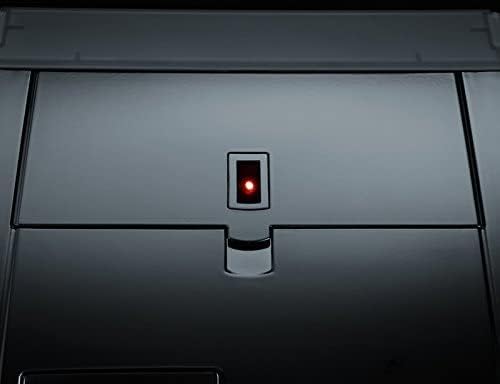
Image 3.1: Close-up of the power button with its red indicator light, located on the top surface of the coffee machine. This light indicates the machine's power status.
3.6 Adjusting Water Hardness
The machine allows for adjustable water hardness settings to optimize the water filter's performance (a filter is included). Refer to the display menu for instructions on how to measure and set your local water hardness level.
4. 操作手順
The Severin KV 8023 S2 features an intuitive E-select button and a high-contrast graphic display for easy navigation.

Image 4.1: The control panel of the Severin KV 8023 S2, showing the multi-language graphic display and the E-select rotary knob for intuitive menu navigation. Several selection buttons are also visible below the display.
4.1 Making Coffee Specialties (One-Touch)
For Cappuccino, Latte Macchiato, or Latte:
- Ensure the milk system is connected and the milk container is filled.
- Place your cup under the coffee-milk spout.
- Select your desired drink from the display using the E-select button.
- Press the corresponding button to start brewing. The machine will automatically prepare your drink without requiring you to move the cup.
4.2 Adjusting Coffee Strength and Volume
You can customize your coffee strength (3 levels + 1 personal fit) and volume via the display menu. Use the E-select button to navigate to these settings and adjust according to your preference.
4.3 挽き具合の調整
The ceramic grinder offers 5 adjustable grind levels. To change the grind level, turn the knob inside the bean container. Adjust only when the grinder is operating to prevent damage.
4.4 Adjusting Coffee-Milk Spout Height
The coffee-milk spout can be adjusted in height from 80 mm to 135 mm to accommodate various cup sizes. Gently slide the spout up or down to the desired position.

Image 4.2: Close-up of the adjustable coffee-milk spout on the Severin KV 8023 S2, featuring the 'SEVERIN S2+' branding. This spout can be moved vertically to fit different cup sizes.
4.5 プログラミングオプション
The machine offers various programming options, including individually adjustable on/off times and 5 temperature levels for your beverages. Access these settings through the main menu on the graphic display.
5. メンテナンスと清掃
コーヒー マシンの寿命と最適なパフォーマンスを維持するには、定期的な清掃とメンテナンスが不可欠です。
5.1 自動清掃プログラム
The Severin KV 8023 S2 features automatic cleaning, rinsing, and descaling programs. The display will prompt you when these programs are due. Follow the on-screen instructions carefully.
5.2 醸造ユニットの清掃
The patented brewing unit is removable for easy cleaning. Follow these steps:
- マシンの電源を切り、プラグを抜きます。
- Open the service door and remove the brewing unit by pressing the release buttons.
- Rinse the brewing unit thoroughly under running lukewarm water. Do not use detergents.
- 再度挿入する前に完全に自然乾燥させてください。
5.3 Cleaning the Coffee-Milk Spout
The coffee-milk spout is dishwasher-safe and removable. Regularly detach it and clean it to prevent milk residue buildup. The machine also has a 2-stage milk system rinse program that should be run after each milk-based beverage.
5.4 Emptying Drip Tray and Coffee Grounds Container
The machine will indicate when the drip tray and coffee grounds container need to be emptied. Remove, empty, rinse with water, and dry these components before returning them to the machine.
6。 トラブルシューティング
このセクションでは、発生する可能性のある一般的な問題について説明します。ここに記載されていない問題については、カスタマーサポートにお問い合わせください。
| 問題 | 考えられる原因 | 解決 |
|---|---|---|
| コーヒーは出ません。 | Water tank empty, beans empty, brewing unit clogged. | Fill water tank/beans. Clean brewing unit. |
| コーヒーが薄すぎる/濃すぎる。 | Incorrect grind level or coffee strength setting. | Adjust grind level (finer for stronger, coarser for weaker). Adjust coffee strength setting in menu. |
| ミルクがうまく泡立ちません。 | Milk system clogged, milk too warm, incorrect milk type. | Clean milk system/spout. Use cold, fresh milk. Ensure milk type is suitable for frothing. |
| マシンにエラーメッセージが表示されます。 | 特定の内部問題。 | Refer to the display for the specific error code and consult the full manual or contact support. Try restarting the machine. |
7. 技術仕様
- ブランド: セヴェリン
- モデル番号: KV 8023
- 色: 黒
- 製品寸法: 33.2 x 24.5 x 35.8 cm
- 商品の重量: 9.51キロ
- 水タンク容量: 1.5リットル
- 力: 1500ワット
- 巻tage: 230ボルト
- 材料: ステンレス鋼
- 特別な機能: Integrated filter, Ceramic grinder, One-Touch function
- コーヒーメーカーのタイプ: エスプレッソマシン
8. 保証とサポート
8.1 保証情報
Your Severin KV 8023 S2 Superautomatic Coffee Machine comes with a manufacturer's warranty. Please refer to the warranty card included in your product packaging for detailed terms and conditions, including the warranty period and coverage. Keep your proof of purchase for any warranty claims.
8.2 カスタマーサポート
Should you require assistance with your appliance, encounter issues not covered in this manual, or need spare parts, please contact Severin customer support. Contact details can typically be found on the official Severin webサイトまたは製品に付属のドキュメントをご覧ください。
For online support and further information, visit the セヴェリンブランドストア.


