導入
The Intermatic TN111RM40 is a mechanical 24-hour timer designed for controlling lamps and small appliances. This timer allows for up to two ON and two OFF events per day, making it suitable for automating various electrical devices, including landscape lighting systems. It features a 2-prong polarized outlet and a manual override function. The timer is housed in a 3R enclosure, indicating its suitability for outdoor use.
This manual provides instructions for the safe and effective operation of your Intermatic TN111RM40 timer.
安全情報
- 使用前にすべての指示をお読みください。
- 水に浸さないでください。
- Ensure the timer is unplugged before making any adjustments or cleaning.
- Do not exceed the electrical ratings of the timer.
- This timer is designed for use with 2-prong polarized plugs only.
製品終了view
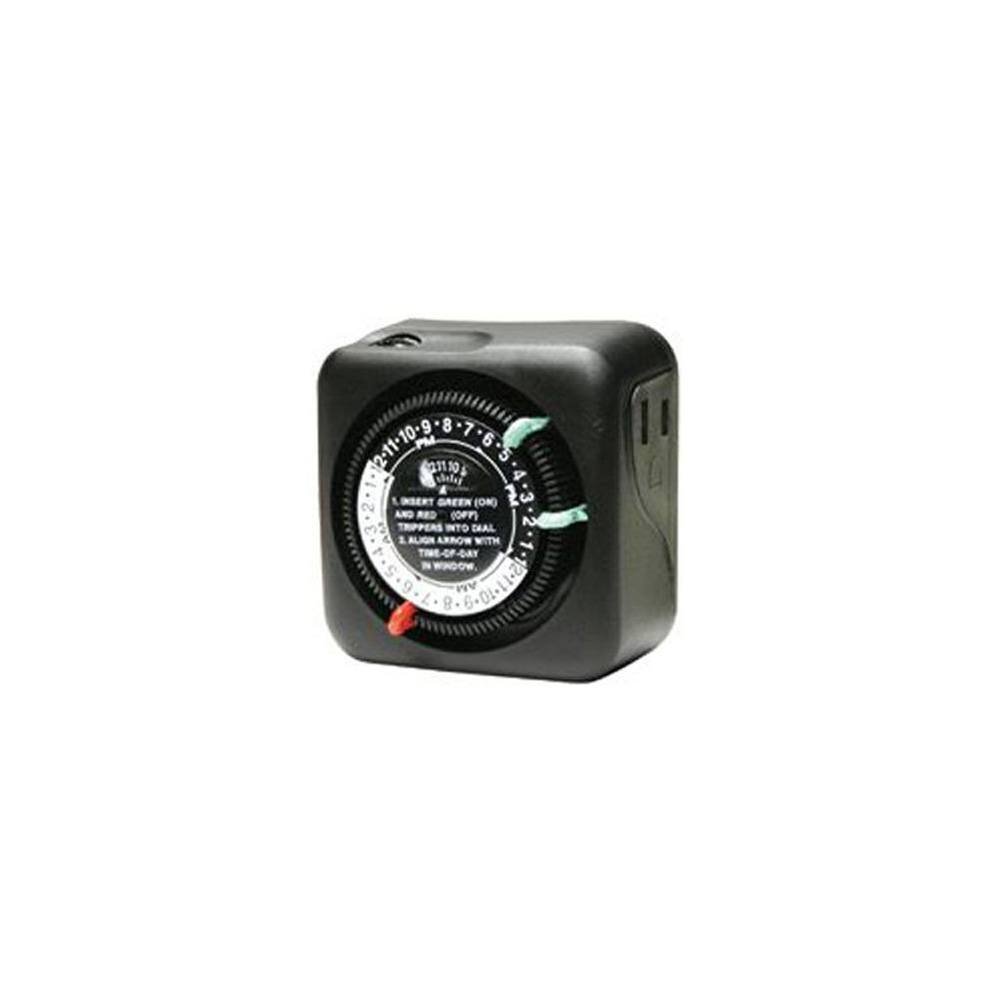
図1: 前面 view of the Intermatic TN111RM40 timer, highlighting the 24-hour dial, green (ON) and red (OFF) trippers, and the time-of-day window. The image also shows the product dimensions: 3 inches deep, 4 inches wide, and 3 inches high.
The Intermatic TN111RM40 timer features a rotating 24-hour dial with markings for AM and PM. It includes removable trippers (pins) for setting ON and OFF times, a manual override switch, and a single 2-prong polarized outlet.
設定
- タイマーを開梱します。 Carefully remove the timer from its packaging. Inspect for any damage.
- コンポーネントを識別する: Locate the green (ON) trippers and red (OFF) trippers. These are small pins that insert into the dial.
- 現在の時刻を設定:
- Rotate the entire dial clockwise until the current time aligns with the "TIME-OF-DAY" arrow in the window. Ensure to distinguish between AM and PM hours.
- Insert ON/OFF Trippers:
- Insert the green (ON) trippers into the dial at the desired times you want the connected appliance to turn ON.
- Insert the red (OFF) trippers into the dial at the desired times you want the connected appliance to turn OFF.
- The timer supports up to two ON and two OFF settings per 24-hour period.
- タイマーを差し込みます: Plug the timer into a standard 2-prong wall outlet.
- アプライアンスを接続: lを差し込むamp or small appliance into the 2-prong polarized outlet on the side of the timer. Ensure the appliance is switched to the ON position if it has its own power switch.
操作手順
Once set up, the timer will automatically turn your connected appliance ON and OFF according to the programmed times. The dial will continuously rotate clockwise, indicating the passage of time.
手動オーバーライド
The Intermatic TN111RM40 includes a manual override feature. This allows you to temporarily turn the connected appliance ON or OFF without disturbing the programmed schedule.
- To manually turn the appliance ON or OFF, locate the manual override switch (often a small lever or button) on the timer.
- Toggle the switch to the desired position. The timer will resume its programmed schedule at the next ON or OFF event.
メンテナンス
- クリーニング: 清掃する前にタイマーをコンセントから外してください。外側は柔らかくて乾いた布で拭いてください。amp 布で拭いてください。研磨剤や溶剤は使用しないでください。
- ストレージ: タイマーを長期間保管する場合は、清潔で乾燥した状態を保ってください。直射日光を避け、涼しく乾燥した場所に保管してください。
- 検査: Periodically inspect the timer and its cord for any signs of wear or damage. If damage is found, discontinue use and replace the unit.
トラブルシューティング
| 問題 | 考えられる原因 | 解決 |
|---|---|---|
| プログラムされた時間に機器の電源がオン/オフになりません。 |
|
|
| タイマーダイヤルが回転しません。 |
|
|
仕様
- モデル: TN111RM40
- ブランド: インターマティック
- タイプ: 24時間機械式タイマー
- 設定: Up to 2 ON/OFF events per day
- コンセントタイプ: 2-Prong Polarized
- 囲い: 3R (Suitable for outdoor use)
- 色: 黒
- 材料: プラスチック
- 製品寸法: 3インチ(奥行き)×4インチ(幅)×3インチ(高さ)
- 商品の重量: 5.3オンス
- 国際コード: 702811361973
保証とサポート
For warranty information or technical support, please refer to the official Intermatic web公式サイトをご覧いただくか、カスタマーサービス部門にお問い合わせください。保証請求のために購入時のレシートを保管してください。
Intermatic Customer Support: www.intermatic.com/support


