1。 オーバーview
The Canon EF-M 22mm f/2 STM is a moderate wide-angle lens designed for the EOS M Digital Camera series. Its ultra-slim and compact form factor makes it highly portable. Featuring a bright f/2.0 aperture, this lens excels in low-light conditions and produces attractive background blur (bokeh). An aspheric lens element contributes to high resolution and contrast. The built-in Stepping Motor (STM) ensures smooth and quiet continuous autofocus, particularly beneficial for video recording. With a short minimum focusing distance, it allows for close-up photography.

図1: 前面 view of the Canon EF-M 22mm f2 STM Compact System Lens.
2. 箱の中身
- EF-M22mm 1:2 STM Lens
- レンズキャップ E-43
- レンズダストキャップEB
- 取扱説明書
- 保証書
3. 主な特徴
- Moderate Wide-Angle: Equivalent to 35mm on a full-frame camera, offering a versatile field of view.
- スムーズで静かなオートフォーカス: Built-in Stepping Motor (STM) provides silent and fluid continuous autofocus, ideal for video recording.
- 明るいf/2.0絞り: Excellent for low-light performance and creating beautiful, soft background blur with its 7-blade circular aperture.
- 高画質: An aspheric lens element ensures high resolution and contrast.
- Close-Up Capabilities: Minimum focusing distance of 5.9 inches (0.15 meters) allows for detailed close-up shots.
- コンパクトなデザイン: Ultra-slim and lightweight, making it easy to carry and suitable for travel.
4. セットアップとインストール
レンズの取り付け
- カメラの電源がオフになっていることを確認してください。
- Remove the rear lens cap from the EF-M 22mm f/2 STM lens and the body cap from your EOS M camera.
- レンズの赤い点をカメラのレンズマウントの赤い点に合わせます。
- レンズをカメラマウントに挿入し、カチッと音がするまで時計回りに回します。
レンズの取り外し
- カメラの電源がオフになっていることを確認してください。
- カメラ本体のレンズ取り外しボタンを押しながら、レンズを反時計回りに止まるまで回転させます。
- カメラからレンズを慎重に取り外します。
- Attach the rear lens cap to the removed lens and the body cap to the camera to protect the sensor.

図2:側面 view of the Canon EF-M 22mm f2 STM lens, showing the mount.
5. レンズの操作
オートフォーカス(AF)とマニュアルフォーカス(MF)
The EF-M 22mm f/2 STM lens supports both autofocus and manual focus. The STM (Stepping Motor) technology provides exceptionally smooth and quiet autofocus, which is particularly advantageous when shooting video, as it minimizes distracting focus motor noise. For precise control, switch to manual focus mode on your camera.
Aperture and Low-Light Performance
With a wide maximum aperture of f/2.0, this lens allows a significant amount of light to reach the camera's sensor. This makes it highly effective for shooting in challenging low-light conditions without needing to drastically increase ISO sensitivity. The wide aperture also enables shallow depth of field, creating a pleasing background blur that isolates your subject.
クローズアップ写真
The lens features a minimum focusing distance of just 0.15 meters (5.9 inches). This allows you to get very close to your subjects, capturing intricate details and achieving a near-macro effect. Experiment with this feature for creative close-up shots.
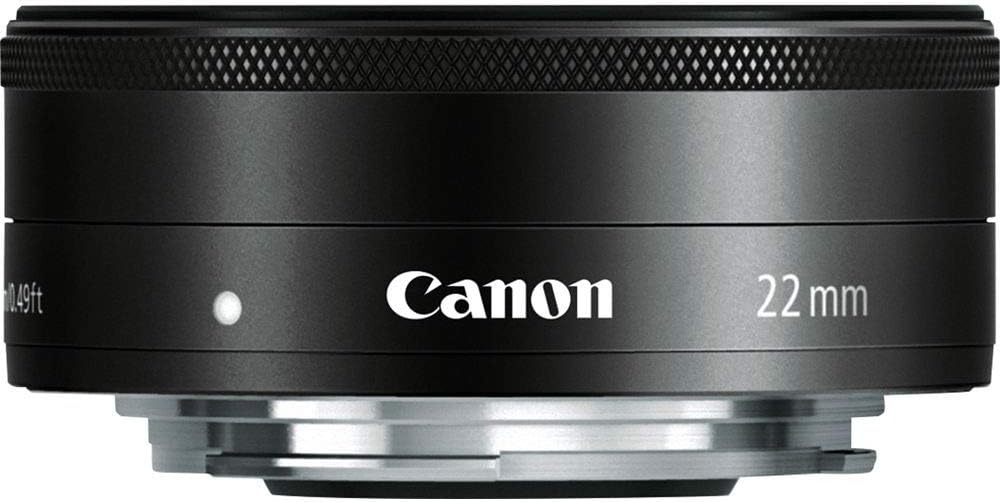
図3: 前面 view of the Canon EF-M 22mm f2 STM lens, illustrating the aperture blades.
Understanding STM Lenses
The Stepping Motor (STM) is a type of autofocus motor designed by Canon to provide smooth and quiet focusing, especially during video recording. Unlike traditional ultrasonic motors (USM) which can be noisy, STM lenses are optimized for silent operation, preventing unwanted audio interference in your videos.
ビデオ1: オーバーview of Canon STM Lenses, explaining their benefits for smooth and quiet autofocus.
6. メンテナンスとケア
- レンズの掃除: Use a soft, lint-free cloth or a lens brush to remove dust. For smudges, use a lens cleaning solution and a microfiber cloth. Avoid touching the glass elements directly with your fingers.
- ストレージ: When not in use, keep the lens attached to the camera or with both front and rear caps on. Store in a cool, dry place away from direct sunlight and extreme temperatures.
- 衝撃を避ける: Protect the lens from drops or impacts, which can damage internal components.
- 湿気防止: Avoid exposing the lens to excessive moisture or humidity. If it gets wet, dry it immediately with a soft cloth.
7。 トラブルシューティング
- オートフォーカスが機能しない: Ensure the lens is securely mounted to the camera. Check the camera's focus mode settings (AF/MF). Clean the electrical contacts on both the lens and camera body with a clean, dry cloth.
- 画像品質の問題: Ensure the lens elements are clean and free from dust or smudges. Check camera settings for appropriate aperture, ISO, and shutter speed.
- Lens Not Recognized: Power off the camera, detach and reattach the lens, then power on the camera again. Ensure camera firmware is up to date.
8. 仕様
| 特徴 | 仕様 |
|---|---|
| 焦点距離と最大絞り | 22mm、f / 2 |
| レンズ構成 | 7つのグループに6つの要素 |
| 対角角度 View | 63°30' |
| フォーカス調整 | Inner Focusing System |
| 最短撮影距離 | 0.49フィート/0.15m |
| フィルターサイズ | 43mm |
| 最大直径×長さ | 2.4x0.9インチ/60.9x 23.7mm |
| 重さ | 3.7オンス / 105g |
| 商品型番 | 5985B002 |
| ASIN | B008NF8BRI |
9. 保証とサポート
This product is subject to a 14-day return policy. For detailed warranty information and customer support, please refer to the Warranty Card included in the product packaging or visit the official Canon support website. Ensure you register your product to activate any applicable warranties.


