導入
This manual provides comprehensive instructions for the installation, operation, and maintenance of your Sony XM-GTX6041 600W Amplifier. Designed for car audio systems, this 4-channel amplifier delivers clear, precise, and distortion-free sound. It features advanced thermal control and a high-capacity air cooling system to ensure stable performance even under demanding conditions. Please read this manual thoroughly before using the amplifier to ensure proper setup and to maximize its performance and longevity.
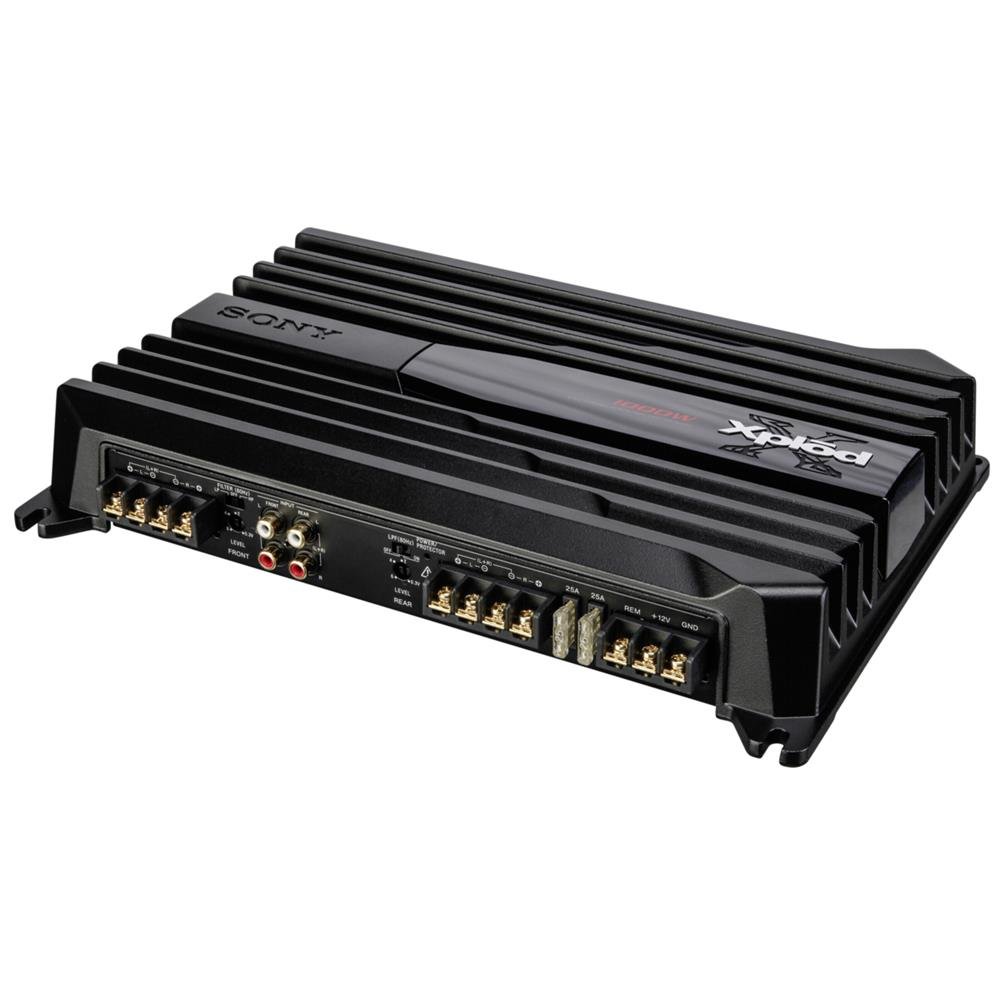
Image: Sony XM-GTX6041 600W Amplifier. This image shows the top view の amplifier unit, highlighting its compact design and connection terminals.
安全情報
- 電源: 接続する amplifier only to a 12V DC car battery with a negative ground.
- 配線: ショートや電気的な危険を防ぐため、すべての配線が正しく接続され、絶縁されていることを確認してください。電源およびアース接続には適切なゲージの電線を使用してください。
- 取り付け: マウント amp換気が十分にでき、湿気や過度の熱から保護された場所に安全に保管してください。
- 音量レベル: Avoid prolonged listening at extremely high volume levels to prevent hearing damage.
- 専門家による設置: If you are unsure about any installation steps, consult a qualified professional car audio installer.
設定
1. 開梱
慎重に取り外します amplifier and all accessories from the packaging. Verify that all components are present before proceeding with installation.
2. 取り付け位置
次の取り付け場所を選択します。
- 乾燥しており湿気から保護されています。
- 通気性がよく、適切な熱放散が可能です。
- Secure and stable to prevent movement during vehicle operation.
- 直射日光や熱源を避けてください。
一般的な場所には、座席の下、トランクの中、パネルの後ろなどがあります。
3. 配線接続
Follow these general guidelines for wiring your amplifier:
- 電源(BATT+): Connect a heavy-gauge power cable directly from the positive terminal of your car battery to the BATT+ terminal on the amplifier. Install an in-line fuse (not supplied) as close to the battery as possible.
- グラウンド (GND): 太いアースケーブルをGND端子から接続します。 amp車両シャーシの清潔で塗装されていない金属面に接着剤を取り付けます。しっかりと電気的に接続されていることを確認してください。
- リモート(REM): ヘッドユニットのリモート出力からリモート電源オンワイヤをREM端子に接続します。 ampライフファイア。これにより、 ampヘッドユニットで電源のオン/オフを切り替えます。
- RCA入力: Connect RCA cables from your head unit's pre-out outputs to the RCA input jacks on the amplifier。
- スピーカー出力: Connect your speakers to the speaker output terminals on the amplifier. Ensure correct polarity (+ to + and - to -) for each speaker. The XM-GTX6041 supports 4-channel speaker configurations.
Always double-check all connections before applying power to the amplifier。
操作手順
1.電源のオン/オフ
の amplifier will automatically power on when your head unit is turned on (via the remote wire connection) and power off when the head unit is turned off.
2. Adjusting Gain Control
The gain control (often labeled "LEVEL" or "GAIN") matches the ampヘッドユニットの出力レベルに対する、リファイアの入力感度を調整します。ゲインを設定するには:
- を回す ampフィルターのゲインコントロールを最小(完全に反時計回り)の設定にします。
- Turn your head unit volume up to about 75-80% of its maximum level.
- ゆっくりと増やします amp歪みが聞こえるまで、lifier のゲイン コントロールを調整し、その後、音がクリアになるまで少しずつ調整を戻します。
The gain control is not a volume control; it is for matching signal levels.
3. Crossover Settings (High-Pass / Low-Pass Filters)
The XM-GTX6041 features built-in high-pass (HPF) and low-pass (LPF) filters to optimize sound output for different speakers:
- ハイパスフィルター (HPF): 周波数を許可する その上 the set point to pass through. Use for full-range speakers or tweeters to prevent them from playing low bass frequencies they cannot reproduce effectively.
- ローパスフィルター (LPF): 周波数を許可する 下に the set point to pass through. Use for subwoofers to ensure they only reproduce bass frequencies.
Adjust these filters according to your speaker types and desired sound profile. Refer to your speaker's specifications for recommended crossover points.
メンテナンス
1. 清掃
定期的に外装を清掃してください amplifier with a soft, dry cloth. Do not use harsh chemicals or abrasive cleaners. Ensure that the cooling fins and ventilation openings are free from dust and debris to maintain optimal airflow.
2. 熱管理
The XM-GTX6041 features an advanced thermal control system and high-capacity air cooling to prevent overheating. Ensure that the amplifier is mounted in a location with sufficient air circulation. Avoid blocking any ventilation openings. If the amplifier enters thermal protection mode (indicated by a protection light, if present), reduce the volume or allow it to cool down before continued use.
トラブルシューティング
| 問題 | 考えられる原因 | 解決 |
|---|---|---|
| 力がない / Amplifierがオンにならない |
|
|
| 音声出力なし |
|
|
| 歪んだ音 |
|
|
| Amplifier overheats / Enters protection mode |
|
|
仕様
| 特徴 | 詳細 |
|---|---|
| ブランド | ソニー |
| モデル番号 | XMGTX6041 |
| チャンネル数 | 4 |
| 最大出力 | 600ワット |
| 巻tage | 12 ボルト (DC) |
| 取り付けタイプ | 表面実装 |
| 動作温度 | 摂氏125度まで |
| 寸法(長さ×幅×高さ) | 10 x 10 x 10 センチメートル |
| 国際商品コード(UPC) | 04905524761740 |
保証とサポート
保証情報
Specific warranty details for the Sony XM-GTX6041 amplifier are typically provided with the product at the time of purchase or can be found on the official Sony webサイトでご確認ください。保証請求のために購入証明書を保管してください。
カスタマーサポート
For further assistance, technical support, or service inquiries, please contact Sony customer support through their official webサイトまたは製品ドキュメントに記載されている連絡先情報を参照してください。