1. はじめに
This manual provides essential information for the proper installation, operation, and maintenance of your Intel Xeon E5-2690 processor. Designed for high-performance computing environments, this 8-core processor offers robust capabilities for demanding applications. Please read these instructions carefully before proceeding with installation.
2.製品オーバーview
The Intel Xeon E5-2690 is an 8-core processor operating at 2.9 GHz, featuring a 20MB L3 Cache and a 135W Thermal Design Power (TDP). It supports DDR3 memory up to 1600 MHz and is designed for the LGA 2011 socket.
- プロセッサ コア: 8
- ベースクロック速度: 2.9GHz帯
- L3キャッシュ: 20MB
- 熱設計電力 (TDP): 135W
- メモリサポート: DDR3 最大 1600 MHz
- ソケットタイプ: 2011 号線
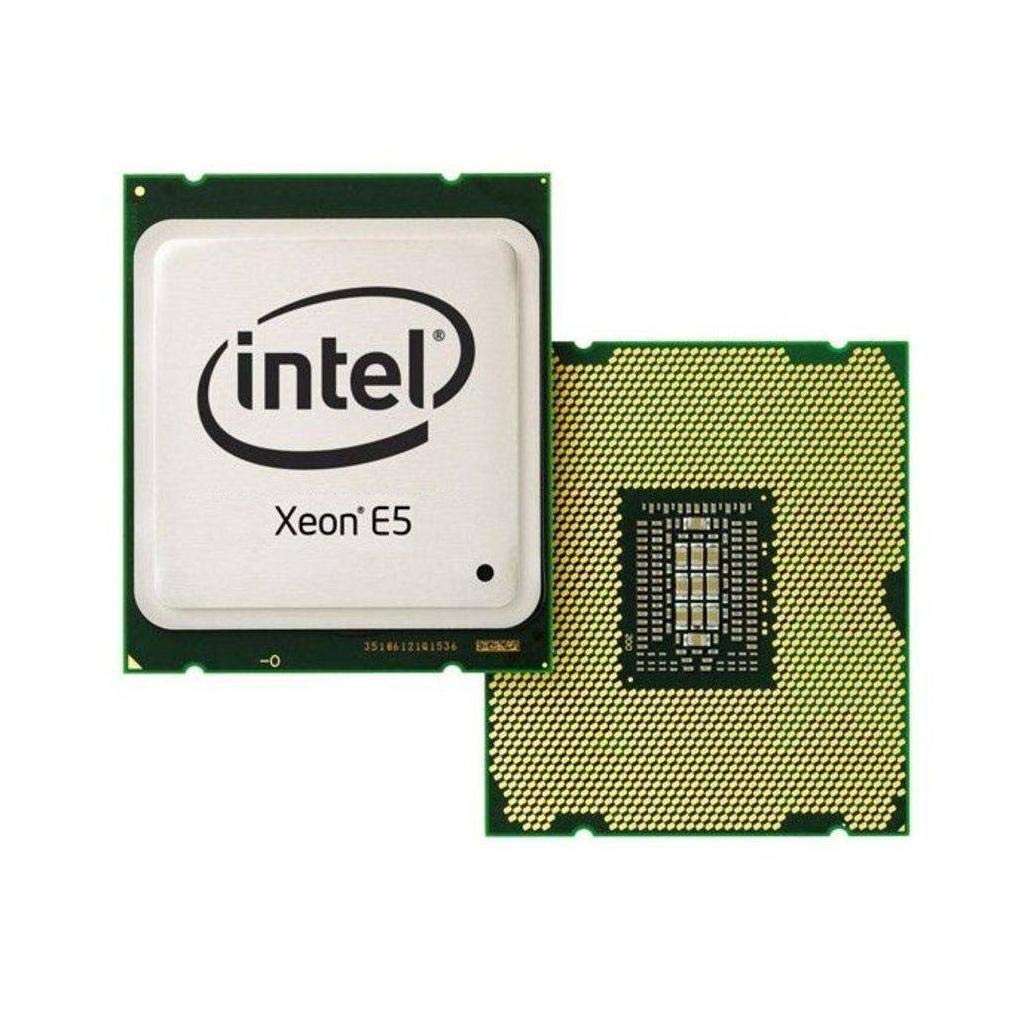
Figure 2.1: Intel Xeon E5-2690 Processor. This image displays the top view of the processor, showing the integrated heat spreader (IHS) and Intel branding.
3. セットアップとインストール
Proper installation is crucial for the stability and performance of your system. Ensure your motherboard supports the LGA 2011 socket and the Intel Xeon E5-2690 processor.
3.1. 始める前に
- 互換性: Verify your motherboard's compatibility with the Intel Xeon E5-2690 (LGA 2011 socket). Refer to your motherboard's manual.
- 静電気: Take anti-static precautions (e.g., use an anti-static wrist strap) to prevent damage to components.
- ツール: Gather necessary tools, including a Phillips head screwdriver and thermal paste.
- 冷却ソリューション: Ensure you have a compatible CPU cooler for the LGA 2011 socket, capable of dissipating 135W TDP.
3.2. インストール手順
- マザーボードを準備します。 Open the CPU socket retention mechanism on your LGA 2011 motherboard. This typically involves releasing two levers.
- Orient Processor: Carefully align the processor with the socket. The processor has notches that correspond to keys on the socket. Do not force the processor into place.
- シートプロセッサ: プロセッサをソケットにゆっくりと下ろします。抵抗なく収まるはずです。
- セキュアプロセッサ: Close the socket retention mechanism by pushing down the levers until they lock into place.
- サーマルペーストを塗布します。 Apply a small amount of high-quality thermal paste to the center of the processor's Integrated Heat Spreader (IHS). Consult the thermal paste manufacturer's instructions for the recommended application method.
- CPUクーラーをインストールします。 Mount your compatible CPU cooler according to its manufacturer's instructions. Ensure it makes firm, even contact with the processor's IHS.
- ファンを接続する: CPU クーラーのファン ケーブルをマザーボード上の指定された CPU_FAN ヘッダーに接続します。

Figure 3.1: Intel Xeon E5-2690 Processor (bottom view). This image shows the pin array on the underside of the processor, which interfaces with the LGA 2011 socket.
4. 操作手順
Once the processor is installed and the system is assembled, you can power on your computer. The operating system will detect the new hardware. Ensure all necessary drivers are installed for optimal performance.
4.1. システム要件
- マザーボード: LGA 2011 socket compatible.
- ラム: DDR3 ECC or non-ECC memory, up to 1600 MHz, as supported by your motherboard.
- 電源: 十分なワット数の電源ユニット(PSU)tage to power all system components, including the 135W TDP processor.
- オペレーティング·システム: Compatible with Intel Xeon processors (e.g., Windows Server, Linux distributions, Windows Pro editions).
4.2. Typical Usage
The Intel Xeon E5-2690 processor is ideal for:
- Workstations requiring high multi-core performance for tasks like video editing, 3D rendering, and scientific simulations.
- Servers handling virtualization, databases, and other demanding server applications.
- High-performance computing (HPC) clusters.
5. メンテナンス
Regular maintenance helps ensure the longevity and stable operation of your processor and system.
- 熱管理: Periodically check CPU temperatures using monitoring software. Ensure your CPU cooler is free of dust and debris. Clean fan blades and heatsink fins as needed with compressed air.
- 気流: Maintain good airflow within your computer case. Ensure case fans are functioning correctly and cables are managed to avoid obstructing airflow.
- BIOS/UEFI アップデート: Keep your motherboard's BIOS/UEFI firmware updated to ensure optimal compatibility and performance with your processor. Refer to your motherboard manufacturer's website for updates and instructions.
- ドライバーの更新: すべてのシステム ドライバー、特にチップセット ドライバーが最新であることを確認します。
6。 トラブルシューティング
問題が発生した場合は、次の基本的なトラブルシューティング手順を検討してください。
- 電源なし/起動なし:
- Verify all power cables are securely connected (24-pin ATX, 8-pin EPS/CPU power).
- CPU がソケットに正しく装着されていることを確認します。
- Check for bent pins on the CPU or in the socket (only if CPU was removed).
- 過熱:
- CPU クーラーが正しく取り付けられており、プロセッサと適切に接触していることを確認します。
- サーマルペーストが正しく塗布されているかどうかを確認します。
- Ensure CPU cooler fan is spinning and heatsink is clean.
- Verify adequate case airflow.
- システムの不安定性/クラッシュ:
- Check RAM modules for proper seating and compatibility.
- マザーボードの BIOS/UEFI およびチップセット ドライバーを更新します。
- Run diagnostic tools to check for hardware errors.
- BIOS/UEFI Not Detecting CPU:
- Ensure your motherboard's BIOS/UEFI version supports the E5-2690 processor. An update may be required (often needs a compatible CPU to perform).
For more advanced diagnostics, consult your motherboard's manual for specific POST codes or diagnostic LEDs.
7. 仕様
| 特徴 | 詳細 |
|---|---|
| プロセッサモデル | Intel Xeon E5-2690 |
| 商品型番 | BX80621E52690 |
| CPUコア | 8 |
| ベースクロック速度 | 2.9GHz帯 |
| L3 キャッシュ | 20MB |
| 熱設計電力 (TDP) | 135ワット |
| CPUソケット | 2011 号線 |
| メモリサポート | DDR3 最大 1600 MHz |
| アイテム重量 | 4オンス |
| 製品寸法(長さx幅x高さ) | 4.9 x 2 x 1.8インチ |
| メーカー | インテル |
8. 保証とサポート
For warranty information and technical support regarding your Intel Xeon E5-2690 processor, please refer to the official Intel webサイトをご覧いただくか、Intel カスタマー サービスにお問い合わせください。
重要な注意: Specific purchase terms, such as "No refunds, no returns, no exchanges. FINAL SALE," may apply depending on your retailer. These terms are separate from Intel's official product warranty. Always review the terms and conditions provided by your point of purchase.
You can find comprehensive support resources, including drivers, software, and troubleshooting guides, on the official Intel support portal: