1. はじめに
This manual provides comprehensive instructions for the safe and effective use of the PeakTech True RMS P 3131 Clamp Meter with Multimeter. This device is designed for measuring AC/DC currents without circuit interruption, as well as AC/DC voltage and resistance, with continuity testing capabilities. It features a 3 3/4 digit LCD display with True RMS measurement for accurate readings.
デバイスを操作する前にこのマニュアルをよくお読みになり、今後の参照用に保管してください。
2. 安全情報
WARNING: Improper use of this meter can cause damage, shock, injury, or death. Always follow all safety precautions.
- 常に地域および国の安全規定に従ってください。
- Do not use the meter if it appears damaged or if the insulation on test leads is compromised.
- 測定を行う前に、メーターが正しい機能と範囲に設定されていることを確認してください。
- 通電中の回路との接触を避けてください。適切な個人用保護具(PPE)を使用してください。
- The device is rated for CAT II 600V. Do not exceed these limits.
- 電池残量低下のインジケーターが表示されたら、すぐに電池を交換してください。
- Do not operate the meter in explosive atmospheres.
3.製品オーバーview およびコンポーネント
The PeakTech P 3131 is a robust and reliable clamp メーター。主な構成要素について理解しましょう。

図1: 前面 view of the PeakTech P 3131 Clamp メーター、clを表示amp jaw, function selector, LCD display, and input terminals.
- Clamp あご: 非接触AC/DC電流測定用。
- 機能セレクターダイヤル: To select measurement modes (A~, A=, V~, V=, Ω/Continuity, OFF).
- LCDディスプレイ: 測定値、単位、および指標を表示します。
- ボタン: AC/DC, ZERO, H/MAX (Data Hold/Max Hold).
- 入力端子: COM (common) and VΩ (voltage/resistance) for test leads.
- ハンドガード: Provides protection against accidental contact.
4. セットアップ
4.1 バッテリーの取り付け
The PeakTech P 3131 requires two 1.5V AAA batteries (included). To install or replace batteries:
- デバイスがオフになっていることを確認してください。
- メーターの背面にある電池ボックスのカバーを見つけます。
- ドライバーを使用してコンパートメントを開きます。
- Insert the two AAA batteries, observing correct polarity (+ and -).
- 電池カバーを取り付けて、ネジで固定します。
When the low battery indicator appears on the display, replace the batteries immediately to ensure accurate measurements.
4.2 テストリードの接続
巻の場合tage, resistance, and continuity measurements, connect the supplied test leads:
- 黒のテストリードをに挿入します コム (共通)入力端子。
- 赤いテストリードをに挿入します VΩ 入力端子。

Figure 2: PeakTech P 3131 Clamp Meter shown with its carrying case, test leads, batteries, and user manual.
5. 操作手順
5.1 電源オン/オフ
Rotate the function selector dial from the "OFF" position to any desired measurement function to power on the meter. To power off, rotate the dial back to "OFF". The meter features an automatic power-off function (can be deactivated) to conserve battery life.
5.2 AC/DC電流測定(Clamp)
To measure current without breaking the circuit:
- 機能セレクターダイヤルを回して A~ (交流電流)または A= (DC電流)位置。
- を押す AC/DC button if you need to switch between AC and DC current modes (if the dial position combines them).
- を押す ゼロ button to zero the display before measuring DC current, especially for small currents, to compensate for residual magnetism.
- clを開くamp トリガーを押すと顎が動きます。
- 同封のみ 1つ 指揮者とclamp ジョーが完全に閉じていることを確認してください。
- LCDディスプレイで現在の値を読み取ります。
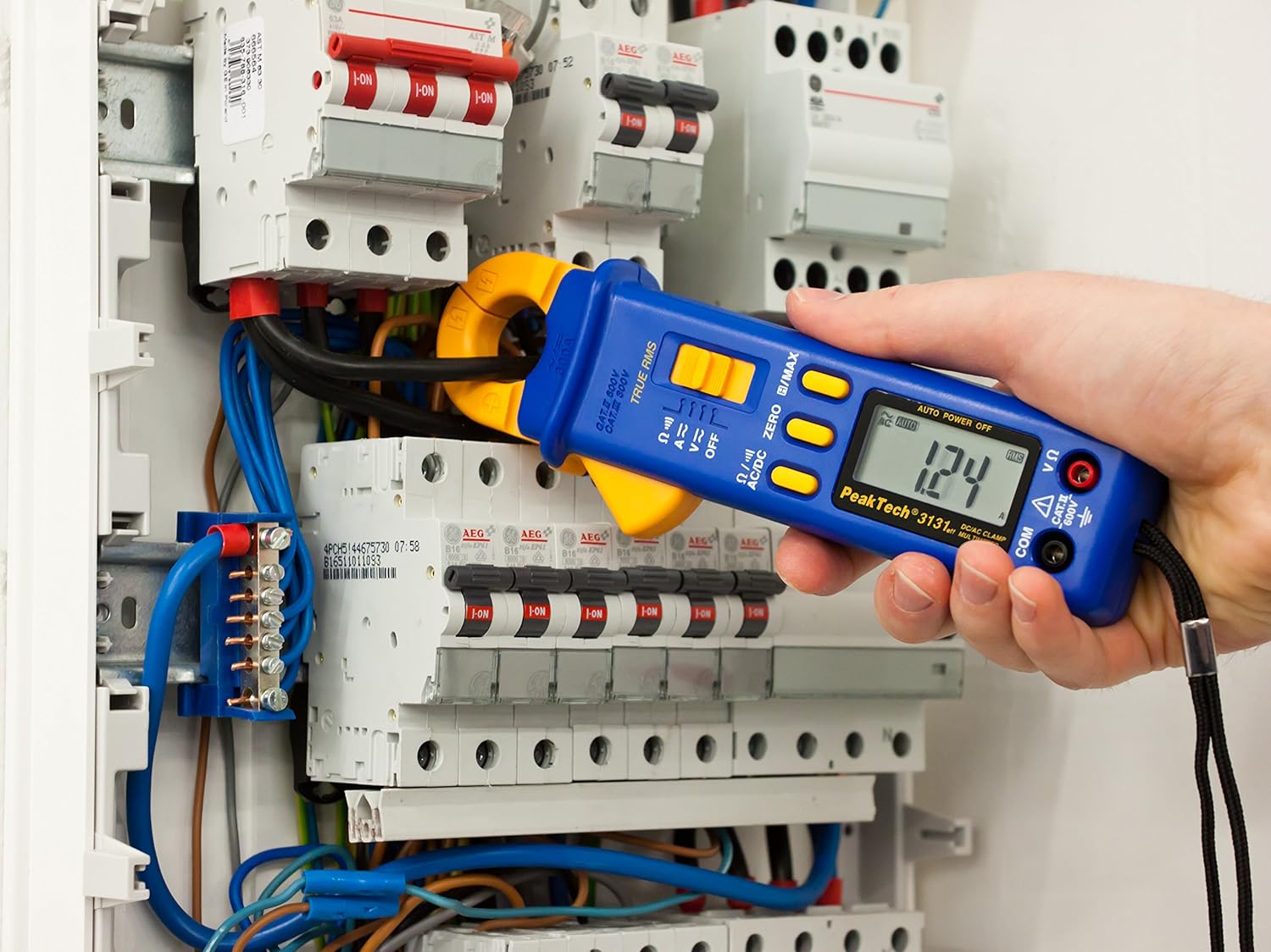
Figure 3: The PeakTech P 3131 Clamp Meter in use, measuring current on a single conductor within an electrical panel.
5.3 AC/DC ボリュームtag測定
体積を測定するtage:
- セクション 4.2 の説明に従ってテスト リード線を接続します。
- 機能セレクターダイヤルを回して V~ (AC巻tage) または V= (DC ボリュームtage) 位置。
- 測定する回路またはコンポーネントにテストプローブを並列に接続します。
- 巻を読むtagLCDディスプレイのe値。
5.4 抵抗と導通の測定
To measure resistance or check for continuity:
- セクション 4.2 の説明に従ってテスト リード線を接続します。
- 機能セレクターダイヤルを回して Ω/))) (Resistance/Continuity) position.
- For resistance: Connect the test probes across the component. Ensure the circuit is de-energized.
- For continuity: Touch the test probes to the two points you want to check. A continuous beep indicates a low-resistance path (continuity).
- LCD ディスプレイで抵抗値を読み取ります。
5.5 特殊関数
- 真の実効値: The meter measures True Root Mean Square values for AC voltage and current, providing accurate readings for non-sinusoidal waveforms.
- データホールド(H): を押す H/MAX ボタンを短く押すと、ディスプレイの現在の表示が固定されます。もう一度押すと解除されます。
- 最大値保持(MAX): を押し続けます H/MAX button to capture and display the maximum measured value. Press again to exit.
- ゼロ関数: Used to zero the display for DC current measurements to eliminate offset errors.
- 自動レンジング: メーターは適切な測定範囲を自動的に選択します。
- 自動電源オフ: The meter automatically turns off after a period of inactivity to save battery. This feature can typically be disabled by holding a specific button during power-on (refer to the device's on-screen indicators or a more detailed manual if available).
6. メンテナンス
6.1 クリーニング
メーターのケースを拭くamp 布と中性洗剤で拭いてください。研磨剤や溶剤は使用しないでください。使用前にメーターが完全に乾いていることを確認してください。
6.2 電池の交換
Refer to Section 4.1 for instructions on battery replacement. Always use two fresh 1.5V AAA batteries. Remove batteries if the meter is not used for an extended period to prevent leakage.
6.3 ストレージ
メーターは直射日光や極端な温度を避け、涼しく乾燥した場所に保管してください。付属のキャリングケースに入れて保護してください。
7。 トラブルシューティング
| 問題 | 考えられる原因 | 解決 |
|---|---|---|
| メーターの電源が入りません。 | 電池が切れているか、正しく取り付けられていない。 | 電池の極性を確認し、電池を交換してください。 |
| 「OL」または「OVER」が表示されます。 | 測定値が選択された範囲またはメーターの最大容量を超えています。 | Select a higher range (if manual ranging) or ensure measurement is within meter's limits. |
| Inaccurate DC current reading. | clの残留磁気amp あご。 | を押す ゼロ button before measurement. |
| 導通ビープ音はありません。 | 開回路または高抵抗。 | Check connections; ensure circuit is complete. |
If problems persist, contact PeakTech customer support or a qualified service technician.
8. 技術仕様
| パラメータ | 仕様 |
|---|---|
| 画面 | 3 3/4 digit LCD, max. 3999 counts |
| DCVol。tage(DCV) | 0.1 mV to 600 V (Accuracy: 0.5% + 2 digits) |
| ACVol。tage(ACV) | 1 mV to 600 V (Accuracy: 1.5% + 5 digits) |
| 直流電流 (DCA) | 10 mA to 300 A (Accuracy: 1% + 2 digits) |
| 交流電流 (ACA) | 10 mA to 300 A (Accuracy: 1% + 3 digits) |
| 抵抗(Ω) | 0.1 Ω to 40 MΩ (Accuracy: 0.9% + 2 digits) |
| 導通テスト | ブザー機能 |
| 真のRMS | Yes, for AC measurements |
| 顎を開く | 22 mm max. conductor diameter |
| 安全性評価 | EN 61010-1, CAT II 600 V |
| 電源 | 2V AAA電池1.5本 |
| 寸法(長さ×幅×高さ) | 192 x 66 x 27 mm(約7.56 x 2.6 x 1.06インチ) |
| 重さ | 205 g(約0.45ポンド) |
9. 保証とサポート
PeakTech products are manufactured under strict quality control. This product is covered by a standard manufacturer's warranty against defects in materials and workmanship. Please refer to the warranty card included with your product or visit the official PeakTech web詳細な保証条件については、サイトをご覧ください。
For technical support, service, or calibration inquiries, please contact your local PeakTech distributor or the PeakTech customer service department. Contact information can typically be found on the PeakTech webサイトまたは製品のパッケージ内。