導入
This manual provides essential instructions for the safe and effective operation of your Toshiba Camileo X200 HD 1080p Camcorder. Please read this manual thoroughly before using the device and retain it for future reference. The Camileo X200 is designed for capturing high-definition video and still images with ease.
箱の中身
パッケージ内のすべてのアイテムが揃っていることを確認します。
- Toshiba Camileo X200 HD 1080p Camcorder
- バッテリー
- USBケーブル
- ACアダプター
- ミニHDMIケーブル
- リモートコントロール
製品終了view
Familiarize yourself with the main components of your Camileo X200 camcorder.

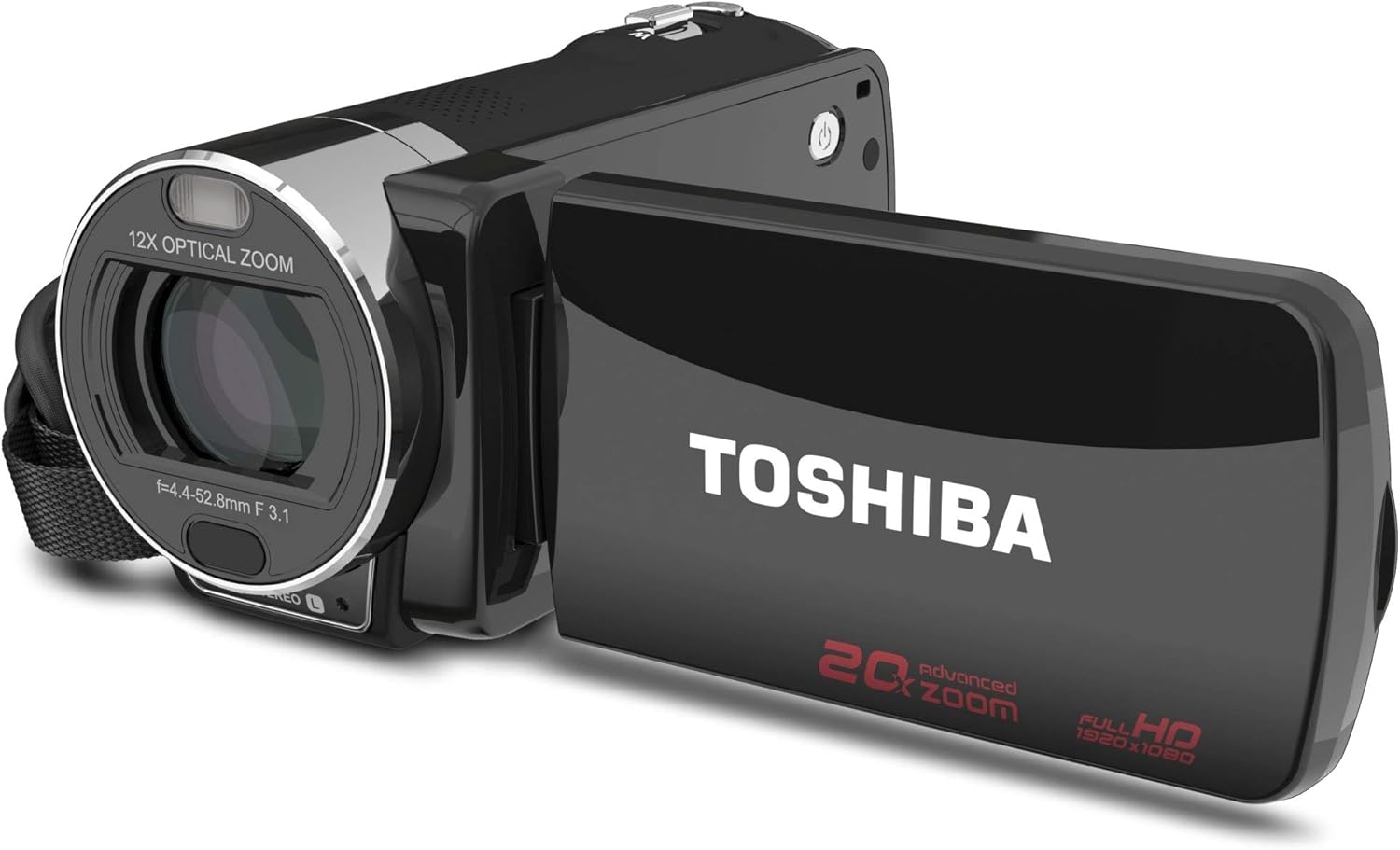
画像: 正面と側面 view of the Toshiba Camileo X200 camcorder with the 3-inch LCD screen open. The lens with "12X OPTICAL ZOOM" is visible, along with the "TOSHIBA" logo on the screen's exterior and "20x advanced zoom FULL HD 1920x1080" markings.
画像: サイド view of the Toshiba Camileo X200 camcorder, showing the USB and HDMI ports under a protective cover, and the record button.

画像: 上 view of the Toshiba Camileo X200 camcorder, highlighting the zoom lever and power button.
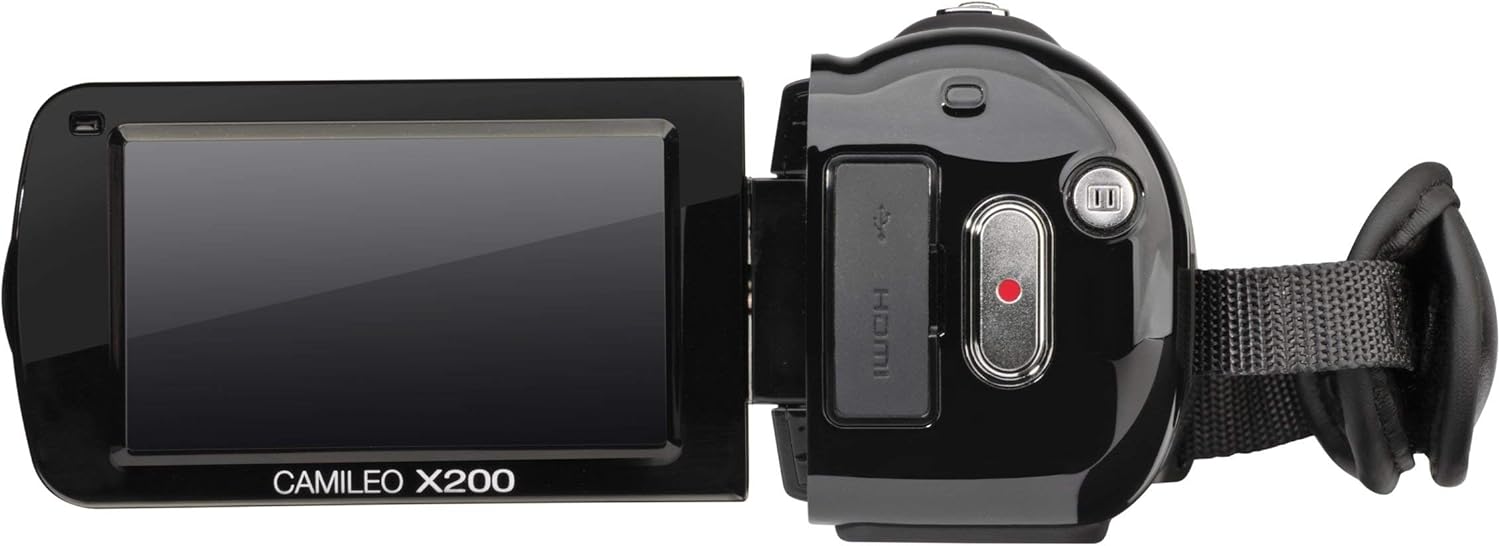
画像: 別の view of the Toshiba Camileo X200 camcorder with the screen open, showing the "CAMILEO X200" branding on the interior of the screen panel.
主要コンポーネント:
- レンズ: Features 12x optical zoom and 60x digital zoom.
- 3" Swiveling LCD Monitor: Touch screen interface for navigation and playback.
- 録音ボタン: ビデオ録画を開始および停止します。
- 電源ボタン: Turns the camcorder on or off.
- USBポート: パソコンに接続して充電します。
- HDMIポート: For connecting to an HDTV or monitor.
- マイクジャック: 外部マイクを接続します。
- SDカードスロット: For memory expansion (SD/SDHC/XD cards).
設定
1. 電池の挿入
- ビデオカメラの底部にある電池ケースのカバーを開きます。
- 付属のリチウムイオン電池を挿入し、接点が正しく揃っていることを確認します。
- 電池ケースのカバーをカチッと音がするまでしっかりと閉じます。
2. バッテリーの充電
初めて使用する前に、バッテリーを完全に充電してください。
- Connect the AC adapter to the camcorder's USB port.
- ACアダプターを電源コンセントに差し込みます。充電インジケーターライトが点灯します。
- Charging can also be done via USB connection to a computer.
3. メモリーカードの挿入
The Camileo X200 requires an SD, SDHC, or XD memory card (not included) for recording.
- メモリ カード スロットを見つけます。通常は、ビデオカメラの側面または底面にあります。
- Insert the memory card with the metal contacts facing down (or as indicated by the diagram near the slot) until it clicks into place.
- 取り外すには、カードが飛び出すまでゆっくりと押し込みます。
操作手順
1.電源のオン/オフ
- 電源を入れるには、LCD 画面を開くか、電源ボタンを押します。
- 電源を切るには、LCD 画面を閉じるか、電源ボタンを長押しします。
2. ビデオ録画
- フォーマットされたメモリ カードが挿入されていることを確認します。
- ビデオカメラの電源を入れます。
- LCD 画面を使用してショットをフレーミングします。
- Press the Record button (usually a red circle) to start recording. The recording indicator will light up.
- 録音ボタンをもう一度押すと、録音が停止します。
- 注記: The camcorder records in 1920x1080p Full HD resolution.
3. 写真を撮る
- Switch the camcorder to photo mode (if applicable, via the touch screen menu).
- ショットをフレーミングします。
- Press the Shutter button (often integrated with the record button or a separate button) to capture a 16MP interpolated photo.
4. Zoomの使用
- Use the zoom lever (typically located near the top of the camcorder) to zoom in (T for Telephoto) or zoom out (W for Wide).
- The camcorder features 12x optical zoom and 60x digital zoom. Optical zoom provides higher quality without pixelation.
5. 3インチタッチスクリーンの使用
- Navigate menus, change settings, and review フーtage by touching the LCD screen.
- On-screen editing features allow for trimming videos directly on the device.
6. 電子式手ぶれ補正(EIS)
The Camileo X200 includes Electronic Image Stabilization to reduce blur caused by camera shake during recording. This feature is automatically engaged.
7. オーディオ機能
- The camcorder has a built-in stereo microphone for capturing audio.
- An external microphone can be connected via the microphone jack for enhanced audio quality.
8. 特別な機能
Explore the menu for options such as slow-motion recording, time-lapse, and various color filters (e.g., black and white).
9. コンピュータへの接続
- Connect the camcorder to your computer using the supplied USB cable.
- The camcorder will appear as a removable drive, allowing you to transfer video and photo files.
- The Toshiba CAMILEO Uploader software (if available for your OS) can assist with web アップロード。
10. Connecting to a TV (HDMI)
- Use the included mini HDMI cable to connect the camcorder to an HDTV or monitor.
- Switch your TV's input to the corresponding HDMI port to view 録画を高解像度で保存します。
メンテナンス
ビデオカメラのクリーニング
- ビデオカメラの外側を清掃するには、柔らかく乾いた布を使用してください。
- レンズと液晶画面には、傷を防ぐために専用のレンズクリーニングクロスと洗浄液を使用してください。
- 強力な化学薬品や研磨材の使用は避けてください。
バッテリーケア
- バッテリーを使用しないときは、涼しく乾燥した場所に保管してください。
- バッテリーの寿命を延ばすために、バッテリーを頻繁に完全に放電することは避けてください。
- 長期間保管する場合は、バッテリーを約 50% の容量まで充電してください。
ストレージ
- Store the camcorder in a protective case to prevent dust and damage.
- Avoid exposing the camcorder to extreme temperatures or high humidity.
トラブルシューティング
次の一般的な問題と解決策を参照してください。
| 問題 | 考えられる原因 / 解決策 |
|---|---|
| ビデオカメラの電源が入りません。 | Battery is depleted. Charge the battery using the AC adapter or USB cable. Ensure the battery is correctly inserted. |
| Poor autofocus performance. | The camcorder may take a few seconds to focus, especially during zoom operations or in low light. Ensure sufficient lighting and stable camera movement. |
| Video appears shaky or blurry. | While Electronic Image Stabilization (EIS) is present, excessive movement, especially at higher zoom levels, can still cause blur. Use a tripod or stabilize the camcorder for best results. |
| バッテリー寿命が短い。 | Battery life can vary based on usage and settings. Ensure the battery is fully charged. For extended recording, consider using the AC adapter or having a spare charged battery. |
| 転送できません files をコンピューターに送信します。 | Ensure the USB cable is securely connected to both the camcorder and the computer. Check if the camcorder is recognized as a removable drive. Try a different USB port or cable. |
| タッチスクリーンが反応しません。 | Clean the screen with a soft cloth. Restart the camcorder. If the issue persists, contact customer support. |
仕様
| 特徴 | 詳細 |
|---|---|
| ビデオキャプチャ解像度 | 1080p フルHD (1920x1080) |
| フォトセンサー技術 | CMOS (8MP sensor, 16MP interpolated photos) |
| 光学ズーム | 12倍 |
| デジタルズーム | 60倍 |
| 画面サイズ | 3 Inches (swiveling LCD touch screen) |
| 画像安定化 | 電子画像安定化(EIS) |
| フラッシュメモリタイプ | SD; SDHC; XD (card not included) |
| ビデオキャプチャフォーマット | H.264、MPEG-4 |
| サポートされているオーディオ形式 | MP3、AAC、MPXNUMX |
| 接続技術 | HDMI、USB |
| アイテム重量 | 1.2ポンド |
| 製品寸法 | 4.69 x 2.09 x 2.36インチ |
| モデル番号 | PA3973U-1C0K |
| 電池が必要 | リチウムイオン電池1個(付属) |
公式製品ビデオ
Watch this official video for additional guidance on using your Toshiba Camileo X200.
ビデオ: 短い事前view video demonstrating the Toshiba Camileo X200 camcorder's features and usage. This video is provided by the seller.
保証とサポート
For warranty information and technical support, please refer to the documentation included with your purchase or visit the official Toshiba support webサイトでご確認ください。保証請求に備えて購入証明書を保管してください。