1.製品オーバーview
The POLY Plantronics CS540/A is a wireless DECT monaural headset designed for clear communication in professional environments. This convertible headset offers multiple wearing styles to suit individual preferences, providing comfort and flexibility for extended use. It features a lightweight design and intuitive call controls.
主な特徴:
- Wireless DECT connectivity for extended range and security.
- Convertible design for multiple wearing styles (ear hook, headband).
- Lightweight construction for all-day comfort.
- Intuitive call control buttons on the headset.
- Noise-canceling microphone for clear voice transmission.
箱の中身:
- CS540/A Wireless Headset
- 基地局
- Ear hook and Headband wearing styles
- 電源アダプター
- 電話インターフェースケーブル
- Lithium Polymer Battery (pre-installed or separate)

Image 1.1: The Plantronics CS540/A wireless headset docked in its base station.
2.セットアップガイド
2.1 ヘッドセットの充電
- 電源アダプタをベースステーションに接続し、電源コンセントに差し込みます。
- Place the headset into the charging cradle of the base station. The charge indicator light on the headset will illuminate to confirm charging.
- Allow approximately 3 hours for a full charge. A fully charged headset provides up to 6 hours of talk time.
2.2 Connecting to a Desk Phone
The CS540/A connects to most standard desk phones. Refer to your phone's user manual for specific port locations.
- Disconnect the handset coil cord from the base of the desk phone.
- Connect the telephone interface cable from the CS540/A base station to the handset port on the desk phone.
- Connect the desk phone's handset coil cord to the handset port on the CS540/A base station.
- Ensure the compatibility switch on the CS540/A base station is set to the correct position for your desk phone. Test by making a call and adjusting if necessary.
2.3 ヘッドセットの装着
The CS540/A offers convertible wearing styles. Choose the one that provides the most comfort and stability.
- 耳かけフック: Attach the ear hook to the headset. Gently place the ear hook over your ear, positioning the speaker comfortably against your ear and the microphone near your mouth.
- ヘッドバンド: Attach the headband to the headset. Adjust the headband for a secure yet comfortable fit, ensuring the speaker rests on your ear and the microphone is positioned for optimal voice pickup.
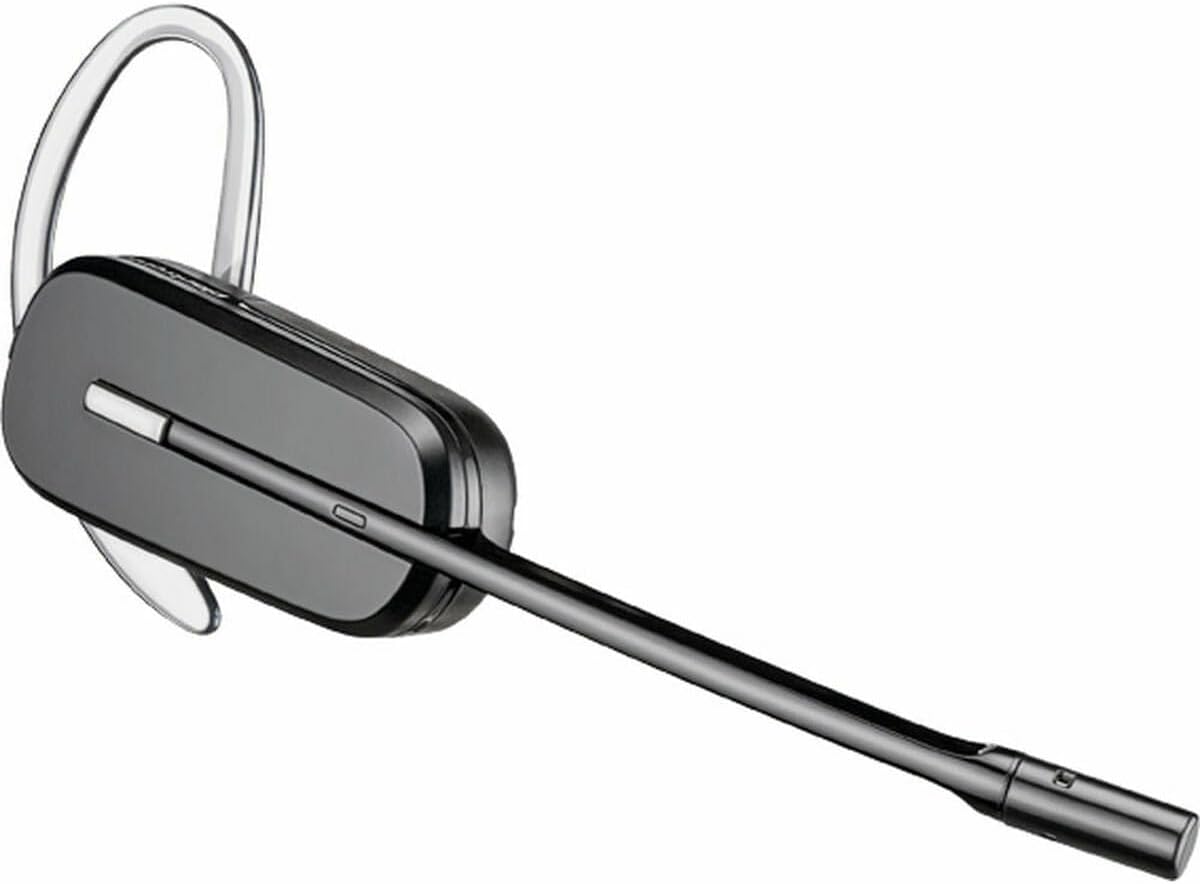
Image 2.1: The CS540/A headset configured with an ear hook.

Image 2.2: The CS540/A headset configured with a headband.
3. 操作手順
3.1電話の発信と応答
- 電話に出るには: ヘッドセットの通話制御ボタンを押します。
- 通話を終了するには: Press the Call Control button again.
- 電話をかけるには:
- Ensure the headset is powered on and connected to the base.
- ヘッドセットの通話制御ボタンを押します。
- Dial the number on your desk phone.
3.2 ボリュームコントロール
Use the volume rocker switch on the headset to adjust the listening volume.
- を押す + side to increase volume.
- を押す - side to decrease volume.
3.3 ミュート機能
To mute the microphone during a call, press the Mute button on the headset. Press it again to unmute.

Image 3.1: A user wearing the Plantronics CS540/A headset during a call.
4. メンテナンス
4.1 ヘッドセットのクリーニング
定期的にクリーニングすると、ヘッドセットのパフォーマンスと衛生状態を維持するのに役立ちます。
- ヘッドセットとベース ステーションを、柔らかく乾いた静電気防止布で拭いてください。
- 過酷な化学薬品や研磨剤入りのクリーナーは使用しないでください。
- 開口部に湿気が入らないようにしてください。
4.2バッテリーケア
The headset uses a Lithium Polymer battery. To maximize battery life:
- 初めて使用する前にヘッドセットを完全に充電してください。
- 極端な温度を避けてください。
- If the headset will not be used for an extended period, charge it periodically.
- The battery is replaceable; contact support for replacement options if needed.
5。 トラブルシューティング
If you encounter issues with your CS540/A headset, try the following solutions:
5.1 No Dial Tone or Audio
- Ensure the headset is fully charged and powered on.
- Verify all cables are securely connected between the base station and the desk phone.
- Check the compatibility switch on the base station. Adjust it to different positions until a dial tone is heard.
- Confirm the desk phone's handset is properly seated or lifted (if not using an electronic hookswitch).
5.2 音質が悪い
- Adjust the listening volume on the headset.
- Ensure the microphone is positioned correctly, approximately two finger-widths from your mouth.
- Check for interference from other wireless devices. Move the base station away from other electronics.
- If using a desk phone, adjust the transmit and receive volume controls on the base station (if available).
5.3 Headset Not Pairing with Base
- Ensure both the headset and base are powered on.
- Place the headset in the charging cradle. The charge indicator should light up.
- If pairing is lost, refer to the full Plantronics CS540/A user guide for re-pairing instructions, which typically involves pressing a pairing button on the base and headset.
6. 仕様
| 特徴 | 詳細 |
|---|---|
| モデル名 | CS540A |
| 商品型番 | 84693-02 |
| ブランド | POLY (formerly Plantronics) |
| 接続技術 | ワイヤレス(DECT) |
| 無線通信技術 | DECT 6.0 (1920-1930 MHz) |
| 着用スタイル | Convertible (Ear Hook, Headband) |
| バッテリー寿命(通話時間) | 最大6時間 |
| 充電時間 | 約3時間 |
| マイクロフォン | ノイズキャンセリング |
| コントロールタイプ | Call Control, Volume, Mute |
| アイテム重量 | 0.7 Ounces (headset only) |
| 製品寸法 | 8.07 x 5.51 x 4.53 inches (packaging/base) |
| 材料 | プラスチック |
| 電源 | AC Adapter (for base station) |
7. 保証とサポート
7.1 限定保証
This product is covered by a limited warranty provided by POLY. The warranty typically covers manufacturing defects for a specified period from the date of purchase. Please retain your proof of purchase for warranty claims. For specific warranty terms and conditions, refer to the official POLY webサイトまたは製品に付属の保証カードをご覧ください。
7.2 カスタマーサポート
For further assistance, technical support, or to inquire about replacement parts, please visit the official POLY support website or contact their customer service. You can often find detailed FAQs, troubleshooting guides, and contact information on their webサイト。
Official POLY Webサイト: www.poly.com


