BlackBerry BB 9900

BlackBerry BB 9900 Bold Touch Smartphone User Manual

Model: BB 9900

1. はじめに

This manual provides essential instructions for setting up, operating, and maintaining your BlackBerry BB 9900 Bold Touch smartphone. Please read this guide thoroughly to ensure proper use and to maximize the device's capabilities. The BlackBerry BB 9900 Bold Touch combines a capacitive touchscreen with a full QWERTY keyboard, running on BlackBerry OS 7.

2. パッケージ内容

パッケージに次のアイテムが含まれていることを確認してください。

3.デバイスオーバーview

Familiarize yourself with the physical features of your BlackBerry BB 9900 Bold Touch.

3.1フロント View

BlackBerry BB 9900 Bold Touch front view, showing the screen, QWERTY keyboard, and navigation buttons.

画像: 正面 view of the BlackBerry BB 9900 Bold Touch, highlighting the 2.8-inch touchscreen and the physical QWERTY keyboard below it. The device also features a trackpad and call/end buttons.

  • タッチスクリーンディスプレイ: 2.8-inch capacitive display for interactive navigation.
  • QWERTYキーボード: Full physical keyboard for efficient typing.
  • Optical Trackpad: For precise navigation and selection.
  • 通話/終了ボタン: Standard telephony controls.

3.2 リア View

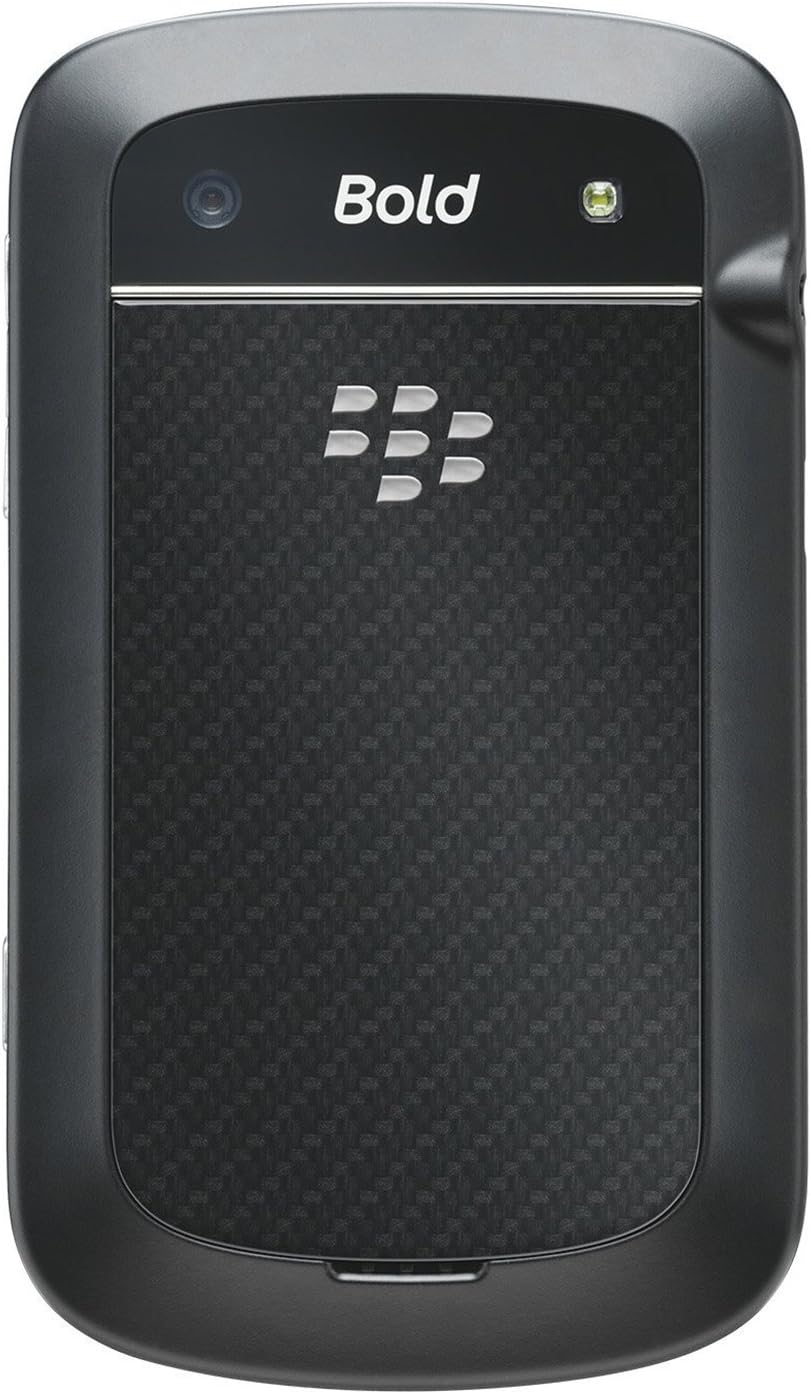
BlackBerry BB 9900 Bold Touch rear view, showing the 5MP camera lens and LED flash.

画像: 背面 view of the BlackBerry BB 9900 Bold Touch, featuring the 5-megapixel camera lens, LED flash, and the BlackBerry logo.

  • 5MPカメラ: Primary camera with autofocus and LED flash.
  • バッテリーカバー: Removable cover for battery and SIM card access.

3.3 サイド View
BlackBerry BB 9900 Bold Touch side view, showing volume buttons and convenience key.

画像: サイド view of the BlackBerry BB 9900 Bold Touch, illustrating the placement of the volume control buttons and a customizable convenience key.

  • 音量ボタン: オーディオレベルを調整します。
  • Convenience Key: カスタマイズ可能なショートカット ボタン。

4. セットアップ

4.1 SIMカードの挿入

  1. デバイスの背面からバッテリーカバーを取り外します。
  2. SIMカードスロットを見つけます。
  3. SIM カードは、金色の接点を下に向けて、切り取られた角をスロットに合わせて挿入します。
  4. SIM カードがしっかりと固定されていることを確認してください。

4.2バッテリーの挿入

  1. After inserting the SIM card, align the battery's gold contacts with the contacts in the battery compartment.
  2. カチッと音がするまでバッテリーをゆっくりと押し込みます。
  3. 電池カバーを取り付けます。

4.3デバイスの充電

  1. Connect the USB cable to the charging port on your device.
  2. Plug the other end of the USB cable into the wall charger, then into a power outlet.
  3. 初めて使用する前に、デバイスを完全に充電してください。画面上のバッテリーインジケーターに充電状態が表示されます。

4.4 電源のオン/オフ

  • 電源を入れるには: Press and hold the Power/Lock button (usually located on the top edge) until the BlackBerry logo appears.
  • 電源を切るには: Press and hold the Power/Lock button until the 'Power Off' option appears on the screen. Tap 'Power Off' to confirm.

5. 操作手順

5.1 タッチスクリーンナビゲーション

  • タップ: 画面を軽くタッチすると、アプリケーションを開いたり、項目を選択したり、ボタンをアクティブにしたりできます。
  • スワイプ: Drag your finger across the screen to scroll through lists or switch between home screen panels.
  • ピンチしてズーム: Use two fingers to zoom in or out on photos, web ページやマップなど。

5.2 QWERTYキーボードの使用

The physical QWERTY keyboard allows for fast and accurate text entry. Each key corresponds to a letter, number, or symbol. Use the 'Alt' key for alternate characters and the 'Shift' key for capitalization.

5.3 電話をかける

  1. From the home screen, tap the Phone icon or press the green Call button.
  2. Enter the phone number using the keyboard.
  3. 通話を開始するには、緑色の通話ボタンを押します。
  4. To end a call, press the red End Call button.

5.4 メッセージの送信

  1. Tap the Messages icon from the home screen.
  2. Select 'Compose New' or similar option.
  3. 受信者の番号を入力するか、連絡先から選択します。
  4. QWERTY キーボードを使用してメッセージを入力します。
  5. Tap 'Send'.

5.5 カメラの使用

  1. カメラアイコンをタップしてカメラアプリケーションを開きます。
  2. スクリーンをフレームとして使ってショットを撮影する viewファインダ。
  3. Tap the screen or press the convenience key (if configured) to take a photo.
  4. The 5MP camera features autofocus and an LED flash for improved image quality.

5.6 Wi-Fiへの接続

  1. Go to 'Options' > 'Networks and Connections' > 'Wi-Fi'.
  2. Wi-Fiをオンにします。デバイスは利用可能なネットワークをスキャンします。
  3. 希望するネットワークを選択し、プロンプトが表示されたらパスワードを入力します。
  4. Once connected, the Wi-Fi indicator will appear in the status bar.

5.7 Using NFC (Near Field Communication)

The BlackBerry BB 9900 Bold Touch supports NFC for short-range wireless communication. This allows for quick pairing with compatible accessories or sharing data with other NFC-enabled devices by tapping them together.

  1. デバイス設定で NFC が有効になっていることを確認してください。
  2. Hold your device close to another NFC-enabled device or tag.
  3. Follow on-screen prompts to complete the desired action (e.g., pairing, data transfer).

6. メンテナンス

6.1 デバイスのクリーニング

  • 柔らかく糸くずの出ない布を使用して、デバイスの画面と本体を拭いてください。
  • 強力な化学薬品、研磨剤入りの洗剤、エアゾールスプレーの使用は避けてください。
  • デバイスを過度の湿気にさらさないでください。

6.2バッテリーケア

  • バッテリーのパフォーマンスを低下させる可能性のある極端な温度を避けてください。
  • 純正または承認された充電器のみを使用してください。
  • バッテリーに穴を開けたり損傷を与えたりしないでください。

6.3ソフトウェアアップデート

Periodically check for software updates to ensure your device has the latest features and security enhancements. Updates can typically be found in the device's 'Options' or 'Settings' menu under 'Software Updates'.

7。 トラブルシューティング

7.1 デバイスの電源が入らない

  • バッテリーが正しく挿入され、充電されていることを確認してください。
  • デバイスを充電器に接続し、数分間待ってから再度電源を入れてください。
  • 問題が解決しない場合は、バッテリーを取り外して再度挿入してみてください。

7.2 ネットワーク接続の問題

  • Check if your SIM card is correctly inserted and activated with your carrier.
  • Verify that cellular data or Wi-Fi is enabled in your device settings.
  • デバイスを再起動します。
  • If using Wi-Fi, ensure your router is working and you have entered the correct password.

7.3 タッチスクリーンが反応しない

  • デバイスを再起動します。
  • 画面がきれいで、ゴミや湿気がないことを確認してください。
  • If the issue is intermittent, check for any recent software installations that might be causing conflicts.

8. 仕様

特徴 詳細
モデル名 BB9900
オペレーティング·システム ブラックベリーOS 7
画面 2.8-inch Capacitive Touchscreen, 640 x 480 Resolution
プロセッサ Not specified (typically 1.2 GHz for this model)
ラム 768MB
内部ストレージ 8ギガバイト
リアカメラ 5 MP, Autofocus, LED Flash
接続性 Wi-Fi 802.11 b/g/n, NFC, Bluetooth, GPS
ネットワークサポート Quad-band GSM/GPRS/EDGE, Tri-band HSPA+
寸法 4.53 x 2.6 x 0.41 インチ (115 x 66 x 10.5 mm)
重さ 4.6オンス(130グラム)
オーディオジャック 3.5ミリメートル

9.サポートと保証

9.1 カスタマーサポート

For technical assistance, troubleshooting beyond this manual, or service inquiries, please visit the official BlackBerry support website or contact your local service provider. Refer to the packaging or official web具体的な連絡先の詳細については、サイトをご覧ください。

9.2 保証情報

Your BlackBerry BB 9900 Bold Touch is covered by a limited warranty. Please refer to the warranty card included in your product packaging or visit the official BlackBerry web保証期間や保証内容を含む詳細な利用規約については、ウェブサイトをご覧ください。保証請求の際は、購入証明書を保管してください。

関連文書 - BB9900

前view BlackBerry Q10 スマートフォン ユーザーガイド
BlackBerry Q10スマートフォンの総合ガイド。BlackBerry Hub、キーボード、BBMビデオ、カメラ、メディア共有、デバイス設定などの機能を網羅しています。生産性を最大限に高め、エクスペリエンスをカスタマイズする方法を学びましょう。
前view BlackBerry Java 開発環境: GPS および BlackBerry マップ開発ガイド
このガイドでは、BlackBerry Java 開発環境内での GPS と BlackBerry Maps 機能の統合について詳しく説明し、位置認識アプリケーションを構築する開発者向けの技術リソースとして役立ちます。
前view Android 向け BlackBerry Tasks ユーザーガイド | 安全なタスク管理
公式の BlackBerry Tasks for Android ユーザー ガイド (v3.17) には、BlackBerry の安全なエンタープライズ タスク管理アプリケーションのインストール、アクティベーション、タスク管理、設定、トラブルシューティングに関する包括的な手順が記載されています。
前view BlackBerry Q5 スマートフォン ユーザーガイド: セットアップ、機能、操作
この包括的なユーザーガイドでは、BlackBerry Q5スマートフォンの操作に関する詳細な情報と手順を説明しています。生産性と接続性を向上させるために設計されたBlackBerry 10 OSバージョン10.2.1の機能についても説明しています。
前view BlackBerry Z30 スマートフォン ユーザーガイド: 機能、セットアップ、操作
BlackBerry Z30スマートフォン(バージョン10.3.2)の包括的なユーザーガイドをご覧ください。このガイドでは、デバイスのセットアップ、機能の操作、通信の管理、メディア機能の活用、設定のカスタマイズ、そして最適なユーザーエクスペリエンスを実現するためのセキュリティ強化について、詳細な手順を説明しています。
前view BlackBerry Work, Notes, and Tasks Administration Guide
Comprehensive administration guide for BlackBerry Work, Notes, and Tasks, detailing setup, configuration, management, and troubleshooting for IT administrators using BlackBerry UEM.