1. はじめに
The Linksys SE1500 is a 5-Port Fast Ethernet Switch designed to expand your wired network. It allows you to connect up to five devices, such as computers, printers, storage devices, and gaming consoles, at speeds up to 100 Mbps. This device provides a simple and efficient way to add more wired connections to your existing network without complex configuration.

図1: 前面 view of the Linksys SE1500 5-Port Fast Ethernet Switch.
2. パッケージ内容
パッケージに次のアイテムが含まれていることを確認してください。
- Linksys SE1500 5-Port 10/100 Switch
- 電源アダプター
- クイックスタートガイド(このマニュアルには含まれていません)
3 製品の特徴
The Linksys SE1500 switch offers the following key features:
- 5 つのファスト イーサネット ポート: Provides five 10/100 Mbps ports for connecting wired devices.
- Auto-Sensing Ports: Automatically detects and optimizes the speed for each connected device.
- サービス品質 (QoS): Prioritizes traffic for smooth performance of bandwidth-intensive applications.
- 省電力機能: Includes auto power-down for unused ports and a port status switch to disable LED indicators, reducing energy consumption.
- プラグ&プレイ: Requires no software configuration for basic operation.
4. セットアップ手順
Follow these steps to set up your Linksys SE1500 switch:
- スイッチの位置: スイッチは平らで安定した面に置くか、適切な場所に取り付けてください。機器の周囲に十分な換気を確保してください。
- 電源アダプタを接続します: Plug the included power adapter into the 12V DC port on the back of the switch. Then, plug the other end of the power adapter into a standard electrical outlet. The power LED on the front of the switch should illuminate.
- ネットワークに接続します: Connect an Ethernet cable from your router or modem to any of the five numbered Ethernet ports on the back of the SE1500 switch.
- デバイスを接続する: Connect your wired devices (e.g., computer, printer, gaming console) to the remaining Ethernet ports on the switch using Ethernet cables. The switch's auto-sensing ports will automatically detect the connection speed.
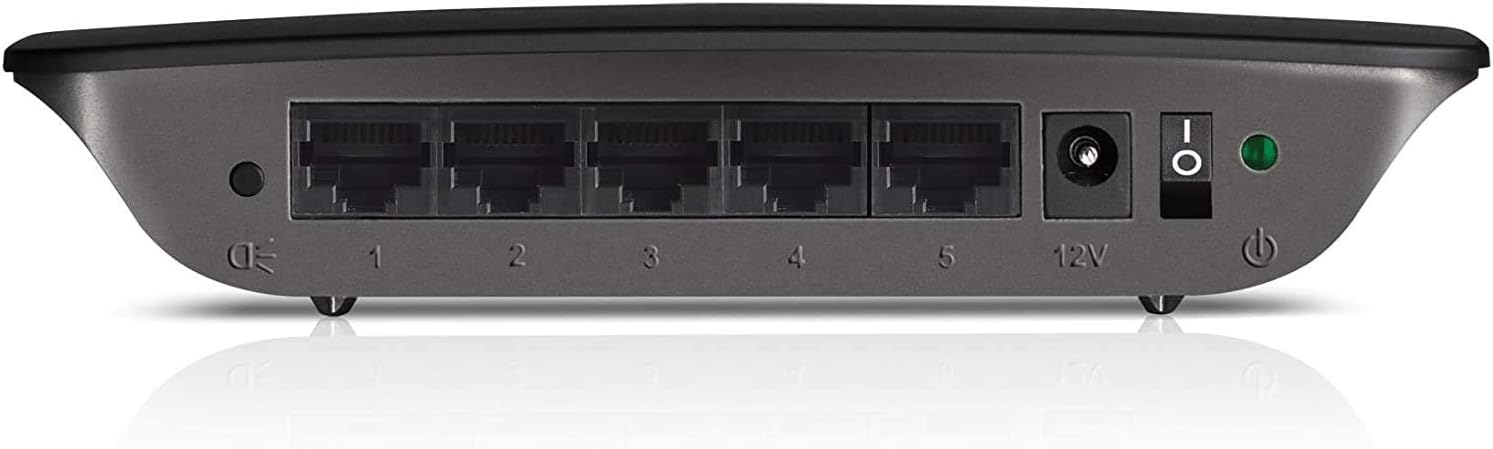
Figure 2: Rear panel of the Linksys SE1500, showing Ethernet ports, power input, and power switch.
5. 操作手順
The Linksys SE1500 is a plug-and-play device, meaning it typically requires no software configuration. Once connected, it operates automatically.
LEDインジケーター
スイッチの前面パネルには、ステータス情報を提供する LED インジケータが搭載されています。
- 電源LED: スイッチの電源が入ると点灯します。
- ポート LED (1 ~ 5): Each numbered port has an associated LED.
- 緑色の点灯: Indicates a successful link connection at 100 Mbps.
- 琥珀色: Indicates a successful link connection at 10 Mbps.
- 点滅: ネットワークアクティビティ(データ転送)を示します。
- オフ: リンクが検出されないか、ポートが非アクティブです。
省電力モード
The SE1500 automatically enters a power-saving mode when a connected device is turned off or when a port is unused. This feature helps reduce energy consumption. You can also use the port status switch on the rear panel to turn off the port LEDs if desired.
6. メンテナンス
To ensure optimal performance and longevity of your Linksys SE1500 switch, consider the following maintenance tips:
- 清潔に保ちます: Regularly wipe the exterior of the switch with a soft, dry cloth. Avoid using liquid cleaners or aerosols.
- 換気を確保してください: Do not block the ventilation openings on the switch. Ensure it is placed in an area with good airflow to prevent overheating.
- ケーブル管理 Keep Ethernet cables neatly organized to prevent accidental disconnections or damage.
- Power Cycle (if needed): スイッチが応答しなくなった場合は、電源アダプターを外し、10 秒待ってから再度接続してください。
7。 トラブルシューティング
If you encounter issues with your Linksys SE1500 switch, try the following troubleshooting steps:
- 電源なし:
- 電源アダプタがスイッチと機能している電源コンセントにしっかりと接続されていることを確認します。
- Verify the power switch on the rear panel is in the "On" position.
- リンクライトなし:
- イーサネット ケーブルがスイッチ ポートと接続されたデバイスの両方にしっかりと接続されていることを確認します。
- 別のイーサネット ケーブルを試してください。
- 接続されているデバイスの電源がオンになっていて、正しく機能していることを確認します。
- If the port status switch is off, toggle it to enable the LEDs.
- ネットワーク速度が遅い:
- Ensure all connected devices and cables support Fast Ethernet (100 Mbps) for optimal performance.
- Check for excessive network traffic or issues with your internet service provider (ISP) or router.
- 断続的な接続:
- イーサネット ケーブルに損傷がないか検査します。
- Try connecting devices to different ports on the switch.
- Power cycle the switch, router, and connected devices.
8. 仕様
| モデル | SE1500 |
| ブランド | リンクシス |
| ポート数 | 5 |
| インターフェースタイプ | RJ45 |
| データ転送速度 | 10/100 Mbps(ファストイーサネット) |
| 製品寸法 | 4.29 x 6.06 x 1.14インチ |
| アイテム重量 | 5.4オンス(0.34ポンド) |
| 色 | 黒 |
| 対応デバイス | デスクトップ、ゲーム機、ノートパソコン、プリンター |
| 含まれるコンポーネント | 5-port 10/100 Switch, Power Adapter |
9. 保証とサポート
For detailed warranty information and technical support, please refer to the documentation included with your purchase or visit the official Linksys support webサイトをご覧ください。保証条件は地域によって異なる場合があります。
リンクシスサポート Webサイト: www.linksys.com/support


