1. はじめにview
This manual provides essential instructions for the safe and efficient use of your Samsung EC-SH100 Wi-Fi Digital Camera. The EC-SH100 is a 14.2-megapixel digital camera featuring a 5x optical zoom, a 3-inch touchscreen, and integrated Wi-Fi capabilities for easy sharing and connectivity.
主な機能は次のとおりです。
- Wi-Fi technology for direct photo and video uploads to social media (Facebook, YouTube) or email.
- Intuitive 3-inch LCD touchscreen with drag-and-scroll functionality.
- 14.2-megapixel resolution and 5x optical zoom for high-quality images.
- Face, smile, and blink detection for optimal portrait shots.
- Wireless, automatic file backup to your personal computer.

図1.1: 前面 view of the Samsung EC-SH100 Wi-Fi Digital Camera, showcasinレンズとフラッシュを取り付けます。
2. 箱の中身
Please check that all the following items are included in your product package:
- Samsung EC-SH100 Digital Camera
- AC Adapter/USB Cable
- 充電式リチウムイオン電池
- ストラップ
- タッチペン
- ユーザーマニュアルCD-ROM
- クイックスタートマニュアル
3. セットアップ
3.1. バッテリーの充電
- Insert the rechargeable lithium-ion battery into the camera's battery compartment.
- Connect the camera to the AC adapter using the provided USB cable.
- ACアダプターを電源コンセントに差し込みます。充電インジケーターが点灯します。
- 初めて使用する前に、バッテリーを完全に充電してください。
3.2. メモリーカードの挿入
The camera requires a microSD card (up to 8 GB supported) to store photos and videos. A memory card is not included in the box and must be purchased separately.
- メモリーカードスロットカバーを開けます。
- 金色の接点を下に向けて、カチッと音がするまで microSD カードを挿入します。
- メモリカードスロットカバーをしっかりと閉じます。
3.3.電源のオン/オフ
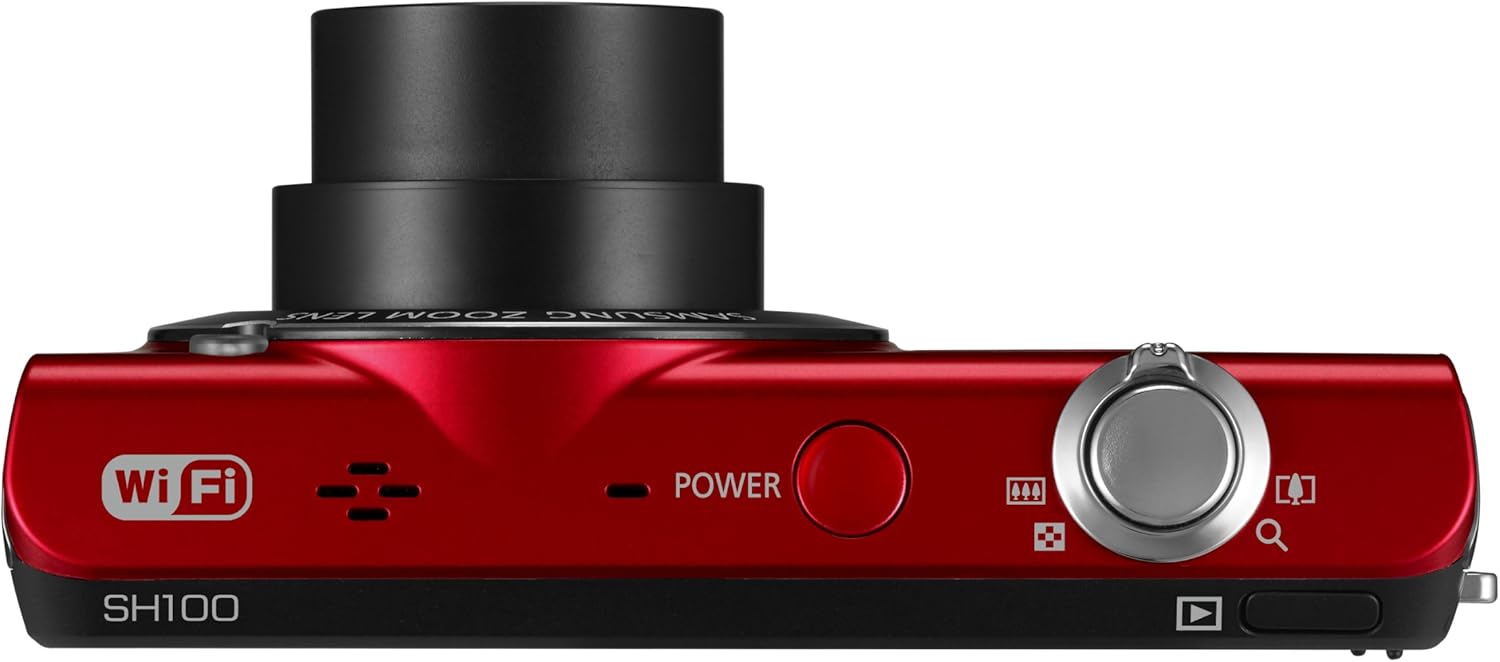
図3.1:上 view カメラの電源ボタンを強調表示します。
を押す 力 カメラの上部にあるボタンで電源のオン/オフを切り替えます。
4. カメラの操作
4.1. 基本的な写真撮影
- カメラをオンにします。
- 3 インチ LCD タッチスクリーンを使用してショットをフレーミングします。
- シャッターボタンを半押ししてフォーカスを合わせ、完全に押して画像を撮影します。
4.2. Using the Smart Touch Interface

図4.1:背面 view of the camera, showing the Smart Touch interface.
The 3-inch LCD touchscreen allows for intuitive navigation similar to a smartphone. Use the included touch pen or your finger to tap icons, drag, and scroll through menus and images. The "Home" icon provides quick access to the main menu.
4.3. Smart Auto 2.0
The Smart Auto 2.0 feature automatically analyzes the scene and selects the most appropriate shooting mode from 17 photo modes and 4 movie modes to ensure optimal image quality.
4.4. Face, Smile, and Blink Detection
This feature detects up to nine faces in a frame, adjusting lighting for optimal results. The camera can be set to automatically capture a photo when subjects smile or laugh, and prevent a shot if anyone's eyes are closed.
4.5. Digital Image Stabilization
Digital Image Stabilization (DIS) helps reduce blur caused by camera shake, especially in low light conditions or when using the zoom. This feature digitally corrects image data before it is recorded.
4.6. Wi-Fi接続と共有
The EC-SH100's integrated Wi-Fi allows for direct sharing:
- ソーシャルシェアリング: Upload photos and videos directly to Facebook, Picasa, or YouTube.
- メールアドレス: Send photos directly from the camera via email.
- AllShare: Wirelessly connect to a compatible Samsung TV to view 写真とビデオ。
- PC Auto Backup: Automatically transfer photos and videos to your PC when within range of a configured Wi-Fi network. The camera will power off after backup to conserve energy.
4.7. Magic Frame
Use Magic Frame to combine two photos using predefined templates, creating unique visual effects and poster-quality images.
4.8. リモート Viewファインダ
When paired with a compatible Samsung Galaxy Phone, the Remote Viewfinder feature allows you to preview images and control the camera's zoom remotely using your smartphone. This also enables geo-tagging of images if your smartphone has GPS.
5. メンテナンス
5.1. カメラのクリーニング
- カメラ本体を清掃する際は、柔らかく乾いた布を使用してください。
- レンズと液晶画面には、専用のレンズクリーニングクロスと洗浄液をご使用ください。刺激の強い化学薬品は使用しないでください。
5.2. バッテリーのお手入れ
- バッテリーを使用しないときは、涼しく乾燥した場所に保管してください。
- バッテリーを極端な温度にさらさないでください。
- Charge the battery regularly, even if the camera is not used frequently, to maintain its lifespan.
5.3. ファームウェアのアップデート
定期的にSamsungのサポートを確認してください website for available firmware updates for your camera. Firmware updates can improve performance and add new features. Follow the instructions provided by Samsung carefully when performing an update, typically involving connecting the camera to a computer.
6。 トラブルシューティング
- カメラがオンにならない: バッテリーが完全に充電され、正しく挿入されていることを確認してください。
- 写真/ビデオを撮影できません: Verify that a microSD card is inserted and has sufficient free space.
- ぼやけた画像: Ensure Digital Image Stabilization is active. Hold the camera steady. In low light, use a tripod if possible.
- Poor video audio: Ensure the microphone is not obstructed. Note that some users have reported limited audio quality in video recordings.
- Wi-Fi接続の問題: Check your Wi-Fi network settings and ensure the camera is within range. Re-enter network passwords if necessary.
- Camera turns on by itself: The power button may be accidentally pressed if the camera is stored in a tight space like a purse. Ensure the camera is stored in a way that prevents accidental button presses.
7. 仕様
| 製品寸法 | 3.66×0.75×2.13インチ(W×D×H) |
| アイテム重量 | 3.84オンス |
| イメージセンサー | 14.2 Megapixels CCD |
| 光学ズーム | 5x |
| レンズ | 26mm Samsung lens, 4.7-23.5mm (35mm equivalent: 26-130mm) |
| 最大絞り | 絞り値3.3-5.9 |
| 画面 | 3インチLCDタッチスクリーン |
| 画像安定化 | デジタル、光学 |
| 内部メモリ | 6.9MB |
| 外部メモリ | 最大8GBのmicroSDカード |
| バッテリー | 充電式リチウムイオン(付属) |
| サポート File 形式 | MP4(ビデオ) |
| 接続性 | Wi-Fi、USB |
| オペレーティングシステムの互換性 | Windows 2000, XP, Vista, 7; Mac OS X 10.3 or higher |
8. 保証とサポート
8.1. 限定保証
The Samsung EC-SH100 Wi-Fi Digital Camera is backed by a one-year limited warranty on parts and labor. Please refer to the warranty card included in your product package for full terms and conditions.
8.2. カスタマーサポート
For further assistance, technical support, or to download the latest drivers and firmware, please visit the official Samsung support website. You may also refer to the User Manual CD-ROM and Quick Start Manual provided with your camera.


