導入
This manual provides essential instructions for setting up, operating, maintaining, and troubleshooting your Kodak EasyShare M583 14 MP Digital Camera. Please read this guide thoroughly to ensure proper use and to maximize your camera's performance.
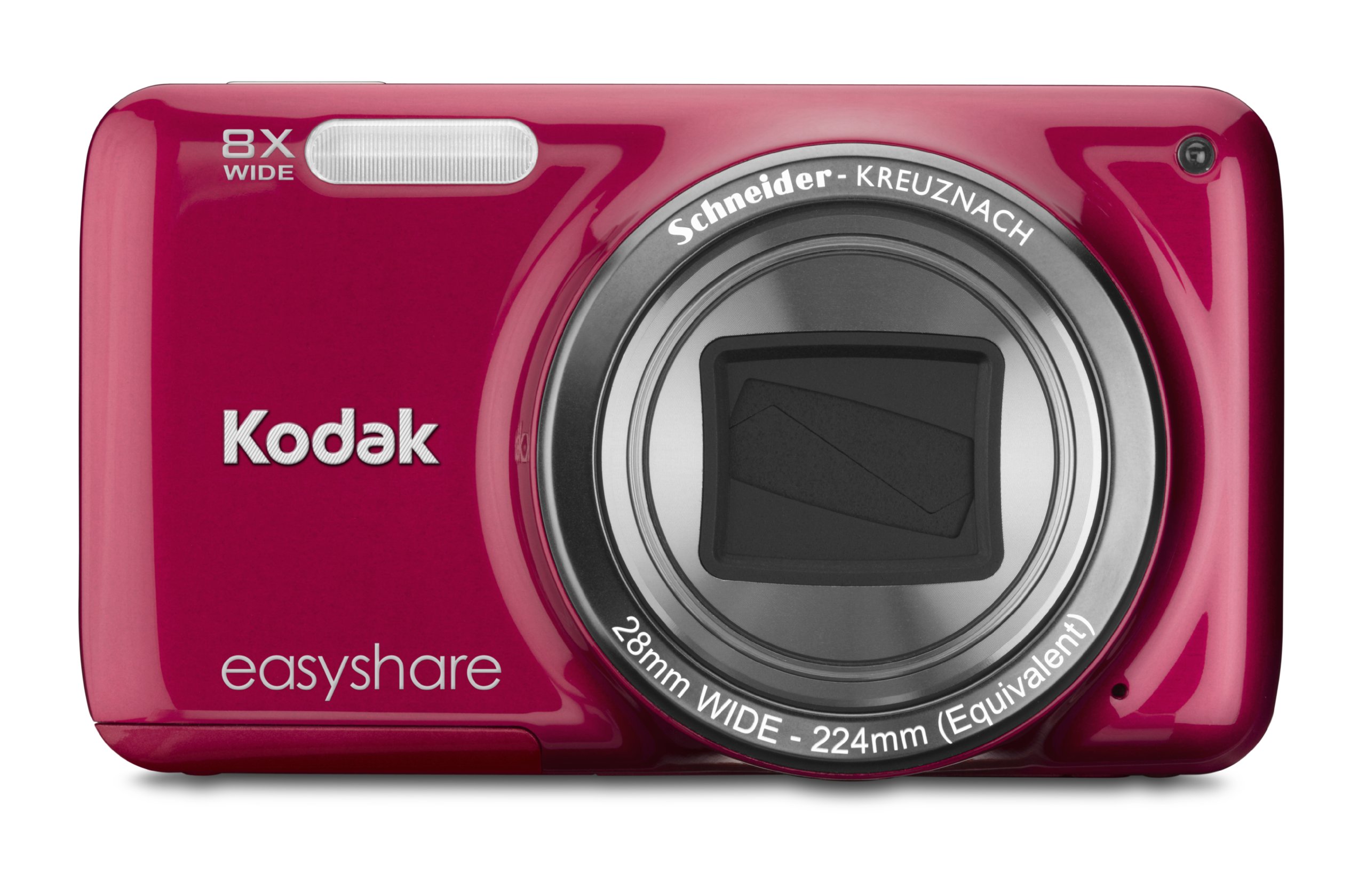
画像: 正面 view of the Kodak EasyShare M583 Digital Camera in red, showcasing the lens and branding.
設定
1. バッテリーの取り付けと充電
The Kodak EasyShare M583 uses a rechargeable Li-Ion battery.
- カメラの下部にある電池ケースのカバーを開きます。
- Insert the Li-Ion battery, ensuring the contacts align correctly.
- 電池カバーをしっかりと閉じてください。
- Connect the camera to a power source using the supplied USB cable for charging. The battery indicator light will show charging status.
2. メモリーカードの取り付け
The camera supports MicroSD and MicroSDHC memory cards. A memory card is required to store photos and videos.
- メモリ カード スロットは、通常はバッテリー コンパートメントの近くにあります。
- Insert the MicroSD/MicroSDHC card with the gold contacts facing down, pushing gently until it clicks into place.
- 取り外すには、カードが飛び出すまでもう一度押し込みます。
注記: The camera supports up to 4 GB of memory. Ensure the card is formatted in the camera before first use.
操作手順
1. Powering On and Basic Photography
- を押す 力 ボタンを押してカメラの電源を入れます。レンズが伸びます。
- 3 インチの LCD 画面を使用してショットをフレーミングします。
- シャッターボタンを半押ししてピントを合わせます。カメラがピントを確定します。
- シャッターボタンを完全に押して画像を撮影します。

画像: 正面 view of the Kodak EasyShare M583 camera, showing the extended lens and flash unit.
2. ズーム機能
The camera features an 8x optical zoom. Use the zoom lever (W/T) located near the shutter button to adjust the focal length.
- レバーを T (望遠)でズームインします。
- レバーを W (ワイド)ズームアウトします。
3.ビデオ録画
To record videos, press the dedicated video record button. The camera supports 720p HD video.
- を押す ビデオレコーディング 録音を開始するボタン。
- もう一度ボタンを押すと、録音が停止します。
- Videos are saved to the memory card in MP4 format.
4. Image Stabilization and Flash Modes
- The camera incorporates both digital and optical image stabilization to reduce blur caused by camera shake.
- The built-in flash operates in automatic mode, activating when lighting conditions require it.
5.再viewコンテンツの作成と共有
View 撮影した写真やビデオを 3 インチの LCD 画面で表示します。
- を押す Review ボタン (通常は再生アイコンで示されます) をクリックして再生モードに入ります。
- 方向パッドを使用して画像やビデオを移動します。
- To share content, press the dedicated 共有 button. This allows one-button upload to email, KODAK PULSE Display, and various social networking sites.

画像: 背面 view of the Kodak EasyShare M583 camera, displaying the 3-inch LCD screen with sharing options for platforms like Twitter and Facebook.
6. コンピュータへの接続
Connect the camera to your computer using the supplied USB cable to transfer photos and videos.
- カメラの電源がオンになっていることを確認します。
- USB ケーブルの一方の端をカメラの USB ポートに接続し、もう一方の端をコンピューターに接続します。
- The camera will appear as a removable drive, allowing you to access your media files.
メンテナンス
1. カメラのクリーニング
- カメラ本体を清掃するには、柔らかく糸くずの出ない布を使用してください。
- レンズと液晶画面には、専用のレンズクリーニングクロスと洗浄液をご使用ください。研磨剤は使用しないでください。
- Do not use organic solvents such as alcohol or thinner.
2. バッテリーのお手入れ
- 最初に使用する前に、バッテリーを完全に充電してください。
- バッテリーを極端な温度にさらさないでください。
- カメラを長期間使用しない場合は、バッテリーを取り外してください。
3. ストレージ
- カメラは直射日光や高湿度を避け、涼しく乾燥した場所に保管してください。
- カメラケースを使用して、ほこりや傷から保護します。
トラブルシューティング
| 問題 | 解決 |
|---|---|
| カメラの電源が入りません。 | バッテリーが完全に充電され、正しく挿入されていることを確認してください。少なくとも30分間充電してみてください。 |
| Blurred pictures. | Press the shutter button halfway to allow the camera to focus before fully pressing to capture. Ensure sufficient lighting. Image stabilization is active, but excessive movement can still cause blur. |
| Lens does not extend or retract. | Check for obstructions around the lens. Remove and reinsert the battery to reset the camera. If the issue persists, contact support. |
| メモリカードが認識されません。 | Ensure the MicroSD/MicroSDHC card is inserted correctly. Try reinserting the card. If possible, test with another compatible memory card. Format the card in the camera if it's new or causing issues (this will erase all data). |
| カメラがフリーズしたり、応答しなくなったりします。 | バッテリーを数秒間取り外し、再度挿入してカメラの電源を入れます。 |
仕様
| 特徴 | 詳細 |
|---|---|
| モデル名 | M583 |
| フォトセンサー解像度 | 14 MP |
| 光学ズーム | 8x |
| デジタルズーム | 5x |
| 画面サイズ | 3インチ(液晶) |
| 画像安定化 | デジタル、光学 |
| ビデオ解像度 | 720p(30FPS) |
| サポート File 形式 | JPEG(画像)、MP4(動画) |
| メモリーカードタイプ | Micro SD, Micro SDHC |
| 電池のタイプ | リチウムイオン |
| 接続性 | USB |
| アイテム重量 | 0.32 ポンド |
| レンズ | 28mm wide-angle lens with 8x optical zoom |
| 最大絞り | F2.8 |
保証情報
KODAK products are manufactured to high quality standards. For specific warranty terms and conditions applicable to your Kodak EasyShare M583 camera, please refer to the warranty card included with your purchase or visit the official KODAK support webサイトでご確認ください。保証請求に備えて購入証明書を保管してください。
カスタマーサポート
If you encounter issues not covered in this manual or require further assistance, please contact KODAK customer support.
- オンラインサポート: Visit the official KODAK support webFAQ、ドライバー、ソフトウェアのダウンロードサイト。
- 電話サポート: Refer to your product packaging or the KODAK web地域の連絡先番号のサイト。
When contacting support, please have your camera model (M583) and serial number ready.


