1. はじめに
This manual provides essential instructions for the safe and effective replacement of the APC APCRBC124 battery cartridge in compatible APC Uninterruptible Power Supply (UPS) units. The APCRBC124 is a Valve Regulated Lead Acid (VRLA) battery designed to restore your APC UPS to its original performance specifications. Please read all instructions carefully before proceeding with installation or maintenance.
2. 安全情報
- Use only genuine APC replacement batteries to ensure optimal performance and warranty support for your APC UPS.
- バッテリーは密閉型で漏れない鉛蓄電池です。
- Do not dispose of the battery in fire; it may explode.
- バッテリーを開けたり、切断したりしないでください。 放出された電解質は皮膚や目に有害です。 有毒である可能性があります。
- Refer to the labels on the battery cartridge for additional safety warnings and handling instructions.
3. パッケージ内容
The APC APCRBC124 package typically includes:
- One (1) Battery Pack with New Batteries Installed
- Reusable Packaging for Recycling Return
4. 互換性
The APCRBC124 battery cartridge is compatible with the following APC UPS models:
- BR1500G
- BX1500M
- BR1300G
- SMC1000-2U
- SMC1000-2UC
- BR1500GI
- BX1500G
And select other compatible models.
5. インストール
The APCRBC124 is designed for hot-swappable installation in many compatible UPS models, meaning the battery can be replaced without powering down connected equipment. However, for safety and proper procedure, it is recommended to power off the UPS if possible.
インストール手順:
- UPS を準備します。 If your UPS supports hot-swapping, you may not need to power it down. However, for safety, it is recommended to turn off the UPS and disconnect it from the main power supply.
- バッテリーコンパートメントを見つけます。 The battery compartment is typically located on the front or side of the UPS.
- バッテリーカバーを取り外します。 Gently slide or pop open the battery compartment cover.
- Disconnect and Remove the Old Battery: Pull the old battery cartridge out using the integrated pull tabs. Ensure the connectors disconnect smoothly.
- 新しい電池を挿入します: Orient the new APCRBC124 battery cartridge as indicated by the "INSERT THIS WAY" label. Slide it firmly into the compartment until the connectors engage.
- バッテリーカバーを固定します。 電池ボックスのカバーを元に戻し、カチッと音がしてしっかりと固定されていることを確認します。
- Power On the UPS: Reconnect the UPS to the main power supply and turn it on.
- Perform Self-Test and Recalibration: After installation, allow the new battery to charge for at least 16-24 hours. Then, perform a self-test and update the battery replacement date using the UPS's display or the PowerChute software. This recalibrates the UPS for accurate runtime estimations.

図1: 前面 view of the APC APCRBC124 Battery Replacement.

図2:側面 view of the APC APCRBC124 Battery Replacement, showing the 'TO CONNECT BATTERY' label and pull tabs.
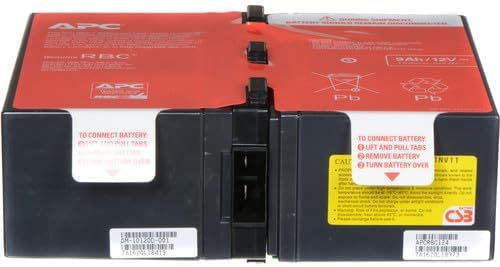
図3:戻る view of the APC APCRBC124 Battery Replacement.
Video 1: Official APC video demonstrating the battery replacement process for various APC UPS models. This video provides a general overview of how to replace an APC UPS battery.
Video 2: Official APC video highlighting the benefits of genuine APC UPS Replacement Batteries, including safety and performance.
6. 操作
After installing the new battery, your UPS should resume normal operation. The UPS will automatically begin charging the new battery. For accurate monitoring and management of your UPS and its new battery, it is highly recommended to use APC's PowerChute software.
PowerChuteソフトウェア: This software allows you to:
- Monitor UPS status and battery charge.
- Perform self-tests.
- Update the battery replacement date to ensure accurate runtime calculations. This step is crucial for the UPS to correctly recognize the new battery's capacity and provide reliable runtime estimates.
Refer to your specific UPS model's user manual for detailed instructions on using PowerChute software and performing battery recalibration.
7. メンテナンス
To maximize the lifespan and performance of your APC UPS and its battery, consider the following:
- Regular Self-Tests: Periodically perform self-tests as recommended by your UPS model's manual or PowerChute software.
- 環境条件: Operate the UPS within recommended temperature and humidity ranges.
- バッテリ寿命: Genuine APC batteries typically have a lifespan of 3-5 years, depending on usage and environmental factors.
- リサイクル: When replacing your old battery, utilize APC's authorized recycling program. This program includes free return to a recycling center using the packaging from your new battery. Visit the APC website for detailed instructions on the "RBC Recycling Program".

Figure 4: APC offers environmentally sound recycling programs for old battery cartridges.
8。 トラブルシューティング
If you encounter issues after replacing the battery, consider the following common scenarios:
- "X" on Battery Icon or Bad Battery Light: This often indicates the UPS has not yet recognized the new battery or requires recalibration. Ensure the battery is fully charged (allow 16-24 hours) and then perform a self-test. If using PowerChute software, update the battery replacement date.
- Low Estimated Run Time: After replacing the battery, the UPS might initially display a low run time. This is normal until the battery has fully charged and the UPS has been recalibrated. Perform a self-test and update the battery replacement date in PowerChute software to resolve this.
- UPS の電源が入らない: Double-check all connections, including the battery cartridge insertion. Ensure the UPS is plugged into a working power outlet.
If problems persist, consult the full user manual for your specific APC UPS model or contact APC customer support.
9. 仕様
| 特徴 | 仕様 |
|---|---|
| 製品寸法 | 8.86 x 7.24 x 3.78インチ |
| アイテム重量 | 1.54ポンド |
| 商品型番 | APCRBC124 |
| 電池が必要 | 1Vバッテリー12個が必要です |
| バッテリーセルの構成 | 密閉型鉛蓄電池 |
| バッテリー容量 | 9 Amp 営業時間 |
10. 保証とサポート
純正APC交換用バッテリーカートリッジ(RBC)は、 2年間のメーカー保証この保証は、通常の使用における材料および製造上の欠陥をカバーします。
For warranty claims, technical support, or further assistance, please visit the official APC by Schneider Electric website or contact their customer service directly. Ensure you have your proof of purchase and the battery's serial number available.


