導入
This manual provides comprehensive instructions for the installation, operation, and maintenance of your Aiphone 2-Call DA Series Door Station, model DA-2DS. Please read this manual thoroughly before attempting to install or operate the unit to ensure correct usage and to prevent damage.
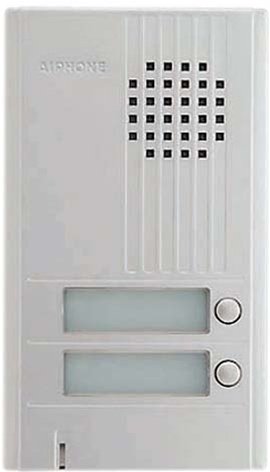
画像: 正面 view of the Aiphone DA-2DS 2-Call Door Station. This silver unit features two call buttons for multi-tenant or multi-location communication.
安全情報
怪我や機器の損傷を防ぐために、次の安全上の注意事項を守ってください。
- 配線やメンテナンスを行う前に必ず電源を切ってください。
- Ensure all wiring is compliant with local electrical codes and regulations.
- ユニットを過度の湿気や極端な温度にさらさないでください。
- Use only specified power supplies and accessories.
- インストールは、資格のある担当者が実行する必要があります。
パッケージ内容
パッケージにすべてのアイテムが揃っていることを確認します。
- Aiphone DA-2DS Door Station Unit
- 取り付けネジとアンカー
- 取扱説明書(本書)
設定
取り付け
Select a suitable mounting location, typically near the entrance, at a height that allows easy access for all users. Ensure the surface is flat and secure. Use the provided mounting screws and anchors to firmly attach the door station to the wall.
配線
Connect the door station to the indoor master station using appropriate wiring. The DA-2DS requires a 2-wire connection for each call button to the corresponding indoor station. Refer to the wiring diagram provided with your indoor master station for specific connection points. Ensure all connections are secure and insulated.
初期パワーアップ
After all wiring is complete and verified, apply power to the system. Test each call button to ensure proper communication with the indoor stations.
操作手順
電話をかける
To initiate a call from the door station, press the desired call button. This will activate the corresponding indoor master station, which will then ring to alert the occupant.
電話に出る
When a call is initiated from the door station, the indoor master station will ring. The occupant can answer the call by pressing the talk button on the indoor station. Two-way communication will then be established.
メンテナンス
クリーニング
Clean the exterior of the door station periodically with a soft, damp cloth. Do not use abrasive cleaners, solvents, or strong chemicals, as these can damage the finish and internal components.
定期点検
Periodically check the mounting screws for tightness and ensure all wiring connections remain secure. Test the call buttons and communication functionality regularly to ensure proper operation.
トラブルシューティング
| 問題 | 考えられる原因 | 解決 |
|---|---|---|
| No sound from door station | Loose wiring connection; faulty speaker/microphone | Check wiring connections at both door and master stations. If problem persists, contact support. |
| Call button does not activate indoor station | Incorrect wiring; faulty button | Verify wiring connections for the specific call button. Test button functionality. |
| 干渉または音質の低下 | Improper wiring; electrical interference | Ensure wiring is correctly installed and shielded if necessary. Check for nearby sources of electrical interference. |
仕様
- モデル: DA-2DS
- メーカー: アイホン
- 部品番号: DA-2DS
- 商品の重量: 3ポンド
- 色: 銀
- 商品パッケージ数量: 1
- 電池付属: いいえ
- 発売日: 8年2008月XNUMX日
保証情報
Aiphone products are designed for reliability and performance. This product is covered by a limited warranty against defects in materials and workmanship. For specific warranty terms and conditions, please refer to the warranty card included with your purchase or visit the official Aiphone webサイトでご確認ください。保証請求に備えて購入証明書を保管してください。
サポート
For technical assistance, troubleshooting, or service inquiries, please contact Aiphone customer support. You can find contact information, including phone numbers and online resources, on the official Aiphone website. When contacting support, please have your model number (DA-2DS) and a description of the issue ready.


