導入
Welcome to the Greenlee DM-810A True RMS Digital Multimeter user manual. This document provides essential information for the safe and effective operation, maintenance, and troubleshooting of your device. The DM-810A is designed for accurate measurement of AC/DC voltage, AC/DC current, resistance, capacitance, frequency, and continuity, making it a versatile tool for electrical professionals.
安全情報
メーターの安全な操作とサービスを確実にするために、これらの指示に従ってください。 これらの警告に従わないと、重傷を負ったり死亡する可能性があります。
- Always read and understand the entire instruction manual before using the meter.
- どの機能でも最大入力制限を超えないでください。
- ボリュームを扱うときは注意してくださいtag30V AC RMS、42Vピーク、または60V DCを超える電圧。これらの電圧はtag感電の危険があります。
- Always use the proper terminals, function, and range for your measurements. The DM-810A features a Beep-Jack audible and visible warning to guard against improper A and mA terminal plug-in.
- 使用する前に、テストリードに損傷した絶縁材や露出した金属がないか点検してください。損傷している場合は交換してください。
- メーターが破損しているように見える場合、またはケースが開いている場合は、メーターを使用しないでください。
- 操作する前に電池カバーがしっかりと閉まっていることを確認してください。
- Adhere to local and national safety codes. Use personal protective equipment (PPE) such as approved safety glasses and electrically insulated gloves when necessary.
製品終了view
This section identifies the key parts and controls of your Greenlee DM-810A multimeter.

図1: フロント view of the Greenlee DM-810A Digital Multimeter, showing the display, function selector dial, and input jacks.
- 画面: Large LCD for clear readings, often with dual display capability.
- 機能セレクターダイヤル: Used to select the desired measurement function (e.g., V~, V-, A~, A-, Ω, CAP, Hz, Continuity).
- 入力ジャック:
- COM: すべての測定に対する共通(負)入力。
- VΩHz: ボリュームのプラス入力tag例えば、抵抗、周波数、静電容量の測定などです。
- mAμA: ミリの正の入力amp地とミクロamp現在の測定値があります。
- A: Positive input for amp現在の測定値があります。
- ボタン:
- 選択: Toggles between functions on a single dial position (e.g., AC/DC voltage、ダイオード/導通)。
- RANGE: Manually selects measurement range or returns to auto-ranging.
- △: Delta function for relative measurements.
- ホールド: 現在の表示の読み取りを固定します。
設定
バッテリーの取り付け
The Greenlee DM-810A requires batteries for operation. Refer to the back of the meter for the battery compartment. Use a screwdriver to open the compartment, insert the specified batteries (typically AA or 9V, check the compartment label), observing correct polarity, and then securely close the cover.
テストリードの接続
測定を行う前に、必ずテスト リードが正しく接続されていることを確認してください。
- 黒のテストリードをに挿入します コム (共通)入力ジャック。
- Insert the red test lead into the appropriate positive input jack based on the measurement you intend to make:
- 巻の場合tage, resistance, capacitance, or frequency, use the VΩHz ジャック。
- ミリampそこまたはマイクロampere current, use the mAμA ジャック。
- のために ampere current, use the A ジャック。
- The meter's Beep-Jack feature will provide an audible and visible alert if the function selector is set to a current measurement (A or mA) but the test lead is incorrectly plugged into a voltage/resistance jack, or vice-versa. This helps prevent damage to the meter and ensures correct setup.
操作手順
This section details how to perform various measurements with your DM-810A multimeter.
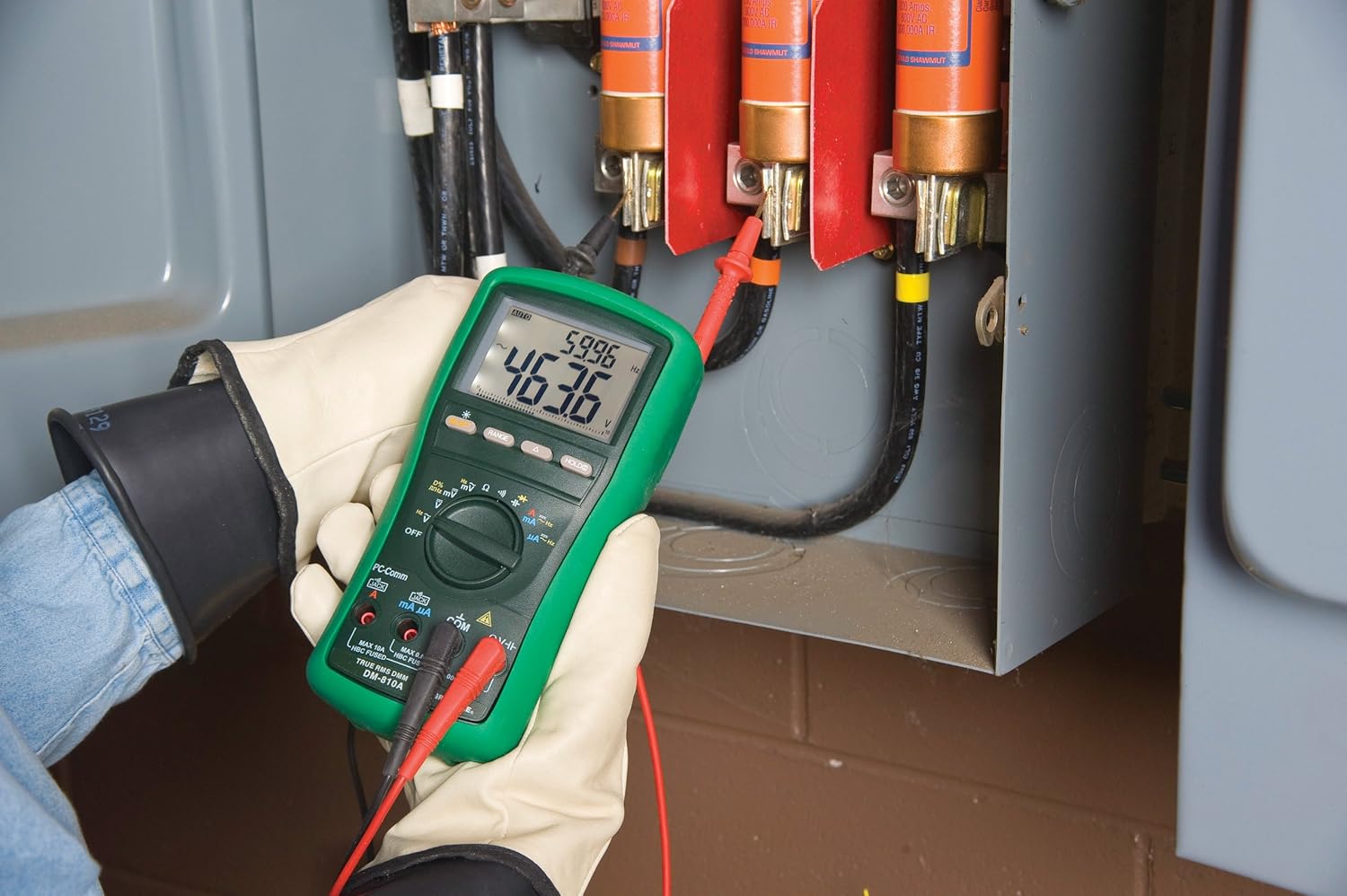
図2: The Greenlee DM-810A Digital Multimeter being used to take measurements within an electrical panel, demonstrating practical application.
AC/DCボリュームの測定tage
- Set the function selector to V~ (AC Voltage) または V- (DC Voltage). Use the SELECT button to toggle if both are on one position.
- 黒のテストリードをに接続します コム そして赤いテストリードは VΩHz.
- 測定対象の回路またはコンポーネントにテスト プローブを並列に接続します。
- 巻を読むtagディスプレイ上のe値。
AC/DC電流の測定
重要: Current measurements require the meter to be connected in series with the circuit. Ensure the circuit is de-energized before connecting the meter.
- 回路の電源を切ります。
- Set the function selector to A~ (AC Current) or A- (DC Current), or mA~ / mA-.
- 黒のテストリードをに接続します コム赤いテストリードを mAμA for small currents or A for larger currents (up to 10A). The Beep-Jack warning will activate if leads are in the wrong jacks for the selected function.
- Open the circuit where the current is to be measured and connect the meter in series.
- 回路に再度通電し、電流値を読み取ります。
- De-energize the circuit before disconnecting the meter.
抵抗の測定(Ω)
- De-energize the circuit or component.
- Set the function selector to Ω.
- 黒のテストリードをに接続します コム そして赤いテストリードは VΩHz.
- テスト プローブをコンポーネント全体に接続します。
- 抵抗値を読み取ります。
Measuring Capacitance (CAP)
- 測定前にコンデンサが完全に放電されていることを確認してください。
- Set the function selector to CAP.
- 黒のテストリードをに接続します コム そして赤いテストリードは VΩHz.
- テストプローブをコンデンサ端子間に接続します。
- 静電容量値を読み取ります。
Measuring Frequency (Hz)
- Set the function selector to Hz.
- 黒のテストリードをに接続します コム そして赤いテストリードは VΩHz.
- テストプローブを信号源に接続します。
- 周波数値を読み取ります。
導通テスト
- De-energize the circuit or component.
- Set the function selector to the continuity symbol (often shared with diode test, use SELECT to toggle).
- 黒のテストリードをに接続します コム そして赤いテストリードは VΩHz.
- Connect the test probes across the circuit path or component.
- ビープ音が鳴れば導通(低抵抗)を示します。ディスプレイには抵抗値が表示されます。
メンテナンス
クリーニング
広告でメーターを拭くamp 布と中性洗剤を使用してください。研磨剤や溶剤は使用しないでください。使用前にメーターが完全に乾いていることを確認してください。
バッテリー交換
When the battery indicator appears on the display, replace the batteries immediately to ensure accurate readings. Follow the battery installation steps outlined in the Setup section.
ヒューズの交換
If the current measurement functions cease to work, the internal fuses may need replacement. Refer to the meter's internal diagram (usually accessible by opening the battery compartment or back casing) for fuse specifications and replacement instructions. Always replace fuses with those of the specified type and rating to maintain safety and performance.
トラブルシューティング
This section provides solutions for common issues encountered during the operation of your DM-810A multimeter.
| 問題 | 考えられる原因 | 解決 |
|---|---|---|
| 画面が表示されない、または画面が暗い | 電池切れまたは電池残量不足 | 電池を交換してください。 |
| 誤った測定値 | Incorrect function/range selected; Damaged test leads; External interference | Verify function and range; Inspect and replace test leads; Move away from strong electromagnetic fields. |
| 電流測定が機能しない | Blown fuse; Incorrect lead connection | Check and replace fuses; Ensure leads are in the correct A or mA jacks. |
| Beep-Jack warning active | Test leads connected to incorrect input jacks for the selected function | Adjust test lead connections to match the selected function on the dial. |
| 導通テストでビープ音が鳴らない | 開回路; 高抵抗 | Ensure the circuit is closed; Check for breaks in the circuit or component. |
技術仕様
The following table outlines the key technical specifications for the Greenlee DM-810A Digital Multimeter.
| 特徴 | 価値 |
|---|---|
| ブランド | グリーンリー |
| モデル | DM-810A |
| 測定タイプ | 真の実効値デジタル マルチメーター |
| 電源 | 電池駆動 |
| スタイル | デジタル |
| アイテム重量 | 16オンス(1ポンド) |
| 製品寸法(長さ x 幅 x 高さ) | 10 x 10 x 12インチ |
| 認定資格 | CE, CSA, UL |
| 欧州連合 | 783310087434 |
保証とサポート
保証情報
The Greenlee DM-810A Digital Multimeter comes with a 1年間のメーカー保証この保証は、通常の使用状況における材料および製造上の欠陥を対象としています。保証請求の際は、購入証明書を保管してください。
カスタマーサポート
For technical assistance, warranty service, or to inquire about replacement parts, please contact Greenlee customer support. Refer to the official Greenlee web最新の連絡先情報については、サイトまたは製品パッケージをご覧ください。


