1. はじめに
Thank you for choosing the SHARP KC850U Air Purifier and Humidifier. This appliance is designed to improve indoor air quality and maintain optimal humidity levels in medium-sized rooms. It combines a multi-stage filtration system with Plasmacluster Ion Technology to effectively reduce airborne particles, odors, and maintain a comfortable environment.
Please read this manual thoroughly before operating the unit to ensure safe and efficient use. Keep this manual for future reference.
2. 安全情報
To reduce the risk of electric shock, fire, or injury, always follow basic safety precautions when using electrical appliances:
- コードやプラグが損傷した状態で本機を操作しないでください。
- ユニットを熱源の近くや直射日光の当たる場所に置かないでください。
- ユニットが安定した水平な面に設置されていることを確認してください。
- 空気の入口や出口を塞がないでください。
- 清掃やメンテナンスを行う前に、ユニットのプラグを抜いてください。
- ユニットを水やその他の液体に浸さないでください。
- お子様やペットの手の届かない場所に保管してください。
- Use only genuine SHARP replacement parts and filters.
3.製品オーバーview
The SHARP KC850U integrates air purification and humidification functions into a single unit. Key components include the air intake, air outlet, control panel, dust and humidity sensors, and water tank.

図3.1: フロント view of the SHARP KC850U Air Purifier and Humidifier, showing the control panel and display.
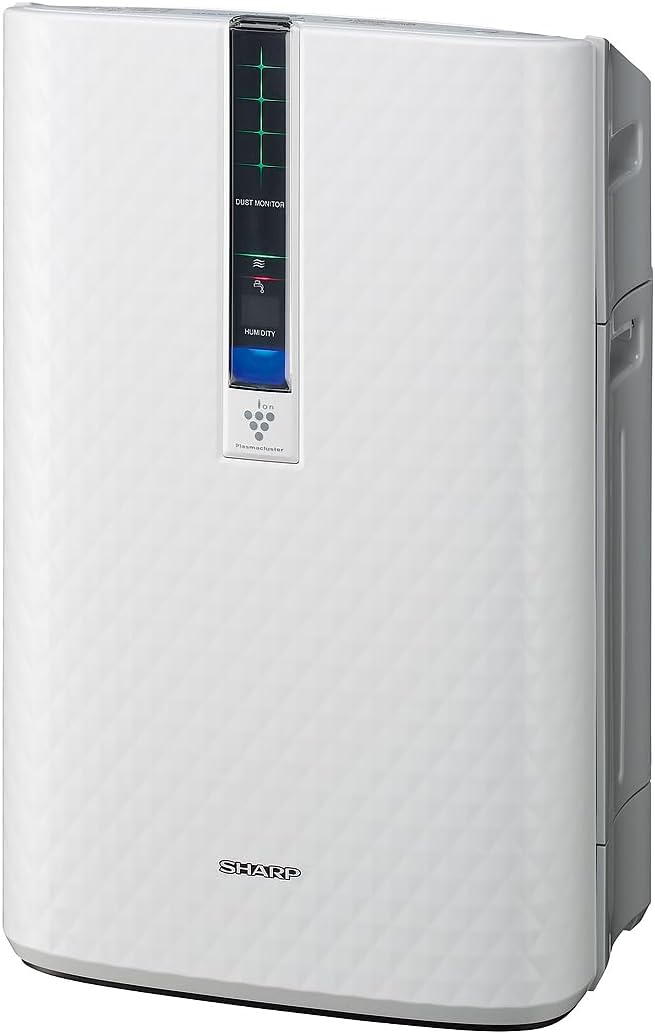
図3.2: 側 view of the SHARP KC850U, illustrating its compact design.
コントロールパネルとディスプレイ
The unit features an intuitive control panel and a display that provides real-time information on air quality and humidity levels.

図3.3: トップ view of the control panel, showing buttons for power, fan speed, modes, and light control.
- 電源ボタン: ユニットの電源をオンまたはオフにします。
- ファン速度ボタン: Cycles through Max, Med, and Low fan speeds.
- モードボタン: Selects operating modes including Auto, Pollen, and Quick Clean.
- ライトボタン: Adjusts the brightness of the display lights (Bright, Dim, Off).
- Dust Monitor: Visual indicator of air impurity levels (e.g., green for clean, red for high impurity).
- 湿度表示: 現在の相対湿度(%)を表示しますtage.
4. セットアップ
4.1 開梱
- ユニットをパッケージから慎重に取り出します。
- Remove all protective materials and plastic bags.
- Ensure all filters are properly installed before first use. Refer to the Maintenance section for filter installation details.
4.2 配置
For optimal performance, place the air purifier in a location where air can circulate freely. Avoid placing it directly against a wall or furniture that might obstruct air intake or output.
- Recommended for use in bedrooms, living rooms, studies, or exercise rooms.
- Ensure at least 12 inches (30 cm) of clear space around the unit.
- しっかりとした水平な面に置いてください。
4.3 水タンクへの給水(加湿用)
If you intend to use the humidification function, fill the water tank:
- Remove the water tank from the side of the unit.
- Open the tank cap and fill with clean tap water.
- キャップをしっかりと閉めて、水タンクをユニットに戻します。
5. 操作手順
5.1 電源オン/オフ
を押す 力 ユニットの電源をオンまたはオフにするボタン。
5.2 ファン速度の選択
を押す ファン速度 button repeatedly to cycle through the available fan speeds:
- マックス: Highest air purification and humidification.
- Med: Moderate operation.
- 低い: Quiet operation, suitable for sleeping (as quiet as 23 dBA).
5.3 モード選択
を押す モード button repeatedly to select an operating mode:
- 自動モード: The unit automatically adjusts fan speed and humidification based on sensor readings for air quality and humidity.
- 花粉モード: 花粉除去に最適化されています。
- クイッククリーンモード: Releases high-density Plasmacluster ions for rapid air purification.
5.4 プラズマクラスターイオン技術
The Plasmacluster Ion Technology actively disperses positive and negative ions into the air to help reduce microscopic pollutants. This function operates automatically with the unit. A slight clicking sound may be audible during operation, which is normal.
5.5ディスプレイライトコントロール
を押す ライト button to adjust the brightness of the display indicators:
- 明るい: Full illumination.
- 暗め: Reduced illumination.
- オフ: Display lights are off, suitable for dark rooms.

図5.1: Display showing 'Lo' for low humidity and green dust monitor indicators.

図5.2: Display showing 'Hi' for high humidity and red dust monitor indicators, indicating higher impurity levels.
6. メンテナンス
Regular maintenance ensures optimal performance and extends the lifespan of your SHARP KC850U. Always unplug the unit before cleaning or replacing filters.
6.1 フィルターシステム終了view
The KC850U utilizes a triple filtration system:
- 洗えるプレフィルター: Traps large airborne particles like dust and pet dander.
- Activated Carbon Deodorizing Filter: Helps reduce common household odors.
- 真のHEPAフィルター: Captures 99.97% of particles 0.3 microns and larger.
- Humidifying Filter: Used for the humidification function.

図6.1: Diagram showing the air purification process through the humidifying filter, True HEPA filter, carbon filter, and pre-filter.
6.2 フィルターの清掃と交換
- プレフィルター: Clean regularly by vacuuming or washing with water. Allow to dry completely before reinstallation.
- Activated Carbon Deodorizing Filter: May be washed. Refer to the filter's specific instructions for cleaning frequency and method. Replace as needed, typically every 2-5 years depending on usage and environment.
- 真のHEPAフィルター: This filter is not washable. Replace typically every 2-5 years, depending on usage and environment. The unit will indicate when replacement is due.
- Humidifying Filter: Clean regularly to prevent mineral buildup. Replace as needed, typically every 2-5 years depending on water quality and usage.
Actual filter life may vary significantly based on air quality, usage frequency, and environmental conditions.
6.3一般的なクリーニング
- 本体の外側を柔らかい布で拭いてください。amp 布。
- Clean the dust and humidity sensors periodically to ensure accurate readings.
- Clean the water tank and humidifying tray regularly to prevent mold or bacteria growth.
7。 トラブルシューティング
If you encounter issues with your SHARP KC850U, refer to the following common problems and solutions:
| 問題 | 考えられる原因 | 解決 |
|---|---|---|
| ユニットの電源が入らない。 | Power cord not properly plugged in; no power at outlet. | Check power connection; test outlet with another device. |
| Air purification/humidification is ineffective. | Filters are dirty or clogged; water tank is empty (for humidification). | Clean or replace filters as per Maintenance section; refill water tank. |
| Unusual noise (e.g., clicking). | Normal operation of Plasmacluster Ion generator; foreign object in fan. | A slight clicking is normal. If noise is excessive, unplug and check for obstructions. |
| Odor persists or unit emits strange smell. | Carbon filter saturated; new unit odor; mold in water tank. | Replace carbon filter; new unit odor will dissipate; clean water tank and humidifying filter. |
| Humidity level not increasing. | Water tank empty; humidifying filter dirty or damaged. | Refill water tank; clean or replace humidifying filter. |
If the problem persists after attempting these solutions, please contact SHARP customer support.
8. 仕様
| 特徴 | 仕様 |
|---|---|
| モデル番号 | KC850U |
| ブランド | シャープ |
| 色 | 白 |
| 製品寸法(奥行き×幅×高さ) | 10.5インチ x 14.87インチ x 23.11インチ |
| アイテム重量 | 20.5ポンド |
| 推奨床面積 | 254 Square Feet (4.8 air changes/hour) |
| 騒音レベル | 23 dBA (Quiet Sleep setting) to 36 dB (typical) |
| 粒子保持サイズ | 0.3 Micrometer (HEPA filter) |
| コントローラータイプ | ボタンコントロール |
| ワットtage | 50ワット |
| CADR (Smoke / Dust / Pollen) | 164年164月174日 |
| 認定資格 | ENERGY STAR Rated, AHAM Verifide Tested, CARB Certified |

図8.1: Dimensions of the SHARP KC850U unit.

図8.2: Room coverage diagram, showing 254 sq. ft. for 4.8 air changes per hour.
9. 保証とサポート
9.1 保証情報
The SHARP KC850U Air Purifier and Humidifier comes with a 1年間の限定保証. Please retain your proof of purchase for warranty claims. For detailed terms and conditions, refer to the warranty card included with your product or visit the official SHARP webサイト。
9.2 カスタマーサポート
For technical assistance, troubleshooting beyond this manual, or to inquire about replacement parts and filters, please contact SHARP customer support. Contact information can typically be found on the SHARP official webサイトまたは製品パッケージに記載されています。


