1. はじめに
The Intermatic EI400C Electronic Countdown In-Wall Timer is designed to provide automatic shut-off functionality for various electrical loads, including indoor and outdoor lighting, bathroom fans, whole house fans, and other appliances. This timer offers precise control from 1 second to 24 hours, enhancing convenience and energy efficiency in your home or office. Its silent operation and simple push-button interface make it user-friendly, while its no-neutral wire requirement simplifies installation in most standard wall boxes.
2. 重要な安全情報
警告:感電の危険があります。不適切な設置は、重傷または死亡につながる可能性があります。
- タイマーを取り付けたり、メンテナンスを行う前に、必ず回路ブレーカーまたはヒューズ ボックスの電源をオフにしてください。
- Installation should be performed by a qualified electrician or in accordance with all local and national electrical codes.
- Do not use this timer with sunlamps, saunas, or any loads that could cause personal injury if timed incorrectly or if the timer malfunctions.
- すべての配線接続が安全かつ適切に絶縁されていることを確認してください。
- このデバイスは屋内での使用のみを目的としています。
3.製品オーバーview
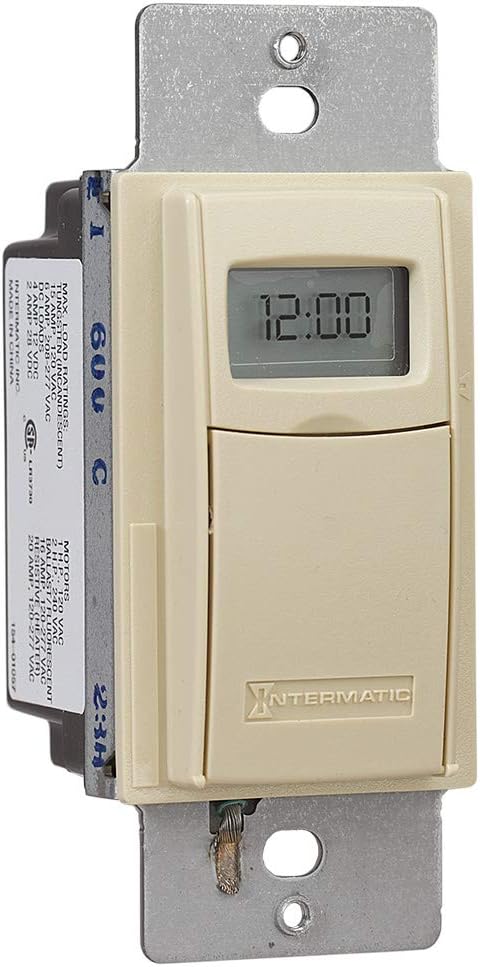
The Intermatic EI400C is an electronic countdown timer designed for in-wall installation. It features a digital display and intuitive controls for setting countdown durations.
3.1 コンポーネント
- デジタルディスプレイ: Shows current time and countdown status.
- オン/オフボタン: Activates or deactivates the timer.
- プラス(+)/マイナス(-)ボタン: Adjust countdown duration.
- 一時停止ボタン: Temporarily stops the countdown.
- バッテリーコンパートメント: CR2リチウム電池を収納します。
3.2 製品画像



4. セットアップとインストール
The Intermatic EI400C timer is designed for easy installation, compatible with single-pole or 3-way switch configurations and does not require a neutral wire connection.
4.1 インストール前の手順
- 電源を切ります: Locate the circuit breaker or fuse that controls the switch you are replacing and turn off the power. Verify power is off using a voltageテスター。
- 既存のスイッチを削除します。 壁プレートを慎重に取り外し、既存のスイッチを壁のボックスからネジを外します。古いスイッチから配線を外します。
4.2配線手順
The EI400C timer is compatible with both single-pole and 3-way switch setups. Refer to the diagram provided with your product for specific wiring configurations. Generally, the timer will have two load wires and a ground wire. For 3-way applications, one of the traveler wires from the existing 3-way switch will be connected to the timer.
- Connect the timer's wires to the corresponding house wires using wire nuts.
- すべての接続がしっかりと固定されていることを確認してください。
- The EI400C does not require a neutral wire, simplifying installation in older homes.
4.3 Mounting and Finalizing Installation
- Carefully push the wired timer into the wall box.
- Secure the timer to the wall box with the provided screws.
- Attach the decorative wall plate.
- 電力を回復する: 回路ブレーカーで電源を再度オンにします。
4.4 バッテリーの取り付け
The timer comes with a replaceable CR2 lithium battery, which powers the internal clock and settings memory. The battery is typically pre-installed or needs to be inserted upon initial setup.
- Open the small front cover of the timer to access the battery compartment.
- Insert the CR2 lithium battery, observing the correct polarity.
- 電池カバーをしっかりと閉じてください。
5. 操作手順
The EI400C timer offers simple, push-button operation for setting countdown durations from 1 second to 24 hours.
5.1 Setting a Countdown Time
- アクセス制御: Gently open the front cover of the timer to reveal the control buttons.
- 時間を調整: 使用 + そして - buttons to set the desired countdown duration. The display will show the selected time.
- タイマーの開始: を押す オン/オフ button to activate the timer. The connected load will turn on, and the timer will begin counting down.
5.2 Turning Off Before Countdown Ends
If you wish to turn off the connected load before the set countdown time expires, simply press the オン/オフ button again. This will immediately turn off the load and reset the timer.
5.3 一時停止機能
を押す 一時停止 button to temporarily halt the countdown. The connected load will remain on. Press 一時停止 もう一度カウントダウンを再開します。
5.4 Lockable Settings
The timer features lockable settings to prevent unintended changes to the program. Refer to the detailed instructions included in the product packaging for how to activate and deactivate this feature.
5.5 Visual/Audible Warnings
The EI400C can be configured to provide a visual or audible warning before the timer turns off. Consult the full product manual for steps on enabling and customizing these warning options.
5.6 指導ビデオ
ビデオ1: An official Intermatic video providing an overview of their in-wall timers, including the EI400 series. This video demonstrates general features and benefits of Intermatic in-wall timers, which are applicable to the EI400C model.
6. メンテナンス
The Intermatic EI400C timer requires minimal maintenance, primarily focusing on battery replacement.
6.1 電池の交換
The internal CR2 lithium battery provides power for the timer's memory and display, typically lasting up to three years. When the battery is low, a 'LoBatt' indicator may appear on the display.
- Open the front cover of the timer.
- Carefully remove the old CR2 battery from its compartment.
- 正しい極性を確認して、新しい CR2 リチウム電池を挿入します。
- 前面カバーをしっかりと閉じてください。
注記: Some users have reported that the battery compartment cover can be difficult to open or may not stay securely closed after multiple battery changes. Exercise care when opening and closing the compartment. If the cover does not stay closed, ensure the battery makes proper contact.
7。 トラブルシューティング
This section addresses common issues you might encounter with your Intermatic EI400C timer.
| 問題 | 考えられる原因 | 解決 |
|---|---|---|
| Timer display is blank or shows 'LoBatt' | Low or dead CR2 battery, or poor battery contact. | Replace the CR2 lithium battery. Ensure the battery is inserted correctly and the compartment cover is securely closed to maintain contact. |
| Timer shows 'NoOP' error | Indicates a problem with battery contact or internal operation. | Check and re-seat the CR2 battery. If the issue persists, the unit may require replacement. |
| Connected load does not turn on/off | No power to the timer, incorrect wiring, or faulty load. | Verify power at the circuit breaker. Double-check wiring connections according to the installation instructions. Test the connected load (e.g., light bulb) with a different switch or power source. |
| Difficulty opening battery compartment cover | Tight fit or worn plastic tabs. | Use a small, flat-head screwdriver to gently pry open the cover. Be careful not to damage the plastic tabs. |
| Timer does not hold settings after power outage | Dead or missing CR2 battery. | The CR2 battery maintains settings during power outages. Ensure it is installed and functional. |
8. 仕様
| 特徴 | 詳細 |
|---|---|
| モデル番号 | EI400C |
| ブランド | インターマティック |
| 色 | 象牙 |
| 材料 | プラスチック |
| 巻tage | 120-277 VAC |
| 最大荷重 | 20 Amps |
| タイマー範囲 | 1 Second to 24 Hours |
| スイッチタイプ | 単極または3方向 |
| 取り付けタイプ | Standard Wall Box, Rectangular Decorator Wall Plate |
| 必要なバッテリー | CR2リチウム電池1個(付属) |
| バッテリー寿命 | 最長3年 |
| 寸法 | 4.13 x 1.75 x 1.2インチ |
| アイテム重量 | 6オンス(0.38ポンド) |
| 認証 | CSA認定 |
| 欧州連合 | 078275101371 |
9.保証とサポート
9.1 保証情報
The Intermatic EI400C Electronic Countdown In-Wall Timer comes with a 5年間の限定保証この保証は、通常の使用状況における材料および製造上の欠陥を対象としています。保証請求の際は、購入証明書を保管してください。
9.2 カスタマーサポート
For technical assistance, troubleshooting beyond this manual, or warranty inquiries, please contact Intermatic customer support. Refer to the official Intermatic web最新の連絡先情報については、サイトまたは製品パッケージをご覧ください。
オンラインリソース: 訪問する Intermatic Store on Amazon 追加の製品情報とリソースについては、こちらをご覧ください。


