1. はじめに
This manual provides essential information for the safe and effective operation of your Behringer B210d Active 220-Watt 2-Way PA Speaker System. The B210d is an active 200-Watt 2-Way PA Speaker System featuring a 10-inch woofer and a 1.35-inch compression driver, designed for various audio applications.

図1: 前面 view of the Behringer B210d Active PA Speaker System.
2. 重要な安全上の注意事項
Please read and follow all safety instructions before operating the device. Retain this manual for future reference.
- 電源: Connect the unit only to a power supply of the type specified in the operating instructions or on the unit.
- 換気: 通気口を塞がないでください。メーカーの指示に従って設置してください。
- 熱: ラジエーター、暖房レジスター、ストーブ、その他の機器(以下を含む)などの熱源の近くに設置しないでください。 amp熱を発生する装置。
- 水と湿気: この装置を水や湿気の近くで使用しないでください。
- クリーニング: 乾いた布でのみ清掃してください。
- サービス: すべてのサービスを資格のあるサービス担当者に依頼してください。 装置が何らかの形で損傷した場合は、修理が必要です。
- 接地: この装置は接地する必要があります。
3. 主な特徴
- Ultra-compact and lightweight system delivers excellent sound even at extreme sound pressure levels.
- Internal switch-mode power supply for noise-free audio, superior transient response, and very low power consumption.
- Built-in HF (High Frequency) and LF (Low Frequency) Protection.
- Integrated Pole Mount for versatile placement options.
4. セットアップ
4.1 開梱と検査
Carefully unpack your B210d speaker system. Inspect the unit for any signs of damage that may have occurred during transit. In the box, you should find the Behringer EUROLIVE B210D 200W 2-Way Active PA Speaker and a power cable.
4.2 配置オプション
The B210d offers flexible placement:
- ポールマウント: Utilize the integrated pole mount to elevate the speaker on a standard speaker stand for optimal sound dispersion.
- フロアスタンディング: The speaker can be placed directly on a flat surface.
- モニターウェッジ: The trapezoidal enclosure design allows the speaker to be used as a floor monitor wedge, angled towards the performer.
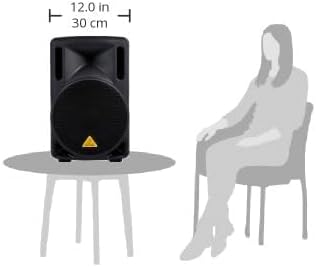
図2:側面 view of the Behringer B210d, illustrating its compact size and suitability for various placements.
4.3電源接続
Connect the supplied power cable to the power input on the rear panel of the speaker and then to a suitable electrical outlet. Ensure the power switch is in the 'OFF' position before connecting to power.
5. 操作手順
5.1 背面パネルのコントロールと接続
The rear panel of the B210d provides all necessary inputs, outputs, and controls for operation:
- 入力: Features XLR and 1/4" TRS inputs for connecting microphones, line-level devices, or instruments.
- レベルコントロール: Adjusts the overall input gain for connected devices.
- イコライザー(EQ): Dedicated 2-band EQ (High and Low) for tone shaping, allowing you to adjust the frequency response to suit your environment and audio source.
- ミックス出力: An XLR output allows you to link multiple B210d speakers or connect to other active loudspeakers for expanded sound coverage.
- Wireless System Connectivity: The speaker is wireless-ready for use with Behringer's ULM Digital Wireless Microphones (sold separately).
- 電源スイッチ: ユニットの電源をオン/オフにします。
5.2 基本操作
- Ensure all connections are secure and the power switch is off.
- Turn on your audio source (mixer, instrument, microphone).
- Turn on the B210d speaker using the power switch on the rear panel.
- Slowly increase the Level control to achieve the desired volume. Monitor the 'CLIP' indicator to avoid distortion.
- Adjust the High and Low EQ controls to fine-tune the sound.
6. 技術仕様
| 仕様 | 価値 |
|---|---|
| ブランド | ベリンガー |
| モデル名 | B210D |
| スピーカータイプ | ウーファー、ツイーター |
| スピーカー Amplificationタイプ | アクティブ |
| 出力ワットtage | 200ワット |
| ウーファー直径 | 10インチ(25.4センチメートル) |
| 圧縮ドライバー | 1.35インチ |
| インピーダンス | 8オーム |
| 接続技術 | XLR |
| 製品寸法 | 奥行き9.61インチ x 幅11.5インチ x 高さ18.35インチ |
| アイテム重量 | 19.18 ポンド |
| 材料 | 金属、プラスチック |
| 色 | 黒 |
| 電源 | コード式電気 |
| 入力ボリュームtage | 230ボルト |
| 取り付けタイプ | 床立ち |
7. メンテナンス
- クリーニング: Use a soft, dry cloth to clean the exterior of the speaker. Avoid using abrasive cleaners or solvents.
- ストレージ: When not in use, store the speaker in a dry, dust-free environment.
- 検査: すべてのケーブルと接続部に摩耗や損傷がないか定期的に確認してください。
8。 トラブルシューティング
- 音が出ない:
- Ensure the speaker is powered on and the power cable is securely connected.
- Check the input source and its connections.
- Verify that the Level control on the speaker is turned up.
- 別のオーディオ ソースまたはケーブルでテストします。
- 歪んだ音:
- Reduce the input Level on the speaker or the output level from your audio source. The 'CLIP' indicator should not be constantly lit.
- EQ 設定を確認してください。極端な調整は歪みを引き起こす可能性があります。
- ハム音またはノイズ:
- すべてのケーブルが適切にシールドされ、接続されていることを確認してください。
- スピーカーを別の電源コンセントに接続してみてください。
9. 保証とサポート
The Behringer B210d comes with a Limited Warranty. For detailed warranty terms, service information, and technical support, please visit the official Behringer webご購入の際は、サイトをご覧いただくか、お近くの販売店にお問い合わせください。保証請求の際は、購入証明としてレシートを保管してください。


