1. はじめに
This manual provides detailed instructions for the safe and efficient operation of your Samsung Glyde U940 mobile phone. Please read this manual thoroughly before using your device to ensure proper functionality and to understand all features.
2. パッケージ内容
製品パッケージに次の項目が含まれていることを確認してください。
- Samsung Glyde U940 Mobile Phone
- 標準バッテリー
- Travel Adapter/Charger
- ユーザーマニュアル(このドキュメント)
- 注意: 具体的なアクセサリは地域または小売店によって異なる場合があります。
3.デバイスオーバーview
The Samsung Glyde U940 features a large touch-sensitive display and a slide-out QWERTY keyboard for versatile input.
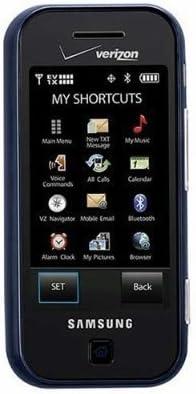
図3.1: フロント view of the Samsung Glyde U940, showing the 2.8-inch display and navigation buttons. The screen displays "MY SHORTCUTS" with icons for various functions like Main Menu, New TXT Message, My Music, Voice Commands, All Calls, Calendar, Mobile Email, Bluetooth, Alarm Clock, My Pictures, and Browser. "SET" and "Back" buttons are visible below the screen.
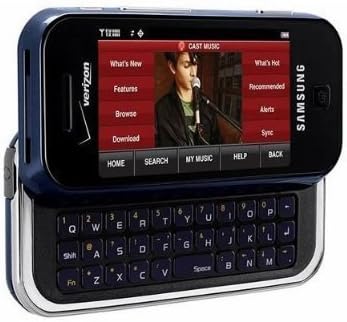
図3.2: Samsung Glyde U940 with its full QWERTY keyboard extended. The phone is oriented horizontally, displaying a media interface on the screen with options like "What's New", "Features", "Browse", "Download", "What's Hot", "Recommended", "Alerts", and "Sync". Navigation buttons for "HOME", "SEARCH", "MY MUSIC", "HELP", and "BACK" are visible below the screen.
主な特徴:
- Large 2.8" Display
- Slide-out QWERTY Keyboard
- タッチスクリーンインターフェース
- Full HTML Browser
- 2.0 MP Camera and Camcorder
4. セットアップ
4.1。 バッテリーの取り付け
- 携帯電話の背面にあるバッテリーカバーを見つけます。
- Gently remove the battery cover by sliding or lifting it.
- Align the battery's gold contacts with the contacts in the battery compartment.
- バッテリーをしっかりと所定の位置に挿入します。
- Replace the battery cover, ensuring it clicks securely.
4.2. バッテリーの充電
- Connect the travel adapter to the charging port on your phone.
- Plug the other end of the travel adapter into a standard electrical outlet.
- 初めてご使用になる前に、携帯電話を完全に充電してください。画面上のバッテリーインジケーターに充電状態が表示されます。
- バッテリーが完全に充電されたら充電器を外してください。
4.3.電源のオン/オフ
- 電源を入れるには: 画面が点灯するまで電源/終了キーを押し続けます。
- 電源を切るには: Press and hold the Power/End key until the power-off options appear, then select "Power off".
5. 操作手順
5.1. タッチスクリーンの使用
The Samsung Glyde U940 features a resistive touch screen. Use your fingertip or a stylus (if provided) to interact with the display.
- タップ: Lightly touch the screen once to select an item or open an application.
- ドラッグ: アイテムをタッチして押したまま、画面上で指を動かして位置を変更します。
- スクロール: Slide your finger up or down on the screen to navigate through lists or web ページ。
5.2. QWERTYキーボードの使用
Slide the screen horizontally to reveal the full QWERTY keyboard. This keyboard is ideal for typing messages, emails, and web アドレス。
- Press individual keys to input characters.
- 使用 シフト key for uppercase letters and symbols.
- の Fn key provides access to additional functions or symbols.
5.3. 電話をかけたり受けたりする
- 電話をかける: From the home screen, tap the Phone icon or dial the number using the keypad and press the Call key.
- 電話を受ける: When a call comes in, tap the "Answer" button on the screen.
- 通話を終了する: Tap the "End" button on the screen or press the Power/End key.
5.4. メッセージング(SMS/MMS)
To send a text or multimedia message:
- From the main menu, select "Messages" or "New TXT Message".
- 受信者の電話番号を入力するか、連絡先から選択します。
- Type your message using either the touch screen or the QWERTY keyboard.
- To add multimedia (pictures, videos, audio), select the attachment option.
- Tap "Send".
5.5. Camera and Camcorder Functions
The Glyde U940 is equipped with a 2.0 MP camera.
- 写真を撮る: Open the Camera application, frame your shot, and press the dedicated camera button or tap the capture icon on the screen.
- ビデオの録画: Switch to camcorder mode within the Camera application, press the record button to start, and press again to stop.
- Access your captured media in the "My Pictures" or "Gallery" application.
5.6. Web ブラウザ
Utilize the full HTML browser to access the internet.
- From the main menu, select "Browser".
- 希望する web のアドレス URL バー。
- Use the touch screen to navigate pages, zoom in/out, and click links.
6. メンテナンス
6.1. バッテリーのお手入れ
- バッテリーを極端な温度にさらさないでください。
- バッテリーに穴を開けたり損傷を与えたりしないでください。
- For optimal battery life, avoid frequent partial discharges and charges.
- 電話機を長期間使用しない場合は、バッテリーを部分的に充電した状態で保管してください。
6.2.デバイスのクリーニング
- Use a soft, lint-free cloth to clean the screen and exterior of the phone.
- 強力な化学薬品、洗浄スプレー、研磨材は使用しないでください。
- Ensure no moisture enters openings such as the charging port or headphone jack.
6.3. ソフトウェアの更新
Periodically check for available software updates to improve performance and add new features. Consult your service provider or the Samsung webアップデート手順については、こちらのサイトをご覧ください。
7。 トラブルシューティング
This section addresses common issues you might encounter with your Samsung Glyde U940.
| 問題 | 考えられる解決策 |
|---|---|
| 電話の電源が入りません。 | Ensure the battery is correctly installed and fully charged. Connect the charger and attempt to power on. |
| Touch screen is unresponsive or erratic. |
|
| バッテリーの消耗が早いです。 |
|
| 電話をかけることも受けることもできません。 | Check network signal strength. Ensure "Airplane Mode" is not enabled. Contact your service provider if network issues persist. |
| QWERTY keyboard input is incorrect. | Ensure the keyboard is fully extended and locked into position. Restart the device if keys are unresponsive. |
8. 仕様
| 特徴 | 詳細 |
|---|---|
| モデル番号 | 940代 |
| 画面 | 2.8 Inches, Touch Screen |
| 入力方法 | Touch Screen, Slide-out QWERTY Keyboard |
| カメラ | 2.0 MP (Camera and Camcorder) |
| ブラウザ | Full HTML Browser |
| アイテム重量 | 11.2オンス |
| 寸法 | 8.1 x 5.4 x 2.2 インチ (パッケージ寸法) |
| 接続性 | Wireless, USB 2.0 |
| メーカー | サムスン |
9. 保証とサポート
保証情報については、製品に付属の保証書を参照するか、Samsungの公式ウェブサイトをご覧ください。 website. For technical support, contact your service provider or Samsung customer service.
Samsungカスタマーサービス: www.samsung.com/us/support/


