導入
Thank you for choosing the Mitel Superset 4025 Digital Phone. This manual provides essential information for setting up, operating, and maintaining your new digital telephone. The Superset 4025 is designed for business environments, offering advanced features for efficient communication. Please read this manual thoroughly before using the device to ensure proper functionality and to maximize its capabilities.
安全情報
Please observe the following safety precautions to prevent damage to the phone and to ensure your safety:
- 携帯電話を水や過度の湿気にさらさないでください。
- 携帯電話を熱源の近くや直射日光の当たる場所に置かないでください。
- Use only the power supply and cables provided or specified by Mitel.
- ご自身で携帯電話を開けたり修理したりしないでください。修理はすべて資格のある専門家にお任せください。
- 携帯電話を強い電磁場から遠ざけてください。
設定
The Mitel Superset 4025 Digital Phone requires connection to a compatible digital extension line and a Mitel PBX system for operation. This phone is specifically designed to work with the Mitel SX 200 ML/EL or SX 2000 series phone systems.
電話を接続する
- ハンドセットを接続します: Plug the coiled cord from the handset into the designated port on the side or back of the phone base.
- ラインコードを接続します。 Connect one end of the line cord to the digital extension line port on the phone and the other end to the wall jack or network interface. Ensure the digital extension line has been programmed for a Superset 4025.
- 電源を接続する(該当する場合): The phone is corded electric. Ensure it is properly connected to a power source if external power is required for certain features or if it's not powered over Ethernet (PoE).
Once connected, the phone should power on and display initial setup information or be ready for use after system configuration.
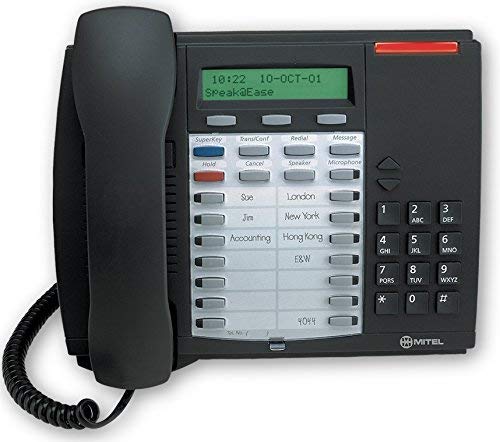
This image shows the Mitel Superset 4025 Digital Phone, highlighting its keypad, display, and programmable keys. The phone features a dark charcoal gray finish.
操作手順
The Superset 4025 offers a range of features for effective communication.
主な特徴と機能
- バックライト付きディスプレイ: Provides clear visibility of caller information, menu options, and system status.
- スピーカーフォン: Allows for hands-free communication. Activate by pressing the dedicated speakerphone button.
- 発信者表示: Shows incoming caller ID information on the backlit display.
- プログラム可能なキー: Features 13 personal programmable keys and 14 personal keys with built-in status indicators. These can be customized for speed dialing, feature access, or line appearances.
- Fixed-Function Keys: Includes 10 dedicated keys for common functions such as Hold, Transfer, Conference, Redial, and Mute.
- Context-Sensitive Soft Keys: The keys below the display change their function based on the current phone state (e.g., during a call, idle).
- Super Key Programming: Use the Super Key to easily access and program PBX telephone system features. Consult your system administrator for specific feature codes and programming instructions.
- Off-Hook Call Announce: Allows for announcing a call to a busy extension without interrupting the ongoing conversation.
- ACD Functionality: Supports Automatic Call Distribution (ACD) agent and supervisor functions, making it suitable for call center environments.
- Basic Conference Call Capability: Allows for multi-party conversations. Refer to your system's specific conference setup procedures.
通話の発信と受信
- 電話をかけるには: Lift the handset or press the Speakerphone button. Dial the desired number using the single keypad.
- 電話に出るには: 電話が鳴ったら、受話器をあげるか、スピーカーフォン ボタンを押します。
- 通話を終了するには: Replace the handset or press the Speakerphone button again.
メンテナンス
Proper care and maintenance will extend the life of your Mitel Superset 4025 Digital Phone.
- クリーニング: 柔らかく、少し硬めのamp cloth to clean the exterior of the phone. Do not use abrasive cleaners, solvents, or aerosol sprays, as these can damage the finish and internal components.
- Handset and Cord Care: Avoid stretching or twisting the handset cord excessively, as this can lead to damage.
- 環境条件: Store and operate the phone in a clean, dry environment within recommended temperature ranges.
トラブルシューティング
If you encounter issues with your Mitel Superset 4025, try the following steps before contacting support:
- ダイヤルトーンがありません:
- Check all cable connections, ensuring they are securely plugged in.
- Verify that the digital extension line is active and correctly programmed for a Superset 4025.
- If using an external power adapter, ensure it is connected and receiving power.
- ディスプレイが動作しない:
- Ensure the phone is properly connected to its power source.
- Adjust the display contrast or brightness settings if available (refer to system administrator for specific instructions).
- キーが反応しない:
- Gently clean around the keys to remove any debris.
- Restart the phone by disconnecting and reconnecting the line cord (and power, if separate).
- 音質が悪い:
- Check handset and line cord connections.
- 他の電子機器からの干渉がないことを確認してください。
- Test with another phone on the same line if possible to rule out line issues.
For persistent issues, contact your system administrator or IT support.
仕様
| ブランド | ミテル |
| モデル | Superset 4025 |
| 製品寸法(長さ x 幅 x 高さ) | 12 x 6 x 12インチ |
| アイテム重量 | 2.9ポンド |
| 色 | グレー |
| 電話の種類 | 有線 |
| 材料 | プラスチック |
| 電源 | コード式電気 |
| ダイヤラの種類 | シングルキーパッド |
| 留守番電話システムの種類 | デジタル |
| 対応デバイス | Mitel SX-200 series phone systems |
| 電話会議機能 | 基本 |
Return Policy Information
If you are not satisfied with your purchase for any reason, you may be eligible to return the product within 14 days of receipt. Please consult your reseller or point of purchase for specific return procedures and conditions.
サポート
For technical assistance, advanced programming, or further inquiries regarding your Mitel Superset 4025 Digital Phone, please contact your system administrator or the reseller from whom the product was purchased. The manufacturer is Mitel Networks Corporation.


